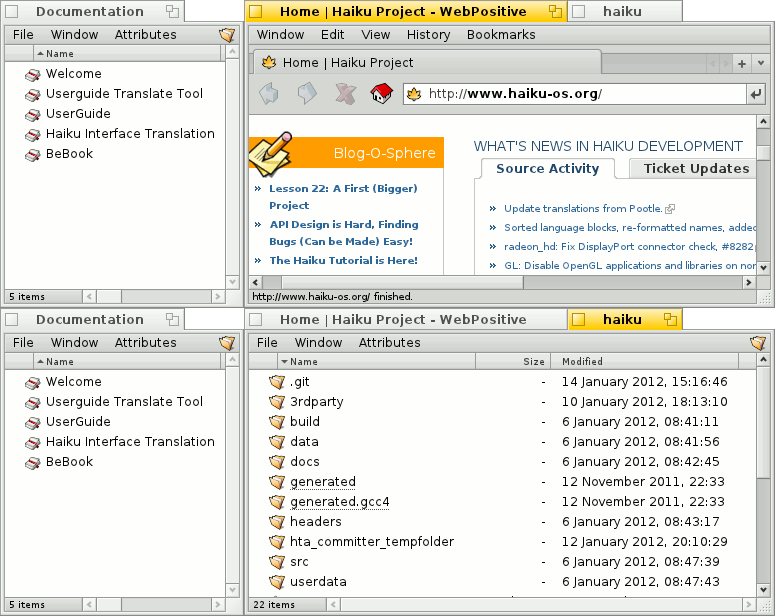
Hah! A friend just shared this with me, I'm Maurice the original author, long time anonymous hn lurker. This was a labor of love, I still remember the sheer exhilaration when I made my first sale!
I'm not going to ask for numbers, but did you make a reasonable income selling this?
The reason I ask is because I've been wondering about why the Mac seems to have a fairly healthy market for small software. It surprises me that Windows, being a much larger market, seems to have fewer opportunities for indie devs.
>I've been wondering about why the Mac seems to have a fairly healthy market for small software. It surprises me that Windows, being a much larger market, seems to have fewer opportunities for indie devs.
I think it comes down to the target audience. Of course both Mac and Windows have their fair share of users across all categories. However, it seems that, in the US, most devs and enthusiasts prefer to use Mac/Linux, while Windows is used a lot by gamers/office workers/etc. (not alleging that enthusiasts and devs don't use Windows, far from it, just talking comparatively). Given the price of an average Mac being higher than a Windows machine, it would also be fair to suggest that Mac users, on average, tend to have more disposable income as well.
With this in mind, it makes sense that the platform with more devs with more disposable income would be a better target to sell niche indie software as well.
For a similar phenomenon, look up the breakdown of earnings from apps on iOS vs. Android. There are plenty of analysis on this over the years, so here is a recent article I just found as an example[0]. Not even diving into the actual revenue per user or per app, iOS apps generated overall almost twice the revenue of Android apps in Q3 of 2019 (using numbers from the article I found), despite there being more of both Android users in the world and Android apps on the store. My reasoning as to "why" boils down to a simple guess that whichever device has more users with higher disposable income is the one that is gonna bring the developer more revenue.
I thought perhaps better curated listings, better communities, blogs, et al could be what could get Windows software to sell better. Especially like productivity and other sort of loved ones that have a consistent market with indie Mac Devs.
But Android I believe has all of the above like Mac and iOS do. Yet as you say, Android lags behind.
I need to check the article. Wouldn’t the sheer number of Android users mean there are enough of them with high disposable income? I’d think there’d be more (outside the US, UK, Canada markets)
> Given the price of an average Mac being higher than a Windows machine, it would also be fair to suggest that Mac users, on average, tend to have more disposable income as well.
I don't think it means much to talk about averages when the Windows market is so much larger. There are plenty of Windows gamers who spend thousands on their machines. There are also plenty of highly paid developers and white collar workers who primarily use Windows. So I don't think there's a shortage of Windows users who could buy indie software, but for some reason they don't.
So I don't think it's a financial reason. Maybe it's cultural? Maybe Mac users enjoy their computers more than Windows users and aren't afraid to pay a little bit more to make it even better. Mac users picked the minority platform whereas Windows is the default and people who don't care about computers end up on the default platform.
If you're willing to write it yourself, `awesome` (the window manager) might be what you're looking for.
It's surprisingly powerful. As an example, I once had a cobbled together WM version of emacs' `ace-window` way of jumping between windows going. It wasn't even that much code…
There also supposedly is a Wayland based "successor" for it called `way-cooler`. I've never used that one, though.
Edit: OTOH, I've come to find the `i3` model of just allocating 10 virtual work spaces to work better for me, since that works way better with just a keyboard than tabs. But I guess this is a matter of personal preference.
virtual workspaces is what i am using now. trouble is that on a dual monitor setup that does not work very well, because either both workspaces move on both monitors at the same time (like kde does) or one monitor is static and only has one work space (like gnome support). the latter is slightly better, but wastes space because i can only organize one screen into multiple workspaces.
there are few window managers/ wayland compositors that do that right. enlightenment is one, but i couldn't get used to it. wayfire is a new compiz style wayland compositor that does it right too. loved that one, as i was a fan of compiz before (and i got wobbly windows with kde now too :-) but unfortunately not stable enough for daily use.
Awesome. Microsoft themselves had planned this feature for some time, but abandoned it for some reason. Instead they were probably focusing their efforts on making it harder to prevent automatic updates.
That isn't quite the same a what this software is or what Groupy does, but that is a fascinating article. I loved this part:
---
For instance, one study subject took twenty minutes of staring at a Windows 3.1 desktop before being able to open a text editing program. Finally, a programmer spoke up that this was unacceptable, to Oran’s relief. But that relief would be short lived: “Our customers are morons!” exclaimed the programmer.
This was frustrating enough, Oran says. But then they talked to that user, and it turns out that he was actually a propulsion engineer for Boeing.
“He was literally a rocket scientist,” Oran says. “And even he couldn’t figure out Windows.”
---
IMO the #1 opportunity for open source software to gain more mainstream acceptance is focusing on making it easier for non-technical users to use. Which is hard when most of your userbase is technical users. Microsoft deserves credit for realizing they had a usability problem, and having made major improvements to that over the years.
> IMO the #1 opportunity for open source software to gain more mainstream acceptance is focusing on making it easier for non-technical users to use. Which is hard when most of your userbase is technical users. Microsoft deserves credit for realizing they had a usability problem, and having made major improvements to that over the years.
... I don't know. On the one hand, I applaud the sentiment. On the other hand, general computing needs of technical users are already becoming a niche too small for the market to serve. If Open Source community gets into their heads that they should optimize for non-technical users, I fear we'll have a dearth of tools...
Funny. I never liked the taskbar at the bottom of the screen on Windows, so I always move it to the top. To this day, it still screws up new window alignment, twenty five-ish years later.
After I moved to Linux and 16:9 monitors became mandatory I moved my gnome/mate taskbar to the left side, where it has stayed for about a decade. It is a bit clumsy in the vertical position, but does the job.
Reminds me of the (apocryphal?) story that the 'OK' button is only labelled that way because in user testing people read the original text - 'Do It' - as 'Dolt'.
Not free (or 'free') but there is a commercial app that does this very well indeed - Stardock Groupy. It was bundled in with something else I bought years ago and I just leave it running as it's quite handy.
Their 'Fences' app is excellent (which was the app I bought the bundle for).
In particular, the ability to create a view on the desktop onto another folder. This lets me split my desktop into 'local' and 'cloud' areas by having a fence containing a view onto a Google Drive-hosted folder.
Seconded. Marketing 101: Make it easy for the consumer to see why they might want to try the product.
I use Stardock's Groupy, and it does this well (and is inexpensive). I'm not sure why I'd want to switch to this when I already have Groupy, although the general idea is one that I think should gain more traction.
For anyone else wanting to, this might be fairly easy to do in Qt with QWindow::fromWinId and then using a tab widget. I have recently done similar w/ a POC to embed FF into a tabbed UI on Windows[0] when researching making a new browser backed by FF instead of Chromium (granted I used Go to test out their Qt binding at the time).
Stardock Groupy is a commercial supported utility that does the same thing, IIRC released during the long period when Microsoft was teasing Windows 10 Sets.
I think Microsoft must have abandoned sets when they moved to Edgium; their engineers were somehow under the impression that Sets was 100% dependent on Edge, and I think they must have been planning the feature as a cudgel against other browsers. IDK, I wish the Windows PMs were like 40% less user hostile and didn’t treat us like children to be manipulated.
Tldr, Groupy is pretty cool and at least appears to fit in with the windows 10 desktop better than the open source utility, for a price.
At risk of seeming like a shill (I just like Groupy!) there seems to be a 50% discount code here, making it the price of a coffee: https://www.techradar.com/uk/reviews/groupy
A sibling comment mentioned Sway, and I've also used this on both Fluxbox and i3. I would be surprised if Awesome didn't have it as well.
The only problem is that (at least in Fluxbox's case) it suffers from poor discoverability, since it's a modifier to the window drag action that has no corresponding buttons or "landing zones" like what you get if you try to tear tabs out of a Firefox window.
I can run i3 or other WMs on Windows with a combination of first and third party tools. WSL with an X Server will happily run a desktop environment and window manager of your choice. Windows makes a great desktop Linux :D
I have run such a setup before on work machines that were required to run Windows.
Beyond that, it is entirely valid to compare features across OSes.
Equating it to macOS Finder tabs is the same as equating it to tabs in Google Chrome.
Your example is of tabs within a single application. While software in the OP is for tabs for your entire workspace that can contain any application (or multiple application). Basically, it is one meta level above.
From playing around with it for a bit, it allows you to tab any application, including tabbing different applications together in a group. There's also something to do with workspaces that I haven't played with yet.