TL;DR: You usually first have to accept the WiFi network's terms of service on a special page (called a captive portal) before you get Internet access. Until you do that, VPN doesn't work, and by then your email program (or anything else) may already have checked for new messages. If you have a password for your email account (which surely you do), it may have been sent unencrypted, open for anyone nearby to see.
It gets worse. Some VPN providers, in order to save money on bandwidth will implement split-tunneling where they route HTTPS traffic out the hostile side of the connection rather than via the VPN tunnel with the assumption that since it's HTTPS it will be protected. A shockingly high number of applications including more than two dozen banking apps I've reviewed in the last 18 months fail to properly validate the public certificate provided by the server during the TLS handshake and allow self-signed certs like those generated by SSLSplit. In the context of free WiFi and a VPN provider that routes HTTPS traffic out the hostile side of the connection in a split-tunneling model it is possible for a man in the middle (MitM) to have full control over the HTTPS application traffic.
One of the first things you should do if you have a VPN solution is to make sure, via HTTPS that your IP address is the actual IP address of the VPN provider:
On a laptop which frequently faces this threat, network access can be restricted to VMs which are isolated by use case:
  - host outbound traffic disabled except security updates & VMs
  - non-persistent "browser VM" for captive portal login
  - non-persistent VPN VM
  - user data VM(s), virtual NIC routed only to VPN VM
This can be done with VMware, Parallels, Qubes, Xen, KVM, etc.
If you don't have enough control over your applications to have them connect over trusted networks and not untrusted ones, you probably don't have enough control to stop them leaking more information than you would want to the endpoints they connect to.
That's not meant to be snarky; it's a real problem. I have an android phone but I am very conscious that it's doing a lot of things I don't control and I can't really trust it.
A VPN can be part of a carefully implemented security policy, or it can be a thing that might help a little on a generally insecure base, but it can't turn an insecure machine into a secure one.
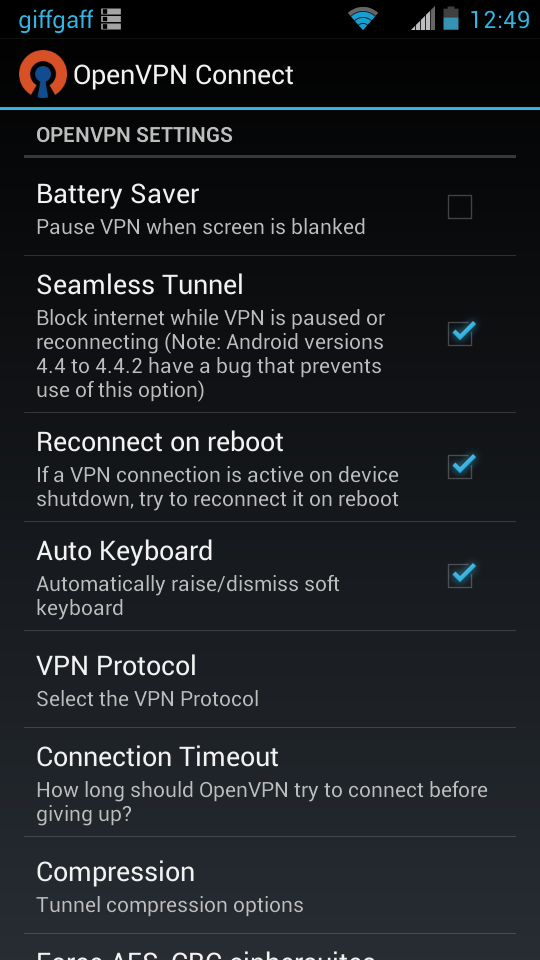
Android also has an AlwaysOnVPN option which I understand also mitigates this.
The VPN simply won't connect if there is a portal because non VPN connections (eg to the portal) are forbidden, and the device won't allow any network traffic until the tunnel is up and established.
Its quite nice actually, and if you're worried about speed issues, host the server on a VPS you trust.
Windows is a step ahead of OSX with it's Private/Public networks distinction. Having little snitch installed on OSX it's staggering to see how many core services are trying to access external services, most of them on port 80.
In both cases we're still lacking good representations of network traffic. If things didn't happen in the dark in the background users would probably be more concerned and watchful.
Little Snitch is one of my favorite pieces of software, it is truly amazing how noisy most software is. Without it, your ISP knows even what programs you have open because they call home every 15 minutes for stupid reasons.
You're confusing two different things. Windows still does phone home even in private network. In private network it just "locks" down access to your computer to some extent.
The same is also present in OS X under Firewall settings where you can go stealth mode and / or block all incoming connections.
I wish "captive portals" were more integrated into the stack somehow. It would be nice if the OS knew from DHCP or something that the connection was captive (without having to guess by trying known URLs), so it could suppress anything from getting out (or just not initialize routes, since there is not truly a route yet). The OS can automatically open a simple browser to do the auth, then allow all traffic. (Or in the case of an unsafe network, allow the VPN to initialize, then allow all.)
If that's too much to ask for, it would at least be nice to have some solution to the problem of HTTPS requests before the captive portal has granted access. The current choices seem to be a) drop all HTTPS packets, so the user waits for a page to load until they figure out they are captive, b) break the connection, so the user sees weird errors like "connection reset", c) MITM with a self-signed certificate or something, so the user gets cert errors, but if they go against best practice and bypass cert errors they'll get redirected to the authentication URL. Would it be crazy to have an SSL packet that the portal can inject, that tells the client to stop handshaking, and that they need to authenticate somehow? Giving a URL to redirect to would be way too open for abuse, I guess, but just getting an obvious signal that the connection isn't really up could be a step forward.
Back in 2004 Microsoft had an initiative to build a smart client into XP (and future OS versions). I was in a group of people from various companies who went to Redmond and did a 3-4 day workshop where we covered their ideas, how to implement into the networks/software we were operating, etc.
At the time, most of us agreed it was needed, but would never really take off. The implementation on the network-side was somewhat clunky and the user experience (even integrated in the OS) was just also pretty bad.
I wish I could remember what it was called to look at detail now. The idea was to make it easier for Users to connect to public WiFi networks, though had it taken off, I'm sure there would be additional security built-in now.
There are some public WiFi networks (and "Smart Clients" e.g. Boingo/iPass) that have 802.1x integration with networks. This does offer some more security, but still not a perfect solution as Users must have the software installed.
Frankly, I see everything becoming even less secure in the near future. I started building/operating WiFi & wireless networks in 2001. I was out of the industry for a few years, but now I'm back with a company enabling businesses to offer free WiFi as a marketing tool (plug: http://www.gozonewifi.com) I never would have thought the demand was so high for this type of service, but it is. People love it and use it a lot.
Tunnelbear[0] has Vigilant mode[1] that blocks all outgoing connections until you have connected to the VPN server. It was one of the main reasons to start using it.
I love Tunnelbear, but I assure you their vigilant mode is far from perfect. In particular, I take a train to and from work. When the network goes down, and it goes down several times every trip, sometimes Tunnelbear goes into vigilant mode, but it frequently doesn't - i.e. I can absolutely connect to sites from the open wifi while the Tunnelbear icon is spinning up a fresh connection but before it has fully secured the tunnel.
My very convoluted solution has been to use my phone and PDAnet [1] for the actual connection, instead of the public train's wifi (they go down with similar frequency). When my phone connection goes down, it requires a hard reset (unlike the public train wifi). Before I actually initiate the hard reset, I use Pauser [2] to manually stop my main browser, then I open my secondary browser and verify I can connect to one of several different generic sites, while Tunnelbear is active. Once I know Tunnelbear is active, I'll un-pause my main browser and go back to work.
In other words, (A) I avoid the public wifi, (B) I manually have to pause my main browser when I loose connection, (C) I have to ensure I'm not using me secondary browser for anything secure, and (D) I have to manually ensure Tunnelbear has fully secured my connection before restarting my main browser.
I'm sure this still leaves me open to attack, but less so than not using this process.
I wasn't aware that it was an American weirdness, but phone carriers here can, and mostly do, charge us to tether our phone to another device [1]. There is at least one legal exception, where consumers whose data is transmitted via the 700 MHz frequency band can not be charged for tethering [2]
Yes, and tethering charges are basically charging consumers twice for accessing that data. I ethically disagree with it, but it is the standard practice here and with one legal exception, it is a legally supported practice.
Similar to Cloak's (https://www.getcloak.com/) "OverCloak" feature that blocks all outgoing connections until the VPN connects. I use it religiously when traveling since airport WiFi is often a huge risk.
I requested this feature from the current maintainer of sshuttle ... I think I referred to it as "failsafe" mode, meaning that if sshuttle crashes or has not yet started, the default firewall rules that it installed allow no traffic to flow.
> Do you use a POP3 or IMAP e-mail client? If they check automatically, that traffic is out in the clear for all to see, including potentially the login credentials. Other programs, like instant messaging client, may try to log on.
That sounds overly pessimistic.
Most POP3/IMAP email services nowadays support TLS, and some don't even work unless you use TLS. Most email clients, likewise, are designed to use TLS by default when you first set up an account. If yours isn't, complain to the developer(s).
Likewise, I'm not aware of any popular instant messaging client that sends login credentials in the clear in this day and age. At least none of the programs I've set up to log in automatically (Dropbox, Skype, etc.) seem to be guilty of that crime.
The part about the operating system automatically connecting to various servers in the clear is a bit worrying. But for the time being, I'm pretty sure none of that traffic carries any login credentials of mine.
Most POP3/IMAP email services nowadays support TLS, and some don't even work unless you use TLS. Most email clients, likewise, are designed to use TLS by default when you first set up an account. If yours isn't, complain to the developer(s).
Using TLS isn't enough, the clients needs to check the certificate. I know that K-Mail does, but I wouldn't bet on every mail client out there doing so.
This problem goes back to the STU-III telephone where Soviets said best attack was listening to what was said between opening the line and going secure. The lesson learned was we have two choices: (a) device is secured the moment you activate it; (b) the interface between trusted and untrusted (Red/Black separation) blocks as much data is needed until the secure link is established then forces everything over it. The latter is the solution here and their recommendations are pretty good.
There's another risk, though: the WiFi layer and TCP/IP stacks themselves. These might be hacked and WiFi is regularly by NSA per leaks. This is why high assurance wireless VPN's they endorse use a dedicated device for secure wifi connections. It works as follows: a device/chip for trusted data with a physical connection to PC; a secure chip in middle for crypto & control logic; a device/chip for untrusted code (esp Wifi driver) and data with connection to antenna. Some use separation kernels instead of different chips these days. The device is programmed to not let "trusted" data through until (a) untrusted chip says wireless is working and (b) VPN is established in middle chip. It can be modified to deal with captive portals although that creates potential covert channels or attacks. Maybe one can tie a sandboxed browser to the untrusted chip for approving the terms. It and the channel are killed the moment Internet is reachable. More work needs to be done in this area.
Regular setups not worried about targeted hacks will probably be fine following the advice in the article. People worried about targeted attacks rarely use Windows anyway haha.
I'm not sure how Cloak (getcloak.com) isolates captive portals, but one of their features blocks http traffic (but allows https traffic) until a tunnel is up. Granted, this doesn't help for things like unencrypted SMTP, but it's a step in the right direction.
> The Wi-Fi Alliance has had a solution for this problem nearly in place for years, called Passpoint. The Passpoint protocol was created to allow for Wi-Fi "roaming" by creating a way for access points to grant access by way of a third-party credential, such as your Google ID or your ISP account.
Ummm, seems like the cure is worse than the disease. So, the suggested response to leaking information via HTTP (and what security-important service uses HTTP these days?) is to…leak usage information to one's provider?!?
Moreover, Passpoint is very much built on a feudal model, where users belong to large corporations which trust one another (for roaming &c.); that seems like exactly the wrong direction to go.
That's why I don't wonder why this hasn't been adopted yet. I dont know what the target demographic for the feature is but it really doesn't seem like it was intended for public WiFi hotspots, instead maybe it was for corporate guest networks or something that wants above average accountability.
I'm certainly not going to let Google or my ISP know which WiFi hotspots I connect from though. Thanks to always on VPN they only see my VPN server IP.
Web clients are no less secure, since browsers actually check the certificates. It's native (desktop & mobile) apps using unauthenticated IMAP or POP3 connections that are vulnerable.
That said, I use the exact same approach; and Alpine is actually pretty usable even from an Android tablet, especially since JuiceSSH lets you create shortcuts that automatically connect to the server and run "exec alpine".
"Web clients are no less secure, since browsers actually check the certificates."
Only if you're pinning the cert...
ssh does not rely on a hazy collection of 500+ middlemen that includes several rogue governments and very poorly behaved corporations to give you the "lock icon". In ssh, the key matches perfectly or it doesn't.
AFAIK this behaviour is caused by VPNs appearing to the OS like another network interface next to the existing "real" one, and applications usually don't give you the option of forcing them to bind to a specific interface. Otherwise they'd just behave like there was no connection before the VPN establishes one.
EXPERIENCE ONLINE FREEDOM
WITH COMPLETE SECURITY
Browse the internet without any threats to your
privacy and bypass regional filters easily with Ivacy!
Get Access to the content of 40+ Countries with Ivacy.
http://www.ivacy.com
That is one of the nice thins about the VPN provider I use - not only do they not keep any logs, but all you have to do is click a single checkbox and then you have no internet unless the vpn is connected.
HideAway from www.firetrust.com is an always connected vpn, so gets around this issue. It offers rules for websites and applications so can always be on