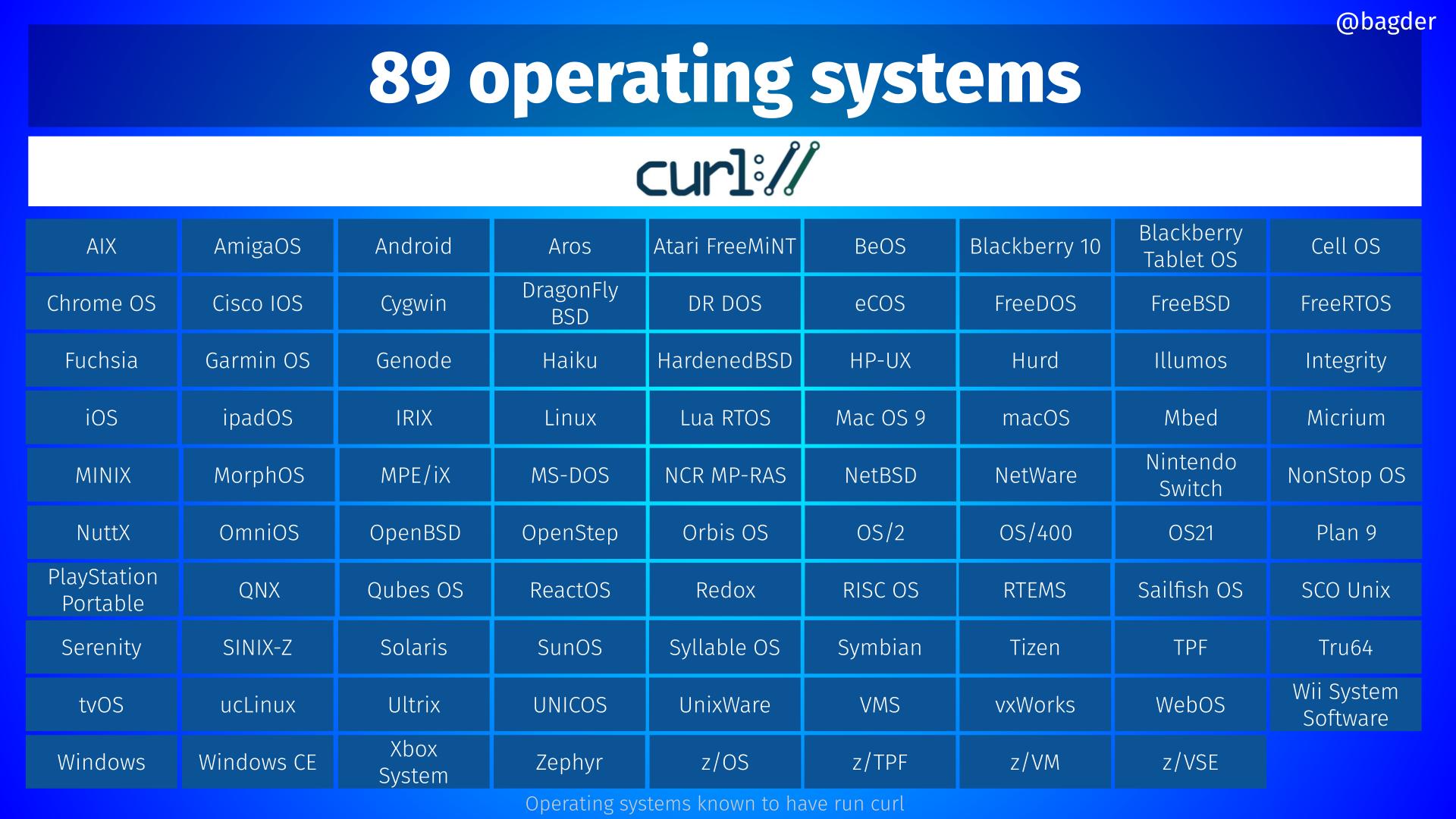
NT is different from Unix, it is heavily inspired by VMS, which was the anti-Unix of its time.
The basic architectural metaphors are different, and the way you think about things is different.
It is more architectured and more opinionated, which may look like over-engineering for some and a superbly coherent design for others.
There are some pain points, of course, a lot of them related to the need to support code written for a completely different OS (MS-DOS + Windows non-nt), but overall, I think that the general architecture of NT is pretty neat, and I would dare say, beautiful in some places.
> superbly coherent design [...] NT is pretty neat, and I would dare say, beautiful in some places
Practically, though, it's a shit show. My "favorite" is the inability to delete a file that is open by another process. Combine this with Windows Defender that scans every file that your application creates, and now you have no reliable way of deleting or moving your files.
As someone who works on a C/C++ build toolchain and has to deal with Windows design decisions every day, I can tell you without any hesitation there is nothing coherent or beautiful about it. I don't think even Microsoft believes this.
I usually put it as "Deep inside windows is a really beautiful OS just screaming to be let out from under all that junk on top."
The NT kernel isn't that bad, different from unix for sure but still good. It then just keeps getting progressively worse as you go upwards in the stack from there.
This is by design though, if another process has a lock on a file, they don't want you to delete it, since it could break another process. They actually do allow it if the applications open it with the createfile flag FILE_SHARE_DELETE. Or you can do it as a transacted operation, which will delete the file "eventually". Again, it's by design, you have to be explicit if you want someone to delete a file you're using, which is honestly a better design than having it be the default with the option of locking the file like Linux does.
If you really want to close it and know you could break another process but don't care(Which you should), you can use NtQueryFileInformation to get the process ID's that have the file opened, then use OpenProcess with the PID, then use NtQueryProcessInformation to get the open handles. Call DuplicateHandle on each of the handles. Then use NtQueryObject on each of them to get the name of the file, then close it.
"don't want you to delete it, since it could break another process."
There is no such problem.
On all the unix-likes, the kernel handles that perfectly naturally.
Think of deleting a file as requesting the file deletion from the kernel rather than directly doing it like in assembly with no os.
When you delete a file, the only thing that happens for sure immediately is no other process can see it in the filesystem, so no new access can be made. To all processes that didn't already have an open file handle, it is effectively deleted and no longer exists.
The contents are not necessarily touched yet, and the filesysyem has not yet necessarily released the occupied inodes and blocks for any other use yet, they are all still tracked as the original file, but now invisible that nothing else except the kernel can see or access.
It stays like that as long as any process anywhere has an open file handle to that file.
Any process with a handle can continue using that handle as normal. If it was opened for write, it can continue to write, seek, read, etc, whatever modes the handle was created with.
The kernel even keeps on coordinating between multiple processes accessing the same now-invisible file. The open file handles aren't just pacifiers, it's still a real file.
But no new file handles can be opened. One by one as processes close file handles, they can no longer open new ones, until the last user has released the last handle.
Only at that point the kernel frees the inodes and blocks in the filesystem making the disk blocks available for new files.
No other processes break, and it's all perfectly graceful and not a problem at all.
For NT not to have that is like some 70's trs-80 stuff.
And holy cow that stuff you just described about querying all other processes...holy cow, not an advertisement for a great, desirable, slick system. "37 easy steps!" It's almost like you were writing a joke to say something is reasonable and then proceed to describe an absolutely laughable process.
If you read my comment, you can see in the first few words I mention how you can do a delete transaction and it will delete it when it's not being used anymore. Or you can also just open the file with the share delete flag and it will allow the same. And linux doesn't handle it perfectly, you see errors like "text file busy". I don't get why you chose to argue how the non recommended, brute force method, is lengthy. It's not intended to be used and was mainly just to show you can, and there's nothing stopping you.
Why is explicitness bad? Would you rather have those weird errors on linux where it's open by default? Or have it where the program author has to say "Yes, this file is fine to be deleted while i'm using it".
"Yes, this file is fine to be deleted while i'm using it"
is fine if all processes play nice, which apparently Windows Defender _does not_. Edit: likely Windows Defender couldn't work if it did? So, in order to consistently delete a file without triggering the file lock, you need to use the work-around.
I'm just guessing here, but wouldn't Windows Defender need to be some privileged process (as it's e.g. an anti-virus) where then this file-locked file deletion process would be impossible to perform? Otherwise, a computer virus could just keep killing the Windows Defender file handler, making it impossible to read its files and keeping Windows Defender from performing its duty.
Exactly, the developers of Defender decided it needed to lock the file, arguably for alot of reasons. To prevent tampering etc, it's an antivirus, it doesn't want you to be able to bypass a scan of a file, or change it. Windows has things like Datastreams(Which come from Mac), so the same "file", can actually have two different files in it, and require different file openings. IE, "Foo.exe" and "Foo.exe:MALWARE" would be completely different file contents, despite both being foo.exe. And OpenFile("Foo.exe"), would not open foo.exe:MALWARE.
Alot of the confusion comes from people not understanding the functionality. Delete file means "Delete it now" on windows(ignoring slack space). But on linux it means "Queue up the file to be deleted". Windows also has this, but it's going to be a transacted operation, which is literally called DeleteFileTransacted vs DeleteFile, so the Kernel sees noone is using it and then will delete it.
And honestly, if you go up to any lay person and ask them "What does 'DeleteFile'" do. They'll probably respond it deletes the file. Not queues it up for deleted, but other people can still access it. So I think the windows verbage makes more sense, with another function appending Transacted to it, which signifies it will be done eventually.
There is nothing about antivirus that requires file deletion block on other processes including the antivirus. For one thing, you just said Windows has a similar functionality available anyway just invoked a different way. Is that a way around Defender? It better not be. If it exists as something you can use, and yet still isn't a way around Defender, then it's silly to even be talking about Defender to justify this 70's behavior.
The understanding of laypeople in how a multitasking operating system kernel coodinates a graceful teardown of a shared resource, or fails to in the case of Windows, has exactly no bearing on anything. Why isn't it exactly as reasonable to presume that "any lay person" would expect that they can simply issue a delete command and it happens, without having sit there and wonder why they're stuck and go worry about other processes that they didn't write and don't have any knowledge or control over? It is exactly as reasonable. And both are pure meaningless presumption, and don't matter anyway since the understanding of a lay person would be a ridiculous way to design the inner workings of ... anything, definitely including an operating system.
> "But no new file handles can be opened. One by one as processes close file handles, they can no longer open new ones, until the last user has released the last handle."
Or, you know... the computer has to restart itself for some reason before the file was fully deleted, and you get a fragmented disk.
If I'm asking to delete a file, I want the file deleted. I want to know whether the deletion succeeded or not. I don't want it to secretly hide in a purgatory somewhere.
If the kernel gets to shut doen gracefully, then there is no problem at all. The file handles are closed when the processed are killed and the filesystem is unmounted in a consistent state.
If the kernel does not get to shut down gracefully (crash or power loss) the filesystem is left no more or less inconsistent than by any other kind of ongoing activity (nothing worse about a pending free-these-blocks vs a pending anything else), and is cleaned up by fsck or by the journal if there is one. Either way the file is finished being deleted on reboot because no processes have open handles and the kenel and the fs know that those blocks are deleted. The last on-disk state of those inodes was that the blocks are not used by any normal file. They are marked pending to be freed but hadn't been freed yet, but now during the mounting process at boot there are no processes that own them, so they are freed. It's no different than the normal process if there were no power loss.
There is no such problem.
As for "some kind of purgatory" and "I want to know it's done now" these imply ignorance of what a multi process operating system is, what it needs to do, the basic job of a kernel, etc. Not just in linux but nt and any other os that allows multiple concurrent processes.
It's the primary job of the kernel to manage exactly such coordination between a process, another process, and the hardware. Slightly virtualizing things like ram and disk is the very job the kernel is there to do, and what makes multiple concurrent processes even posible.
When you delete a file from a process and get your return from that syscall, it IS "really done right now" as far as that process and all other processes are concerned, and "from your point of view" is as "real" as anything ever gets for any process. The fact that some other process can continue reading and writing to a file handle you no longer care about is none of your business any more, and your intent that the file no longer exist in the filesystem so that it could be created again without conflict, or so that it no longer appears in listings, all does happen as you requested, and immediately.
If you had a file named foo, and you needed to delete that because you need to create a directory named foo, you can do that. It happens exactly as you need, even though some other process now has a file handle open to some invisible file that used to be named foo. That other file handle is just not your problem any more. It's as if the other process simply opened a new temp file in some other firectory that has nothing to do with you.
This isn't how things work on Linux. It keeps the file "alive" as long as there is at least one process using it. Any processes which do not have the file open already will not be able to see it but those that do can keep using it. The file will be deleted when all processes release the file.
That's about modifying files though, not deleting files. If you delete an executable that's currently running and create a new one with the same path, that's fine. If you try to modify an executable that's currently running, the kernel won't let you.
Not normally on delete. (Most common exception: you're trying to delete an active mountpoint.)
Where most people see that is attempting to mutate a currently running executable. That's forbidden, as it would lead to executing essentially random code. You can replace what file the filename points to, with rename.
> My "favorite" is the inability to delete a file that is open by another process
Because of this Linux "feature" I experienced data loss - I zipped a file and deleted it, but the process which created it was still writing to it. But all the data that it wrote now ended up in the void since the file didn't exist anymore. And there was no error/warning that the process was writing to a non-linked file, so I discovered the data loss much later.
I don't see why you'd blame Linux for deleting a file you asked it to.
However, if the process is sufficiently long-running, it is possible to relink the file by looking inside `/proc/$(pgrep yourprocess)`.
You can open files non-exclusively on windows. If your antivirus doesn't do it, it is not a problem with the operating system but with the application.
Frankly, the windows behavior, while annoying in some situations because of badly behaved applications, is much more logical to me and avoids issues like what you described here.
People are used to Unix. I know because I am too; the only non-linux or mac os machines I have at home are the windows laptops of my kids. But yet, on this regard, I think that the windows behavior, while annoying because of badly written apps, it the best approach.
But if the zip process had happened a bit quicker, the delete would have worked on either platform. Getting the error on Windows would only have been due to a race you could never guarantee would work out in your favour.
So, you experienced data loss because you deleted a file you didn't mean to.
The race is between the process writing the zip file, and you trying to delete it.
If the process creating the zip file runs faster, and finishes, and closes the file, your attempt to delete it would have worked anyway. Because the program that created it didn't have it open any more.
The program which created the file was running all the time, before I created the zip, during the zip creation, after the zip creation ended, and after I deleted the file.
The zip creation and me deleting the file were in parallel with another process writing to the file.
And I didn't delete the zip file, I deleted the original file that I zipped.
> And I didn't delete the zip file, I deleted the original file that I zipped.
OK, I think that's where a lot of the confusion comes from.
When you originally said "I zipped a file and deleted it, but the process which created it was still writing to it.", I thought the "it"s referred to the zip file, not the original file, and "the process that created it" was the zip process.
Going by your actual meaning - are you saying you zipped a file on disk that was still being written to? That's... weird.
Given that reading from disk is faster than writing to it, and the written data may well have been in the disk cache anyway, it's likely that the zip program could have "caught up" with the program that was writing the data, tried another read and been told "this is the end of the file", and then finished creating the zip file. That would have created an incomplete zip.
But also, as others have pointed out, just because you delete a file and it gets removed from the directory, the actual file and its contents stay around until all open handles to it are gone. So if one process has the file open and is writing to it, and a second process has the file open and is reading from it, if you delete the file then both processes should still be able to access it through their existing file handles, even though it doesn't have a directory entry any more. So you shouldn't have experienced any data loss from that series of events.
(And that's why having the "it"s refer to the zip file is a logical interpretation of what you said, and why a few repliers - including me! - seem confused)
> Going by your actual meaning - are you saying you zipped a file on disk that was still being written to? That's... weird.
That's how Linux works. Some programs, like rsync, will give you a warning at the end, similar to "the file was modified during the rsync operation". Most others, like zip will give no warning at all.
Sorry, I wasn't clear. I didn't mean it was weird that Linux would be able to do that. I meant I thought it was weird that a user would choose to do that. Because without any co-ordinated locking in place, or double-checking at the end (which most won't unless it's been specifically added), having one program read a file while another is modifying it will most probably produce confusing or unexpected results.
> I didn't delete the zip file, I deleted the original file that I zipped.
This is why you should always check the contents of your archive before deleting the originals. There are myriad reasons why the archive may be incomplete or incorrect. You were hit by one of them that happens to not happen on Windows.
I was expecting that the process writing to the now deleted file would throw some kind of error/exception that the file doesn't exist anymore. I would have noticed that. But instead it silently continued writing into the void.
As others have mentioned, it was still writing to disk, but its directory entry was removed. This is considered a feature since the data will be automatically cleaned up once the process holding the last file descriptor closes it or terminates. Also as others have mentioned, Linux provides an additional directory entry through /proc, something not available on most other OSs.
In this case, you can have your cake (delete the directory entry) and eat it too (get the data back through /proc).
The "location on disk" (blocks) are owned by the file until all descriptors to it are closed. So nothing else can write to those blocks (actually, inodes) until all file handles to it are closed. At that point, the inodes in the file will be freed to be reclaimed by another file.
This is actually really handy behavior to have in a number of cases. A prominent example is temp files. They will automatically be cleaned up on process exit by the filesystem if you open and then delete them. It also helps prevent (not completely, but greatly reduces the window) others from accessing the temp file. you can also use this for intermediate files. Process A creates and writes, B opens for read and immediately deletes the file. A can continue writing and B continue reading until both close their file descriptor, at which point the inodes will get freed.
That doesn't answer my question. I'm saying that you can't recover the file in any realistic way, in a reliable way. Once you close the file descriptor, the file is gone.
When the last directory entry for a file is passed to the unlink() system call, the file is removed from the directory hierarchy.
However, the data on media will be deleted only after all open file descriptors are closed.
One exploitation of this feature that I have seen is the SQLite temporary tablespace, which is created and immediately unlinked, ensuring that it will not persist after the program terminates.
In any case, I have never seen any way to coerce POSIX unlink() behavior on Windows.
'Broad software compatibility was initially achieved with support for several API "personalities", including Windows API, POSIX, and OS/2 APIs – the latter two were phased out starting with Windows XP.'
I still don't understand the loss. The original data that was going into the zip was still there. Or did you the write pipeline delete it at the end of something?
More precisely, what data was lost, and how did it get lost?
I understand the UNIX file model. My mistake was that I thought that the data producer was writing to a different file (think something like log-rotation).
I think it's debatable if it's reasonable to continue allowing writing to an unlinked file.
There was discussion some time ago about Postgres data loss because of something similar, where the linux kernel returned successfully from fsync despite the movable media not being present anymore.
> How is it possible that PostgreSQL used fsync incorrectly for 20 years, and what we'll do about it
1. Start zip.
2. In parallel, copy the intermediate zip file.
3. Delete the zip
4. Delete originals
The data was deleted in step 4 and is the loss. It notably would also had occurred had the zip terminated early or not zipped _all_ the files for some reason. The process was not resilient.
I can update glibc or other core system libraries on Linux without rebooting. Processes using the old library will show "(deleted)" in their /proc/self/maps files, but they will continue to use the old code. New processes will use the new library, and downtime was not required.
This is not possible on Windows because of mandatory locking on core system libraries. As a consequence, Windows must reboot for every Patch Tuesday.
There are only a few places that Linux has mandatory locking, and this is a good thing.
Here is a script that will show you all the deleted libraries that are still in use on Linux:
I don't know about Windows core system libraries, but for user libraries you can do the same thing - rename old library, and put new library in it's place. Running processes will continue using the old library, and new ones will pick up the new library. The only difference is that instead of deleting the old library you need to rename it (and then delete it later).
Linux doesn't need reboots only in theory. I have an Ubuntu server box and not a week passes in which I don't see a "system reboot is required" prompt when I SSH into it.
Also, in theory Windows doesn't need reboots because like you said, the rename and replace works just fine for hot patches. Windows reboots as often as it does in part for "backwards compatibility" and the long tail of applications built under the broken 90s assumption that windows "doesn't" hot patch things.
Linux assumes that long running processes just randomly exploding because they are living in a pre-hotfix ghost state is fine (and usually free of security concerns). Windows assumes users notice and get frustrated when long running apps start acting "weird" and don't know why and that there are too many security implications if you just leave unpatched apps running alongside patched ones.
It's another one of those things on the list that the NT Kernel has the raw design to do a lot of smart, deliberate things, but at the end of the day can't trust user space to play nice with them happening and is maybe a little too safety conscious of that.
(My understanding too is that Ubuntu is an interesting example here because Canonical now explicitly uses a more Microsoft-influenced security model in user-focused distributions for when to require reboots. Under the same general concerns: avoid user-noticeable "weirdness" and avoid unpatched CVEs remaining long running in user space. While it could just kill unpatched processes, that creates "user noticeable weirdness", and for better and worse a full "restart" is much less shocking to the average user than long running processes getting killed "weirdly".)
There are mechanisms for updating the kernel in-place, and I believe canonical is one of the leaders in that domain, but if you're choosing not to use it and you don't want to reboot once/week, you can still keep your system level libraries up to date without rebooting.
The above poster didn't say you could update absolutely everything in linux without a reboot, just that the locking mechanisms in windows means you have to reboot to update things that don't require a reboot in linux.
I didn't choose anything, it's the default Ubuntu 22 image from a big cloud provider. They enabled auto-updates, including for the kernel. They didn't enable whatever update kernel in-place mechanism Ubuntu has. I assume they know what they're doing.
My point was that in theory Linux doesn't need reboots and Windows does, but in practice my Ubuntu box needs a weekly reboot, while my Windows box just once a month.
There was never any theory that Linux doesn't need reboots to update the kernel. That's never been a general understanding in the more than 20 years that I've personally been working with Linux.
What's true is that you can update everything BUT the kernel without a reboot.
Any understanding of theory that involved a belief that Linux never needed a reboot to update the kernel is a flaw in your understanding rather than a problem with the theory.
And in fact, the reason people have been working on being able to update the kernel without a reboot is finally put to rest that final mile. Personally I don't think it will ever come to full fruition, but the list of things that does require a reboot will become smaller and smaller over time.
> Rebootless Kernel updates are not a replacement for full kernel upgrades but it allows you to patch critical security vulnerabilities and bug fixes. With these methods, you can keep your servers safe and running without outage for years.
> Several Linux vendors offer rebootless kernel updates. Your solution mostly depends on the distribution you are running.
And finally, a bit more info about canonical's solution
> There was never any theory that Linux doesn't need reboots to update the kernel.
Yet people keep saying that on HN, that unlike Windows, you don't need to reboot Linux after updating, and then maybe mention how they have months of uptime.
By default Ubuntu, the most popular distro, updates the kernel too. And frequently the kernel update is a security update.
Actually, I'm going to add to my earlier reply here.
The amount of harm "security" people have wrought to everyone else around them is astronomical.
I don't doubt your cloud provider made that decision, it's yet another example of security people forcing major inconveniences on everyone else in the name of protecting them. It might even be warranted here (it probably is), but I would almost put money on 85-90% of terrible situations in software dev having a root in a security person somewhere. That sounds outlandish, yet it completely matches my experience.
What you're trying to imply here is that linux effectively needs to be reboot on every update, and you're wrong.
It's possible your cloud provider has chosen to have its own package repository where they insist on doing this, but this is a decision by your cloud provider and not Canonical.
Linux has what's called Kernel Modules that can be unloaded and loaded at runtime without the need to update the kernel itself. I myself run ubuntu in vmware, and have done so for probably over 10 years, and your description of Ubuntu's default behavior is inaccurate.
---
But more than that, it's been explained to you, stop arguing.
This is hardly Linux's fault, nor its responsibility. As far as I know Linux gives you mechanism to lock files and directories, so the compression program you used should have locked the directory by default until it was done or canceled. And if that option was not the default in the program you've used, it could be present as an optional flag.
Someone with more knowledge please correct me if I got the above wrong.
That being said, the issue with Windows is that it prevents me from deleting a file if it's open in a text editor or any program, which should not be the default in my opinion. A directory gets locked simply because you have explorer open in that path, or a terminal cd'd into that path, which is annoying and counter productive most of the time.
> As far as I know Linux gives you mechanism to lock files and directories, so the compression program you used should have locked the directory by default until it was done or canceled.
File locking on Linux is advisory, it excludes other processes which try to lock the same region of the same file, but not operations other than locking. Mandatory locks were optional (required a mount option, see https://lwn.net/Articles/667210/ for details), and were removed in 5.15 (https://lwn.net/Articles/874493/).
Thank you for the links. I did a bit of reading to learn a bit and my understanding of the advisory file locking is that it can be ignored by programs that don't respect it. Is it fair to say that the the shell or gui the user used should have respected the advisory lock?
Of course that's assuming the compression program used does attempt to apply file lock, which may not be the case according to another comment.
I think that file locking was a decision made with good intentions, but it's probably one of the single biggest mistakes in the windows ecosystem.
And I understand people will argue for it because it does have some utility, but not near enough to pay for the all the damage it's done to people's time.
And if someone is more familiar with nix then windows, trying to delete a directory in Windows can be a teeth-grinding frustration. I don't care* if this file 3 levels down is still open by some background process... If I cared, I wouldn't be trying to delete it!
> Combine this with Windows Defender that scans every file that your application creates, and now you have no reliable way of deleting or moving your files.
This doesn't happen for years now due to "opportunistic locks" -- when you open a file being used by an app which support oplocks (i.e.: usually antiviruses), they get a blocking notification and can release the file. They can hold the notification (and stall the requesting application) until they're done, close their handle, and the other app's open succeeds.
That's probably your disks cache catching up with what you've done.
NTFS likes making sure that disks flush their caches regularly, and congestion caused by cache bloating makes it harder. Getting an nvme (or better, while you can, Optane) SSD for compilation on is a good start for improving your build times.
Sweet child, he reads the documentations but doesnt use it. I concur with op, to this day, deleting a fucking file in Windows is an unbelievable chore compared to all their competitors. I tried today, nope, couldn't.
I use Windows Defender on several PCs, and have used for years. All are kept up to date on Windows 11 (and prior, Windows 10) and not “modded” to disable telemetry etc.
I haven’t had a “locked by Defender” error in at least 5 years, and I would say more if I could remember the last time I did.
I’m also developing a(n existing) product that actually uses oplocks, so I’m speaking from experience here.
Can I, as an application developer, configure a user's exclusion list in Windows Defender?
If yes - that sounds insane!
If no - it doesn't really help, then, does it? The complaint was that an application developer cannot create a file and then just move/remove it when they please.
I'm neither a Windows user nor Windows dev, so I might be missing something.
He writes compilers and developers tools. There are plenty of other developers of compilers and developer tools for Windows who apparently don't see this as big hassle because probably they understand that Windows have other ways of doing things differently from the way he is used to doing in Unix.
If his application can only work by creating and deleting files as soon as they are created, then it makes sense for him to point his users to the appropriate documentation.
I recently discovered that Linux handles processes holding files open a little differently from FreeBSD, too, when I tried to unmount a ZFS volume. Something had ahold of a file on it, so I couldn't unmount it—on FreeBSD you can just say "I want all programs that are preventing this to fuck off and, if they're so inclined, to crash"—and ZFS provides a flag to do just that—and go on with your day, but Linux evidently won't let you (I ended up on some ZFS mailing list archive to confirm this was the case and I wasn't just holding it wrong). You have to go track the process(es) down and kill it(/them) yourself, not unlike how you can't delete a file that's in use on Windows and have to go kill the processes. It was faster to just reboot the damn machine than to do that (a very Windows solution).
[EDIT] It may have been a ZFS export operation, not exactly an unmount? I can't recall for sure. Point is, Linux made you go find and kill the relevant processes yourself, while FreeBSD made it trivial to override that and do what you needed to do with no further fuss.
Back in the day there was a patch floating around that let you mark mounts as "bad", and all open files would be shunted to a "badfs" which gave I/O errors for all operations.
Some filesystems implement a less-comprehensive variant that's `umount(2)` with `MNT_FORCE` -- but generally that's only network/FUSE-style ones:
       MNT_FORCE (since Linux 2.1.116)
              Ask  the filesystem to abort pending requests before attempting the
              unmount.  This may allow the unmount to  complete  without  waiting
              for  an  inaccessible server, but could cause data loss.  If, after
              aborting requests, some processes still have active  references  to
              the  filesystem,  the  unmount  will still fail.  As at Linux 4.12,
              MNT_FORCE is supported only on the following filesystems: 9p (since
              Linux  2.6.16),  ceph  (since  Linux  2.6.34),  cifs  (since  Linux
              2.6.12), fuse (since Linux 2.6.16), lustre (since Linux 3.11),  and
              NFS (since Linux 2.1.116).
Windows has the concept of OpLocks on files, which open the file but can be broken by other access. When used properly that should prevent antivirus from ever preventing file deletion. The deletion would break the lock that antivirus has open.
But apps have to use it. An example of an app that apparently doesn't is Explorer. Another example: cmd.com. So if you have a shell or explorer window opened in a directory, and an app tries to delete or move it, that app will die. It might be better for Explorer to notice and go up to the next nearest available directory.
At least last year I was seeing problems where having Explorer open in a directory would block an app from moving or deleting that directory. So if it was using oplocks then, it didn't seem to be working.
Pick one. No seriously, tradeoffs have to be made, and I don't think "people who work on build automation" are the intended main use case for Windows Home Edition.
> My "favorite" is the inability to delete a file that is open by another process.
What does the alternative look like?
Lets say a process has a file open. Lets say it is a really big one, like 200GB. Ok, so our disk is nearly out of space, better delete this 200GB file, problem solved right?
Only not. Because now even though the file looks deleted, the process still has it open and that space is still allocated to it.
So either you're hiding reality from the user, or you're preventing them from deleting a file that is in use. Windows went one way and UNIX went another.
There's two problems here, the process and the file, it seems you need to deal with both situations on both styles of OS. You could truncate the file (there's also a `truncate` command I have never used):
cat /dev/null > somefile
and let the process continue writing, or you could just `rm` the file, then either kill the process (or the other way round), or if you've got mysterious disk space usage issues you think are due to still open but deleted files you can:
lsof | grep deleted
I'm an ex (mostly) sysadmin and so this stuff is easy, but is obviously out of reach for "normal" users. Personally as someone who still uses Unix-like machines (Mac, servers) and Windows (games, chkdsk) and I greatly prefer the Linux/Unix way and find the Windows way frustrating.
> Lets say a process has a file open. Lets say it is a really big one, like 200GB. Ok, so our disk is nearly out of space, better delete this 200GB file, problem solved right?
Not naively intuitive, but for this you can write an empty file to the large open file with shell redirection.
cat /dev/null > /path/to/big/file
and that will free up the space on disk immediately. Not great, but more or less nicely handles the somewhat common runaway log file case.
I get how this corner case sucks, but to me it seems so much better than the endless parade of reboots and application restarts necessitated by file locking in the Windows world.
I've been in exactly this situation on production (with a panicked operator on the other end of the phone and any number of other applications that would've been brought down). On either platform, you end up needing to kill the offending program to release the resource. But at least on Windows you know it! On Linux you can unlink the file, realise the problem still exists, and now you've lost an avenue for figuring out the real problem.
When you open a file on Windows, you can share: read, write and/or “mark to delete”. A lot of times you don’t share any (read can lead to data incoherency; write means you can go out of sync in offsets with someone else; delete might not be relevant if it’s your database file). But if you do, the file isn’t “locked” if someone else opens it for the permissions you’ve agreed to share.
“FILE_SHARE_DELETE” is a little tricky because you can’t delete a file in use, because after all it’s _in use_. So instead, your request to delete puts a mark on it that prevents future opens, and completes the delete once the previously open handles all close.
And except for very specific cases (PE mapping, special “on-purpose” locking, specific APIs) you can always rename/move a file in use, so combined with “FILE_SHARE_DELETE” it’s sort of equivalent except for the space not being freed immediately.
One thing I have trouble with in windows is debugging problems. If say I plug in a usb device and nothing happens, I know what logs to look at, and they are verbose and if I don't, I can search the internet and find five or six possible solutions depending on distro and age. In windows the search generally says "download this malware and it will solve your problem", "restore to a save point" or "grab your install media and start over". I would be surprised if there is a good way to do the same things, they just aren't discoverable. When the device manager and services.msc show all is well, but it clearly isn't, there doesn't seem to be much advice out there.
Edit: I liked vms fine, I don't think this is inheritance from that, or even dos. I knew how to debug in dos, using debug.com even. I think it has something to do with the lack of expectations for a user to be able to debug a problem. Osx has abit of this, but sitting on a bsd saves it to some extent.
It's absolutely a problem. Aka the sysinternals / Bryce Cogswell and Mark Russinovich problem.
To wit, Windows has plenty of debugging functionality. Historically not as extensive as Unix, but it was there.
However, 0% of that was exposed in any sane way, because Microsoft...? Actually, I have no idea why it wasn't. For the price of 2 senior engineers and a willingness to actually release tools, Microsoft could have drastically improved the situation.
Instead they just (eventually) bought sysinternals. :(
Do you have a good reference point for me to start learning that stuff? I use linux almost exclusively, but it bites me often enough it is worth a few days to self educate.
For logs, Windows has a standard events mechanism that many apps and the kernel itself uses. So windows event viewer is the equivalent of journalctl logs for specific services.
But the gui is kind of heavy and not at all like opening a text file in less.
Event Viewer has gotten a lot better over the years for surface-level stuff, but is still summary only. Which in no way mimics the *nix verbosity. I'll see if I can find a good entry point.
NT upto 4 was beautiful when it was released in my opinion.
It was a "serious" "workstation" operating system.
Supporting multiple platforms.
The ability to run different "operating systems" was neat.
The graphics stack was all in user space.
The biggest hope was a selling WindowsNT with Alpha CPUs
to the Defense department if memory serves.
(Which is why the POSIX parts were added)
That never happened.
NT4 was not made to be the best OS for games.
After that Microsoft has cut a lot of neat parts out
and bastardized the clean separation between the kernels
and user space in order to make the OS faster.
I wish they had branched it
"Windows Home"
and
"Windows Workstation"
It would be a lot of work I guess.
They do have Windows Service but I think that
it has undergone the same changes.
Also, the selling point of the Professional editions was and continues to be use in Active Directory and business environments, not developer workstations.
IO completion ports (IOCP) was such a brilliant design, and still holds up today. It's fascinating how long it took for similar paradigms to become more dominant elsewhere eg with kqueue
See another recent thread for my theory (based on what I heard from various Unix vendors at the time) that this was mostly due to fear of MS patent litigation. iirc AIX did have an IOCP-like feature. MS acquired the rights to DEC's patents in this space, handy since IOCP is similar to VMS's QIO.
"Windows is so bad at being Linux compared to Linux! Why is it so bad at being the same as Linux?"
Well, yeah. I sympathize with @bagder here trying to be cross-platform but Windows is just Different than POSIX, and if you try to write everything for Linux then "compatibility shim" your way to Windows support, you're gonna have a Bad Time
No longer maintained / barely changing, like MS-DOS, Mac OS 9, Amiga OS (which does occasionally get an update but usually not much in the way of core changes)
It's relevant because Windows is a moving target and the dead operating systems aren't so there's not a lot of support work needed for them nor will there be as much of a user base.
Many of them are better at being unix-y because they are Unixes or Unix clones.
Apart from Windows, which squares remain if one removes any Unix/linux derivative?
The real joke is that people defending Windows' oddity by saying it's a VMS clone, where curl authors apparently consider actual VMS an easier platform to support.
> Are you really saying that it's normal to be harder to port some software into Windows than into z/OS?
No, I'm saying that from 89 OSes mentioned on that picture, a lot of them are better at being *nix because they are *nix.
But answering your question, sure! The only good thing in POSIX is that you have easy access to a lot of *nix software. Other than that, POSIX is a spectacularly bad API.
Windows doesn't really care about running *nix software natively, because most of Windows userbase just want and use different things. Therefore, why invest into a bad API? For those wanting to use *nix software on Windows, there is Cygwin or WSL anyway.
This is really my main complaint about "Windows sucks" complaints. Nearly universally, something was written for Linux only to be hacked to work, if at all, on Windows while complaining about Windows as if it's supposed to be Linux. Then all the hacks and bugs of the same tool on macOS are ignored because it's a Unix-like, apparently.
Another comment here mentions NT being full of all sorts of quirks. Such sentiments ignore all sorts of quirks with Linux. For some reason, they're ignored or forgot about because people like digging into the internals of esoteric design choices of Unix tools and the Linux OS.
I find myself fairly OS agnostic having spent about equal times on macOS and Windows and a little less on Linux other than as a programming target. In my experience, Windows is the best these days to work on because I get both Linux and Windows on one machine and OS. macOS and Linux all by itself are too much of a compromise as a Linux and as a desktop OS, respectively, for me.
I am currently working on a cross-platform windowing tool with GLFW. Linux and macOS are by far the problem children because of strange limitations in Cocoa/macOS and because Linux has no "built-in" windowing solution.
I've seen the cosmic horror that results from taking a Windows-oriented software and then writing enough headers and glue to make it work on Linux without changes to the main codebase.
> If it's written for linux it can be made to work well with BSD and Mac.
Maybe that's true in a theoretical sense, but it has not been my practical experience with macOS. Too many times have I found I needed a plethora of workarounds on macOS only for the same thing to work flawlessly on Ubuntu.
It's still just a different flavor of ice cream, even if a really, really weird flavor. Linux is strawberry ice cream, BSD is chocolate ice cream, Unix is vanilla ice cream, macOS is avocado-and-mint sherbet. Most of these easy-to-port-to platforms are just plain or exotic flavors of ice cream. Windows is hamburger.
Yeah, I've spent a lot of my career supporting cross-platform software and pretty much all problematic cases were because POSIX fanboys wrote the software and then tried to shim themselves onto macOS and Windows while refusing to rethink their approach.
A lot of issues disappeared when better abstractions were found on top of POSIX.
That's a weird and derogatory way to talk about people who appreciate having a standard which makes it easier to write cross-platform software.
EDIT: To expand on this comment and make it more productive. You're right. If the goal is to have first-class support for both Windows and POSIX-like platforms, the right approach is to have an understanding of what your software needs to do, what the POSIX APIs make easy, and what the Windows APIs make easy, and build abstractions which make sense based on that. But man, do I appreciate that if first-class Windows support isn't top priority, I can support essentially every other widely used platform in the world (including macOS) by just writing against the POSIX API, and I can even get okay-ish Windows support by using a POSIX compatibility layer on Windows. So my point isn't, "People who want to have first-class Windows support but do so through POSIX compatibility shims are doing it right".
> That's a weird and derogatory way to talk about people who appreciate having a standard which makes it easier to write cross-platform software.
When I say "POSIX fanbois" I mean "fanboys" (people that are unreasonably attached to this standard and try to use it everywhere without being level-headed about its usefulness). That probably doesn't include the people who actually wrote the standard, which are all (in my experience) pretty reasonable and realistic about the limitations of things they've created.
> people that are unreasonably attached to this standard and try to use it everywhere without being level-headed about its usefulness
This is certainly a better way to put it!
But it's possible that they indeed mostly had the POSIX standard in mind when trying to create their software, possibly because that's what they were developing on (e.g. one of the *nix distros or something compatible) and that's what was available easily.
Support for Windows might have been a bit of an afterthought, or something that was added later. It's still better than nothing, even if not always viable.
So is Windows (certified even!), which is exactly my point. It's not a practical and useful abstraction.
If anything, it's even more problematic, because Windows is "wierd" and people go out of their way to create special approaches to handle it. For macOS, too many developers think it's "just posix, ya know, like Linux" and then walk into horrible compatibility edge cases.
A lot of comments here aren’t acknowledging the actual complaint, which is:
> everything from path separators, stupid shells, charsets, to not excepting non-sockets in select, no std libc, ownershipd of memory passed to DLLs, ...
Not having a standard-compliant libc seems really annoying. Also, curl is an IO heavy library. Not having select work as it does on other platforms or not having libc work as expected is going to be really annoying.
> Not having a standard-compliant libc seems really annoying
There are several standard-compliant libc implementations (and C implementations in general) available on Windows, pick any one that you fancy. And why should an OS even ship a default runtime for some random programming language anyhow? Just because it was written in that programming language so it gets a preferential treatment? That's breaking the abstraction layering.
If you want to allow people to build curl using various different compilers (and old versions of them) on Windows, it needs to support all their libc’s.
And at runtime, libcurl could find itself using a different libc from the application, so a buffer malloc’d in libc can’t be passed to free() by the app.
> If you want to allow people to build curl using various different compilers (and old versions of them) on Windows, it needs to support all their libc’s.
That sounds like a problem that could be solved by not doing that and picking one.
> And at runtime, libcurl could find itself using a different libc from the application, so a buffer malloc’d in libc can’t be passed to free() by the app.
Yes, it's something anybody who has been seriously programming for Windows has been aware since forever. Which is why libraries and plugins generally expose FreeX() for every X they allocate and return.
> And at runtime, libcurl could find itself using a different libc from the application, so a buffer malloc’d in libc can’t be passed to free() by the app.
That's a general issue with C plugins/libraries. You cannot even assume that objects are allocated with malloc() because the library might use its own memory allocator, object pool, etc.
> Not having a standard-compliant libc seems really annoying. Also, curl is an IO heavy library.
Emphasis on library, curl is not just a command line tool. Calling a library compiled with one version of libc (actually msvcrXX.dll) from a program or library compiled with a different version of libc (for instance, msvcr71.dll vs msvcr81.dll) means things like file descriptors (not just FILE structs, but also numeric file descriptors) aren't shared between them.
Yes, and if you link against something compiled with cc3290.dll (or whatever Borland's C runtime was called) you too will have bad time unless you structure your library with explicit understanding that there may be any number of C runtimes inside one process, including zero. Expose CreateX()/FreeX() from your library or arrange that the process would on start up pass to your library a table of allocation/deallocation functions to use and use those.
Nowadays there is the Universal C Runtime you could link against. It's available on Windows 10 out of the box, and via Windows Update or redistributable on Windows Vista/7/8.1.
The path separator should just be fixed. Almost all the APIs accept '/', it's just that the old "cmd" utilities don't because they use / as the option separator (from CP/M), not "-".
That would probably require killing CMD, which would be a big compatibility break. I suspect it could be turned into a shim layer for corporates who need to keep running BAT files.
Not accepting non-sockets in select() .. the native API (WaitForMultipleObjects) is much more flexible, but it doesn't look like select().
No one is saying that it's impossible to develop curl for Windows. Needing to either work around a non-standard libc, require the user install a standard compliant libc, or ship your own libc with custom methods like FreeX is strange and hard compared to other operating systems. Same with using something like WaitForMultipleObjects vs select and path separators.
If you're a Windows-first developer, you're probably used to these things, but to non-Windows developers, Windows is strange and annoying.
I tried to port one of our server applications to Windows. I eventually gave up because our service would remove files that were still open. To me, it's crazy that Windows doesn't allow you to do that. This also means you can't use a tool like SSH or SCP. If you accidentally kill the local SCP process while the file is transferring, you need to remotely connect to the destination and kill the remote SCP process to allow that file to be modified again.
Except the APIs you need to use to avoid the 260-character MAX_PATH limit (without depending on both an obscure group policy setting and a setting on the application manifest, and keep in mind that curl is also a library so it cannot control the application manifest). AFAIK, the "\\?\" trick to extend the limit to 32767 characters requires both absolute paths and the use of a backslash (\) as the path separator.
Honesty this just seems that we’ve lost a lot of operating systems except for POSIX and NT. Imagine a libcurl for a SmallTalk machine… or a custom RTOS without any POSIX comapt layer; I’d bet Windows will seem easy compared to one.
In fact, maybe the fact that a Windows port of libcurl can exist at all means that the Windows BSD socket implementation is useful enough to allow these sort of things.
Symbian was the last weird built-from-scratch OS that shipped a massive amount of units (over 100M in 2010).
In its last years it got a POSIX compatibility layer. Before that it was hard to even use C strings — which I presume was considered a feature by the Symbian API designers, but unfortunately they made their design choices in the mid-1990s using a subset of C++ that didn’t age well at all.
FWIW Nintendo's Horizon OS is also built from scratch (and isn't Unix at all), and has also shipped on a massive amount of units (over 110M as of 2022).
But the point is that crazy thing was not what the developer said was the hardest to deal with. Doesn't matter much that it's closed or not many developers see it, he does.
Linux is both older than Symbian and wasn't designed from scratch since it's derived from Unix. So I guess it's a philosophical question whether Android is Linux or something new.
Linux is just a kernel, and only a Unix-like kernel at that. It is not an operating system. You're probably thinking of the GNU/Linux operating system, but then GNU is a recursive acronym for GNU's Not Unix. Android forgoes the GNU part, but maintains the Linux part (albeit with some patches).
While both written from scratch at some point in history, the trouble is that Linux is the newer one. Symbian is rebranded EPOC, which is older than Linux.
As a primarily dev who grew up on Windows and has just used curl for some basic stuff, wonder what's so hard. That is, on the face of it, curl seems like a quite basic application in the grand scheme of things. Would have been nice with some specific, juicy details.
I've worked on a medium sized open-source project (~500kLOC) that was supported on Windows, Linux and MacOS, so I'm not unfamilar with cross-platform support. For us, MacOS was by far the weirdest of the bunch.
One of the complaints was the path separators. We solved that by just consistently using / everywhere internal. Any supplied paths would get converted right away. Not really an issue to write home about IMHO.
There are bigger specs like for wifi where it's thousands of pages, but I don't think you can classify a client that implements even half of the HTTP specs as basic.
Yeah that's what I mean, on the face of it there's not all that much platform specific code should be required for that.
Sure handling all the edge cases of HTTP and whatnot isn't trivial, but almost all of that should be platform neutral so not relevant for this discussion.
Now granted I know HTTP/2 and HTTP/3 are different beasts. But that's why I said it would have been nice with some concrete examples. It's always interesting to learn about issues and pitfalls you've never considered, or similar.
In other words, curl attempts to fully implement the RFCs, which have many, many edge cases and weird features, so a seemingly simple application balloons into a massive undertaking.
After porting ZeroTier to Windows years ago I then had to merge some helpful person’s pull request to remove a lot of profanity that didn’t look professional.
I discovered things about the Windows driver, installer, and networking subsystems and APIs that are best described by pinhead from Hellraiser: “I have such sights to show you.”
No other OS comes close. Definitely not the fruit company one or even commercial Unix (yes Solaris and AIX still live). Most Linux package management is a tire fire but the OS is pretty nice.
I blame backward compatibility coupled with what seems to have been a series of fits of overengineering that now must be carried along as boat anchors.
This is because a) windows is truly general purpose, anyone from your old grandma to a corporate scientist is the audience b) It is an emergent system, it was pieced together after supporting many features over decades to meet a wide range of needs. In other words, it wasn't architected to meet the needs of a specific subset of users. Like with MacOS it is the graphic designers and consumers that want a simple pc (wasn't alwayd corporate friendly, still isn't compared to windows) and nix, I hardly need to describe that on HN.
You must remember, Windows was at its core made for the PC! Which meant random manufacturers get to shove it on their PC and random devs get to write code on it and it was closed source. This meant a lot of apis and the burden of supporting them long term. It was made in the era whe se purchased software in CDs.
The more I learn the internals of windows (it's a hybrid kernel but I mean the stuff close to the kernel not userspace) the more I am finding our a lot of fascinating design decisions that others can learn from. But even in user space, COM and WMI alone would be amazing to have on nix (I think KDE sort of tries for COM).
But from curl's perspective I can see why he'd be frustrated but I truly wonder what the problems are. If you use openssl and basically the same libs as on *nix, could it be the build systems and runtimes (Visual C++?)?
As a teenager I avidly read some Microsoft book on the impending Windows 95 release (I didn’t have the “Chicago Betas”. I remember reading that book cover to cover. I remember that it depicted checkboxes are rhomboid-shaped, which didn’t actually appear in the final release. I remember my excitement as I queued to get my upgrade edition of Windows 95 that I then installed onto my sluggish 486DX2-66.
I had an NT4 machine at work until 2007 that only had a floppy drive for writable media. It had USB 1 ports but those were unusable in NT which was why $employer kept running it.
Windows NT 3.1 seems to have come with a CD, a complete installation set of 3.5" discs, and even boot discs for the CD on 5.25" discs (and a voucher for a 5.25" complete set). So Microsoft obviously thought 3.5" discs were often going to be needed back in 1993 (and there's a notable number of people that have a CD-ROM drive, but no 3.5" drive?). See https://socket3.wordpress.com/2016/12/24/ebay-purchase-5-mic...
Frankly, I'd count Windows 95 as really being in the CD era, floppy software was getting rare than (although apparently there's a even a 39 disc floppy version of Windows 98 if you're a real masochist), but a couple of years earlier CD-ROMs were still quite niche, although a high end workstation does seem a likely candidate to have one.
When I installed windows 95 soon after release, I had to figure out how to dial boot it with my SLS or Slackware installation which was installed from floppies.
And they were DMF format, 1680KiB instead of the usual 1440KiB which would have resulted in two extra disks. If you were unlucky and had an old/crap drive you might find you have to replace it to get Win95 to install. Somewhere into the 4.x line of MS Office, pre-dating Win95, this format started to be used as well.
Do you remember the Weezer “Buddy Holly” video that was included to show off the multimedia features? Hilariously small resolution by today’s standards.
If he's got the floppy disc edition he won't, it was only on the CD version.
(As well as bonus "filler" like Weezer and Hover they also cut a few things from the actual installer like some of the alternate sound effects and animated cursors from the floppy version IIRC).
I messed up my parent's computer so many times, that my uncle (the family IT guy) just left the set of floppies so I could re-install it myself. I inevitably kept breaking Windows 95 every 8 months or so.
One of the most frustrating thing with Windows is the UTF16/UCS2/etc wide chars needed everywhere with their APIs. UTF8 is so much nicer to deal with in almost every situation. Things are starting to get better on that end but it's still behind compatibility flags that third party libraries may not handle properly anyway. It's probably a minor annoyance, but seems entirely unnecessary now that you may need more than one wchar to encode a character anyway.
It came about because Microsoft deployed what they called "unicode" before UTF-8 was standardized. In Microsoft-land "Unicode" means UTF-16. This isn't great but it's also baked into all the APIs.
At one point when I was in academia I had to write drivers for Windows to control some scientific equipment for our experiments. I remember it being a damn nightmare compared to even the VAX we had (which, granted, was basically just a toy we had in the lab, and didn't do much serious with).
Is this just a rant or did I miss further content that gives examples of the "many custom, special, weird and quirky ways that require special-case solutions in the code"? As a long time Windows developer I know of several, but am genuinely interested in hearing about more from the perspective of someone who's been "in the trenches" of several OS's. eg:
- What does Windows get right?
- What's it get miserably wrong?
- Is the trouble that all the other OS's are more POSIX-like and this is the odd one out?
What is the best way to learn to write programs for Windows? For example, let's say 'I want to disable taskbar tab grouping programmatically', how would I know where to look?
The quickest "I want to write an application" is probably C#, and then good old Windows Forms on top of that for UI. (Many more modern options exist with various drawbacks).
C# has an excellent system for native interop ("P/Invoke") if you need to write a program that calls a couple of native functions that aren't available as nuget packages.
> disable taskbar tab grouping programmatically
.. fiddling with windows settings, on the other hand, is kind of a nightmare. Either you identify the registry key or you have to go hunting in an endless maze of APIs.
> What is the best way to learn to write programs for Windows?
There are many ways to program Windows.
If you want C or C++, you can use Win32[0] and COM[1]. Of course, the C and C++ standard libraries are also available, within ucrt.dll[2]. Not to mention additional libraries/frameworks like Direct3D, OpenGL, DirectSound, etc.
For .NET, there's several options:
  - Windows Forms[3]
  - Windows Presentation Foundation (WPF)[4]
  - WinUI 3[5] (most recent, but lacking some features)
Windows' command-line shell of choice is PowerShell[6], written in C#. There are two flavours, Windows PowerShell 5.1 (Windows-only, uses .NET Framework 4.8), and PowerShell Core (cross-platform, uses .NET 6+).
> For example, let's say 'I want to disable taskbar tab grouping programmatically', how would I know where to look?
There are registry keys and GPO policies[7] (you can use any of the above C/C++/C# APIs to read/write from the registry, but your program will need the appropriate permissions)> However, Windows really is best configured with the GUI (Settings app -> Personalisation -> Taskbar).
Actually, Windows development has moved on since the Win32/.NET days.
A "modern" Windows app can use WinRT, which is a reasonably clean OOP API, from multiple languages including C++. The API is based around coroutines and async/await for concurrency and you can do a lot without ever touching Win32, e.g. there are HTTP clients, file APIs etc all of which are not Win32 and also don't require .NET. Under the hood it's all COM based stuff but you aren't really exposed to that.
No, you can use it in any app including "normal" Win32 apps. I've done it, it works. You can think of it as a plain upgrade over Win32.
The reason you think that is that once, it was indeed the API of UWP apps and those had various constraints as Microsoft tried to Apple-ify the platform. But they gave up on that a long time ago and got far more relaxed. Now you can mix and match old/new tech. You can ship Win32 apps in the app store, Win32 apps using MSIX, WinRT code using custom installers etc (the "sideloading" toggle switch went away a while ago for up to date Windows 10 machines, it still exists in Windows Server which is a fork of an ancient Win10 branch).
Caveat: some WinRT APIs want you to have "package identity", which (I think??) requires MSIX. This is not different to macOS though, where some APIs require you to have a bundle ID and be code signed. The OS wants to be able to have some stable identifier for an "app" which is allowed to change arbitrarily between versions. On macOS that identity is plumbed through Apple's in-house certificate authority through to a CMS signed CodeDirectory structure in the MachO headers. On Windows it's in some ways a bit simpler, in other ways, more complex - it comes from a combination of your code signing certificate and your package ID. There is an API and cmdlet for granting an app package identity without it being installed via MSIX but for some reason it's limited to developer mode. My guess is that MS will give up on that at some point and let old-style Win32 installers grant package identity too. The MS approach is there for a reason though, because the files installed via MSIX are "tamper-proofed" which prevents other apps from overwriting them. So, establishing the identity of an app installed this way is extremely fast and there's no way to hijack another app's identity by fiddling with its data files. If you look at how macOS does it, it's kind of painted itself into a performance corner by lacking this, the requirements on apps w.r.t. loading data files is very unclear, and they're still changing how they enforce code immutability even in Ventura as a consequence.
Ewwww, metro apps. Please don't make any more of those! Use Electron instead: it's faster, cross-platform, and has better dev tools. (Yes, I am saying Electron is better than something else)
That's a user setting, if you change that from your program Raymond will get mad at you.
But yes, it's a registry key. It will be a bit hard to make explorer.exe reread that registry key without restarting it, though, since it probably reads the key on startup and caches it.
curl in Windows Powershell is by default mapped to Invoke-Webrequest but it is not in powershell which you download or install via the store. I long ago removed the alias for curl in Windows Powershell too.
Having used both. It is close in that the api looks similar. But has a lot of interesting edge cases. Usually around error codes. One thing you learn quickly is win32 != bsd != linux. Each one has their own set of quirks and issues.
My biggest gripe with Mastodon is just how bad their thread support is. With Twitter, it's easily noticeable which reply belongs to which chain, Mastodon just flattens everything.
My biggest gripe is that it is just like twitter: there's no HTML page with text or images. There's only a javascript application to run. For twitter I could use a nitter mirror. For mastadon... I just close that tab because there's no way to avoid executing the javascript that I'm aware of. Does anyone know of a way?
Perhaps the implication is that it's poor form to publicly announce you understand How Things Work so you should use a more neutral handle like SoyLord66 or DankM3mer - same reason nerdctl is a worse Docker.
If all curl did was "opening a socket and issuing a GET" it would be about a hundred lines long, including input validation and two kinds of errors.
It does a lot more than that, because the Internet isn't actually that simple. You should look at the first paragraph of https://curl.se rather than have me rehash it here.
CURL supports plenty of protocols, but at the end of the day they're all application-layer and should've easily been written as platform-agnostic business logic. If CURL was architected properly, keeping any OS-specific code behind platform-agnostic interfaces - porting it across operating systems should not have been an issue.
When the codebase depends on POSIX and platform-specific quirks everywhere, putting the blame on the operating system when it's time to port things is hilarious.
I don't see posts like this from the people who had to port Portal 2 to run natively on Linux, as an example. If Portal 2 (a codebase you can safely assume is 1000x more complex) made it fine without the drama, there's no reason CURL can't follow suit (unless the architecture is botched).