I concur. It is an incredibly stupid practice for an e-commerce portal to distract or burden their users with anything other than the product they're viewing. I'm like, "Buddy, you have a potential paying customer at your doorstep, all you have to do is not insult them and they'll whip out their credit card on the next step."
Anyone reading this purely as a child safety or campaign finance story might miss the broader architectural war happening here. If you zoom out a little, this is the inevitable, scorched-earth retaliation for Apple's ATT rollout from a few years back.
Apple cost Meta billions by cutting off their data pipeline at the OS level, justifying it with a unilateral privacy moral high ground. Now, Meta is returning the favor. By astroturfing the App Store Accountability Act through digital childhood alliance, Meta is forcing Apple to build, maintain and also bear the legal liability for a wildly complex state-by-state identity verification API.
Gotta give it to Zuck. Standing up a fully-fledged advocacy website 24 hours after domain registration and pushing a bill from a godaddy registration to a signed Utah law in just 77 days is terrifyingly efficient lobbying.
Arabella Advisors provided some of the funding for Chat Control lobbying, alongside the Hopewell Fund, Oak Foundation, and Children’s Investment Fund Foundation (CIFF).
I was equally impressed/terrified by Apple's marketing blitz around client-side-scanning. So many people got paid to advocate for that, and the community barely convinced them it was a bad idea. There's not much hope left for any of FAANG deliberately resisting surveillance.
Well they can profit from that so why resist if ordinary user usually cares only about colors being pretty and Instagram/tiktok/x/your slop generator of choice working properly.
That law is perhaps an annoyance for Apple, but it can't cost them billions, can it? I seriously doubt that it would cost Apple more than the several hundred million dollars Meta still needs to funnel in order to get those laws passed in more states.
Plus, Apple gets to be the gatekeeper for Meta and other apps which can't be good for meta, and Apple gets to know the age of its users, which in itself is monetizable.
> That law is perhaps an annoyance for Apple, but it can't cost them billions, can it?
The CEO has 24h in the day, and he/she is asked to be deposed (laws and legal system has that power), it chips away from grand visions. It isnt just money, you cant just stand up a team and be done with it. Everybody will be coming at you.
Expect to see a lot "Y alleges Apple didnt do enough to protect kids" and the burden of proof will be on Apple to make their executives available.
But didnt Apple fire the first shot with ATT? Apple was never against ads (see ads.apple.com or numerous ads on App Store) they were against Facebook's ads.
Well, I certainly prefer if big tech fight each other instead of the user as sometimes there might even come something good out of it - like elevated privacy in Apple's ATT case.
Overall, that's the reason anti-trust laws must be applied rigorously, otherwise the normal population has no chance.
Sometimes something good (ATT). Sometimes something bad (this terrible age-verification thing that is a huge barrier to entry for small entrants and comes with massive state surveillance risk).
In the end, all the little people are just collateral damage or occasionally they get some collateral benefits from wherever the munitions land.
If ATT had been applied uniformly, sure. But Apple has exemption from its own rules. So, less trickle down benefit, and more tilting the playing field wildly in their favor. Its new advertising system is doing great!
I don't think the online advertising field is tilted "wildly in Apple's favor". Yes, Apple squeaked out one area of advantage, eliminating some crushing abuse by others in the process.
In a sane world, no one would have the kind of market power that so much hinges upon their competitive actions.
Personally I've lived in the world of "small entrants" and can see that but I think the average voter doesn't really understand that "just anybody" could have created an online service. That is, they think you have to have VC money, be based in Silicon Valley, have to have connections at tha pp store, that it's a right for "them" and not for "us".
All they had to do was exempt free and open source software from the requirements, which are unworkable in the FOSS context anyway, and they would have gotten away scot-free with their tech company pillow fight.
But no, they had to let collateral damage frag the free software crowd, which is inconsequential to their aims anyway, but 100% a huge concern for those suffering the collateral damage.
The return of com.getpebble.android.provider.basalt is a very nice development. It revives the legacy plugin ecosystem overnight without requiring original developers (many of whom may be long gone) to push updates. Moving the app store native and switching iOS weather to WebSockets are also solid wins for latency, but I'm most curious about the package ID reclamation.
Has anyone else successfully recovered a dormant package name from Google Play recently? I was under the impression that once an original developer account goes inactive, those namespaces were effectively burned forever? Is that an incorrect assumption on my part?
I'm sure it helps that the owner of the pebble package ID is Google, assuming all the developer accounts were part of the original Fitbit acquisition, and then Google acquiring Fitbit.
I see they haven't handed over https://pebble.com though, that still forwards to Google's smartwatch lineup.
We have officially reached the logical conclusion of the feature-bloat-to-vulnerability pipeline.
For nearly thirty years, notepad.exe was the gold standard for a "dumb" utility which was a simple, win32-backed buffer for strings that did exactly one thing...display text. An 8.8 CVSS on a utility meant for viewing data is a fundamental failure of the principle of least privilege.
At some point, they need to stop asking "can we add this feature?" and start asking "does this text editor need a network-aware rendering stack?"
If I had to guess, the mandate to cram AI in everywhere came down from Nadella and the executive level with each level of management having KPIs for AI in their product all the way down. Much like the "everything has to be .NET even though nobody has any idea what .NET means" when it was first introduced and every MS product suddenly sprouted .NET at the end of their names. When executive management gives stupid non-negotiable orders, they get stupid results.
I’m all for AI integrated into applications where it makes sense; “remove background” buttons in image editors, for example, where the application uses AI to perform a useful function, without the user needing to care what happened under the hood.
Microsoft’s product managers however have no imagination, and so they insist on just mindlessly shoving obnoxious Copilot buttons everywhere.
Now imagine that you are someone who doesn't even think AI is useful, and imagine just how much more infuriating it is to have it crammed in. Drives me up a wall.
Individual developers or even developer management doesn't get much of a say in product direction at large corporations. The product management folks are who decide what features go in and when.
Even if you talk to users, you can do it the wrong way. Big companies are incentivized by the stock market to care more about new users than existing ones because their only focus is growth. Growth can't be rooted in your existing users is a common feeling in product management circles. If you try to do things for people other than your existing users, then you end up doing odd stuff that at best is a mild annoyance. More likely you hurt their ability to continue using the app.
Unjustified downvoting. You absolutely have a point. Not just software, also the gazillion UI/UX designers. They keep moving things around and changing colors and fucking things up just to justify their salaries. Case in point: Google maps. It was perfect 15 years ago. We don't need vomit inducing color changes every 2 years
Because there are plenty of developers who'll say yes, so anyone saying no is putting their ethics ahead of their livelihood. Few people will be willing to put their beliefs ahead of providing for their family.
It's easy to say you will, and very hard to actually do it.
This is easy to say until you're an immigrant worker in a foreign country - something one probably worked for their entire life up to that point - risking it all (and potentially wrecking the life of their entire family) just to stop some random utility from having a Copilot button. It's not "this software will be used to kill people", it's more like "there's this extra toolbar which nobody uses".
I hadn't made more solid connections between the current state of software and industry, the subjugation of immigrants, and the death of the American neoliberal order until this comment thread but it here it lies bare, naked, and essentially impossible to ignore. With regards to the whole picture, there's no good or moral place to "RETVRN" to in a nostalgic sense. The one question that keeps ringing through my head as I see the world in constant upheaval, and my one refuge in meaning, technical craftsmanship, tumbling, is: Why did I not see this coming?
Because the society in US is arranged as a competition with no safety net and where your employer has a disproportionate amount of influence on your well being and the happiness of your kids.
I'm not going to give up $1M in total comp and excellent insurance for my family because you and I don't like where AI is going.
Just having the option of giving up $1 million in compensation put one far far far above meaningful worries about your well-being and the happiness of your kids.
I'll have to explain it to the wife: "well, you see, we cant live in this house anymore because AI in Notepad was just too much".
I'll dial up my ethical and moral stance on software up to 11 when I see a proper social safety net in this country, with free healthcare and free education.
And if we cant all agree on having even those vital things for free, then relying on collective agreement on software issues will never work in practice so my sacrifice would be for nothing. I would just end up being the dumb idealist.
I don't think you should make any change you don't want to, I'm not arguing for collective agreement on anything, and I'm not convinced there's a big ethical case for or against AI, even in Notepad.exe. If you can make $1M, go nuts, I just think it's not a great example of dealing with ethics & tradeoffs.
I was more just reacting to your the contrast between ideas early in this thread, and your implication of a $1M comp. Early in the thread there was implication that poor/exploited/low-level workers with few other options were either being blamed for AI in notepad, or should not be blamed. Then you casually drop the $1M comp line. Maybe that's real, maybe it's not but regardless, it felt silly to compare the earlier population with people who can or have made $1M. Of course we all face challenges, and the hedonic treadmill calls for us equally at $1K/year and $1M/year, I just think people in the latter have objectively more options, even if the wife complains, than people in the former, and it's tough to take the latter seriously when they talk about lifestyle adjustments.
Your solution for us to all agree to do the same thing is not realistic for the same reason that recycling doesn't really work, why we have a myriad of programming languages and similar but incompatible hardware, etc.
There is always someone who will take advantage of the prisoners dilemma.
It is a bit odd that they basically took one of Microsoft’s most universally hated features (Clippy) and then decided “let’s put this into literally every part of the OS”.
"For nearly thirty years, notepad.exe was the gold standard for a "dumb" utility which was a simple, win32-backed buffer for strings that did exactly one thing...display text."
Well, except that this did not prevent it from having embarrassing bugs. Google "Bush hid the facts" for an example. I'm serious, you won't be disappointed.
I think complexity is relative. At the time of the "Bush hid the facts" bug, nailing down Unicode and text encodings was still considered rocket science. Now this is a solved problem and we have other battles we fight.
As funny as the "Bush hid the facts" bug may be, there is a world of difference between an embarassing mistake by a function that guesses the text encoding wrong, and a goddamn remote code execution with an 8.8 score
> and we have other battles we fight.
Except no, we don't. notepad.exe was DONE SOFTWARE. It was feature complete. It didn't have to change. This is not a battle that needed fighting, this was hitting a brick wall with ones fist for no good reason, and then complaining about the resulting pain.
They likely knew nobody would be drawn to WordPad by the additions, so they had to scavenge their rapidly diminishing list of actually useful software for sacrifices on the altar to their outrageous AI investments.
How long were they threatening to kill snipping tool despite it being a perfectly serviceable piece of kit so we could switch to some shitty alternative?
They did ultimately kill it though - and then they re-created it as a bloated UWP version that is an insane 449 MEGABYTES in size! The old win32 Snipping Tool used to be only a few kilobytes...
For a good built in "done" text editor, theres apples textedit. It's barely changed since NeXTSTEP and works flawlessly and is FOSS. As much as I hate apple there's a reason I have GNUstep installed on most of my *nix boxes
This definition in the first paragraph on Wikipedia matches my understanding of it as a security consultant:
> The ability to trigger arbitrary code execution over a network (especially via a wide-area network such as the Internet) is often referred to as remote code execution (RCE or RCX). --https://en.wikipedia.org/wiki/Arbitrary_code_execution
Issues in handling local files, whether they require user interaction or not, are just that
Doesn't take away from the absurdity that notepad isn't a notepad but does extensive file contents parsing
> Except no, we don't. notepad.exe was DONE SOFTWARE
While 8.8 score is embarrassing, by no measure notepad was done software. It couldn't load a large text file for one, its search was barely functional, had funky issues with encoding, etc.
Notepad++ is closer to what should be expected from an OS basic text editor
What counts as "large"? I'm pretty sure at some point in my life I'd opened the entirety of Moby Dick in Notepad. Unless you want to look for text in a binary file (which Notepad definitely isn't for) I doubt you'll run into that problem too often.
Also, I hope the irony of you citing Notepad++ [1] as what Notepad should aim to be isn't lost on you. My point being, these kinds of vulnerabilities shouldn't exist in a fucking text editor.
Remote into a machine that you're not allowed to copy data out of. You only have the utilities baked into Windows and whatever the validated CI/CD process put there. You need to open a log file that has ballooned to at least several hundred megabytes, maybe more.
Moby Dick is about 1MB of text. That's really not much compared to a lot of log files on pretty hot servers.
I do agree though, if we're going to be complaining about how a text editor could have security issues and pointing to Notepad++ as an example otherwise, its had its own share of notable vulnerabilities even before this update hijacking. CVE-2017-8803 had a code execution vulnerability on just opening a malicious file, this at least requires you to click the rendered link in a markdown file.
Oh right, generated files exist. Though logging systems usually have a rollover file size you can configure, should this happen to you in real life.
Honestly I'm okay with having to resort to power tools for these edge cases. Notepad is more for the average user who is less likely to run into 100 MB text files and more likely to run into a 2 kB text file someone shared on Discord.
> Notepad is more for the average user who is less likely to run into 100 MB text files and more likely to run into a 2 kB text file someone shared on Discord.
There's no reason it shouldn't handle both use cases.
> Though logging systems usually have a rollover file size you can configure, should this happen to you in real life
I get what you're saying. But if things were done right I probably wouldn't have to be remoting into this box to hunt for a log file that wasn't properly being shipped to some other centralized logging platform.
I know about the vulnerabilities in notepad++, however I was referring to the feature set.
Regarding large, I am referring to log files for example. I think the issue was lack of use of memory mapped files, which meant the entire file was loaded to RAM always, often giving the frozen window experience
Plus for many years Word was one of the main cash cows for MS, so they didn't want to make an editor that would take away from Word.
And you could see how adding new things adds vulnerabilities. In this case they added ability to see/render markdown and with markdown they render links, which in this case allowed executing remote code when user clicks on a link.
> nailing down Unicode and text encodings was still considered rocket science. Now this is a solved problem
I wish…
Detecting text encoding is only easy if all you need to contend with is UTF16-with-BOM, UTF8-with-BOM, UTF8-without-BOM, and plain ASCII (which is effectively also UTF8). As soon as you might see UTF16 or UCS without a BOM, or 8-bit codepages other than plain ASCII (many apps/libs assume that these are always CP1252, a superset of the printable characters of ISO-8859-1, which may not be the case), things are not fully deterministic.
Thankfully UTF8 has largely won out over the many 8-bit encodings, but that leaves the interesting case of UTF8-with-BOM. The standard recommends against using it, that plain UTF8 is the way to go, but to get Excel to correctly load a UTF8 encoded CSV or similar you must include the BOM (otherwise it assumes CP 1252 and characters above 127 are corrupted). But… some apps/libs are completely unaware that UTF8-with-BOM is a thing at all so they load such files with the first column header corrupted.
Source: we have clients pushing & pulling (or having us push/pull) data back & forth in various CSV formats, and we see some oddities in what we receive and what we are expected to send more regularly than you might think. The real fun comes when something at the client's end processes text badly (multiple steps with more than one of them incorrectly reading UTF8 as CP1252, for example) before we get hold of it, and we have to convince them that what they have sent is non-deterministically corrupt and we can't reliably fix it on the receiving end…
> to get Excel to correctly load a UTF8 encoded CSV or similar you must include the BOM
Ah so that’s the trick! I’ve run into this problem a bunch of times in the wild, where some script emits csv which works on the developers machine but fails strangely with real world data.
Good to know there’s a simple solution. I hope I remember your comment next time I see this!
Comma for decimal separator, and point (or sometimes 'postraphy) for thousands separator if there is one, is very common. IIRC more European countries use that than don't, officially, and a bunch of countries outside Europe do too.
It wouldn't normally necessitate not using comma as the field separator in CSV files though, wrapping those values is quotes is how that would usually be handled in my experience.
Though many people end up switching to “our way”, despite their normal locale preferences, because of compatibility issues they encounter otherwise with US/UK software written naively.
Locales should have died long ago. You use plain data, stop parsing it depdending on wen your live. Plan9/9front uses where right long ago. Just use Unicode everywhere, use context-free units for money.
Locales are fine for display, but yes they should not affect what goes into files for transfer. There have always been appropriate control characters in the common character sets, in ASCII and most 8-bit codepages there are non-printing control characters that have suitable meanings to be used in place of commas and EOL so they could be used unescaped in data fields. Numbers could be plain, perhaps with the dot still as a standard decimal point or we could store non-integers as a pair of ints (value and scale), dates in an unambiguous format (something like one of the options from ISO8601), etc.
Unfortunately people like CSV to be at least part way human-readable, which means readable delimiters, end-or-record markers being EOLs that a text editor would understand, and the decimal/thousand/currency symbols & date formatting that they are used to.
A lot of the time when people say CSV they mean “character separated values” rather than specifically “comma separated values”.
In the text files we get from clients we sometimes see tab used instead of comma, or pipe. I don't think we've seen semicolon yet, though our standard file interpreter would quietly cope¹ as long as there is nothing really odd in the header row.
--------
[1] it uses the heuristic “the most common non-alpha-numeric non-space non-quote character found in the header row” to detect the separator used if it isn't explicitly told what to expect
The very fact that UTF-8 itself discouraged from using the BOM is just so alien to me. I understand they want it to be the last encoding and therefore not in need of a explicit indicator, but as it currently IS NOT the only encoding that is used, it makes is just so difficult to understand if I'm reading any of the weird ASCII derivatives or actual Unicode.
It's maddening and it's frustrating. The US doesn't have any of these issues, but in Europe, that's a complete mess!
I think you mean “the US chooses to completely ignore these issues and gets away with it because they defined the basic standard that is used, ASCII, way-back-when, and didn't foresee it becoming an international thing so didn't think about anyone else” :)
    UTF-8 always has the same byte order,[5] so its only use in UTF-8 is to signal at the start that the text stream is encoded in UTF-8...
    Not using a BOM allows text to be backwards-compatible with software designed for extended ASCII. For instance many programming languages permit non-ASCII bytes in string literals but not at the start of the file. ...
   A BOM is unnecessary for detecting UTF-8 encoding. UTF-8 is a sparse encoding: a large fraction of possible byte combinations do not result in valid UTF-8 text.
That last one is a weaker point but it is true that with CSV a BOM is more likely to do harm, than good.
> The very fact that UTF-8 itself discouraged from using the BOM is just so alien to me.
One of the key advantages of UTF8 is that all ASCII content is effectively UTF-8. Having the BOM present reduces that convenience a bit, and a file starting with the three bytes 0xEF,0xBB,0xBF may be mistaken by some tools for a binary file rather than readable text.
One particular English-speaking country… The UK has issues with ASCII too, as our currently symbol (£) is not included. Not nearly as much trouble as non-English languages due to the lack of accents & such that they need, but we are still affected.
There is a difference between a bug you laugh at and walk away and a bug a scammer laughs at as he walks away with your money.
When I open something in Notepad, I don't expect it to be a possible attack vector for installing ransomware on my machine. I expect it to be text. It being displayed incorrectly is supposed to be the worst thing that could happen. There should be no reason to make Notepad capable of recognizing links, let alone opening them. Save that crap for VS Code or some other app I already know not to trust.
Funny how back then people claimed peak stability was Windows 2000. 10 years from now people will look at Windows 10 and claim that was peak stability.
To be honest, the 'bush hid the facts' bug was funny and was not really a vulnerability that could be exploited, unless... you understood Chinese and the alternative text would manage to pursuade you to do something harmful.
In fact, those were the good days, when a mere affair with your secretary would be enough to jeopardize your career. The pendulum couldn't have swung more since.
I couldn't agree more. A text editor exposing an attack surface via a network stack is precisely the kind of bloat that makes modern computing ultra-fragile.
I actually built a "dumb" alternative in Rust last week specifically to escape this. It’s a local-only binary—no network permissions, encrypted at rest, and uses FIPS-compliant bindings (OpenSSL) just to keep the crypto boring and standard.
Why does my text-editor need to do "encryption at rest"? If I want data encrypted, I store it in an encrypted drive with a transparent en/decryption layer.
That is completely valid for personal threat models, I rely on LUKS/BitLocker for my daily driver too.
The specific gap this fills is 'Defense in Depth' + compliance. OS-level encryption (like FDE) is transparent once you log in. If you walk away from an unlocked machine, FDE does nothing.
App-level encryption, however, ensures the specific sensitive notes remain encrypted on disk even while the OS is running and the user is authenticated.
It's also portable as it allows the encrypted blob to be moved across untrusted transports (email, USB, cloud) without needing to set up an encrypted container/volume on the destination.
For FIPS/NIST workflows, relying solely on the OS often isn't enough for the auditor; having the application control the keys explicitly satisfies the 'data protection' control regardless of the underlying storage medium.
...then I might as well ask what happens when I walk away from the encrypting edior while a file is still open. User Error can happen with any encryption or security schema. Pointing out a trueism is not an argument.
> It's also portable
So is encrypting files using a specialized tool. I don't need my editor to do this. The entire point of my criticism, and indeed the entire point of this thread, is that software that should focus on a narrow task, tries to do way too much, leading to problems.
For what it's worth I understood the argument and think it is valid. It's one thing for the file you're working on to be vulnerable if you walk away leaving the editor open; it's another for all of your other files to be vulnerable too. It's O(1) vs. O(n). The difference is clearly not zero.
While I think this is good advice, the fact that it's true feels backward to me. "We have a legal or contractual obligation to be less secure than we otherwise would be." Just seems silly.
Welcome to the reality of most of the "information security" business, which is mostly just compliance by checkbox. A significant proportion of encrypted Internet traffic that is transiting government agencies or major enterprises gets decrypted in flight for inspection, literally inserting a black-box with privileged MITM capabilities into otherwise secure protocols, purely for the purpose of checking a compliance box, and that's not even the worst sin.
There's no insecurity like compliant cybersecurity :)
To meet FIPS 140-3, I can't roll my own crypto; I have to use a validated module.
I actually only link OpenSSL on Linux, and then only if it's in FIPS-mode. On Windows (CNG) and macOS (CoreCrypto), I use the native OS primitives to avoid the dependency and keep the binary small.
Emacs has EMMS for music, reusing mpg123/mpv/ffplay and the like, but it can emulate Vim well enough too ;)
Altough now I'm using 9front, Sam and Acme. I feel myself weird not using the keyboard but at least I understood structural expressions for Sam/Acme really fast, first with 'Vis' and next under Acme. Oh, Acme can do mail and news and a bunch more... because it has I/O since the beginning, you can plug anything into it, from commands to the text buffer to sockets. Even a crude HN client if you dare.
>At some point, they need to stop asking "can we add this feature?" and start asking "does this text editor need a network-aware rendering stack?"
But so far as I can tell the bug isn't related to "network-aware rendering stack" or AI (as other people are blindly speculating)?
From MSRC:
>How could an attacker exploit this vulnerability?
>An attacker could trick a user into clicking a malicious link inside a Markdown file opened in Notepad, causing the application to launch unverified protocols that load and execute remote files.
Sounds like a bug where you could put an url like \\evil.example\virus.exe into a link, and if a user clicks it executes virus.exe
I think there are more text editors around that render clickable links than there are that don't. Even your terminal probably renders clickable links.
Despite the scary words and score this wouldn't even be a vulnerability if people weren't so hard wired to click every link they see. It's not some URL parsing gone wrong triggering an RCE. Most likely they allowed something like file:// links which of course opens that file. Totally valid link, but the feature must be neutered to only http(s):// because people.
But a few months ago, I gave 11 a shot on my gaming PC Windows partition, because 10 had reached end of life, and Minecraft refused to work on it at all, Minecraft then required the store login, without any recourse.
So I wiped out the Windows partition and decided Java Edition on Linux was good enough. My kids stopped playing Bedrock anyway. All the other games I cared about worked on Linux too.
For me, that's really just Rocket League, but that might die when EAC is added, so another toxic company might be out of my life soon. It'll be sad after 4k hours, but I expected the day to come the day Epic took over.
Sober for Roblox is good enough for occasional play with the kids.
And just 1 person at work is keeping Windows alive, hopefully they're going to retire soon.
You basically have to find the "execution alias" setting and disable notepad and you get the ole reliable :D
OLD POST:
This has hurt me specifically. Since I work without IDEs, no VIM, no vs code. On linux I use nano, on windows I use Notepad. I like the minimalism and the fact that I have absolute control, and that I can work on any machine without needing to introduce an external install.
Last couple of years notepad started getting more features, but I'm very practical so I just ignored them, logged out of my account when necessary, opted out of features in settings, whatever.
But now this moment feels like I must change something, we need a traditional notepad.exe or just copy it from a previous version, I'll try adding NOTEPAD.exe to a thumb drive and having that. But it's a shame that it breaks the purity of "working with what's installed".
I had a USB that I carried around with me with a whole bunch of portable apps on it. That allowed me to have some kind of "standard environment" I could rely on.
I've since migrated to Linux 100% (outside of work) and whilst there are the odd annoyances, it's been a breath of fresh air compared to Windows. And I can have a good chuckle almost once a week these days with each new Windows consumer hostility coming across the HN front page.
You can do that (probably even better) on linux with a Live Usb. I have a fedora one on my keychain since it has firefox and libreoffice included by default
Oh but we have our configuration, it's all in the defaults baby. And what isn't like locking down /home/user permissions and increasing bash_history sizes, I keep it small and configurable in less than 2 minutes. (And server side only, which always requires more setup.
Not saying that spending the first days on a new project configuring your custom setup with the company's stack is bad, especially if you are categorizing as employee and are looking for a multi year long run. But I tend to do small contracts, 1 to 6 months, and starting right away is a nice boost.
I played with the preinstalled languages in windows before, but the legacy stuff dizzied me before llms existed.
now that llms exist I am learning with dotnet, that now comes with windows, (or at least it comes with winget, and you can install a lot of kosher software, which is almost as good as having it preinstalled.)
If I ever hop onto an older machine I'll use the gpt to see what I get, i recall there's vbscript, apparently a .net compiler+runtime, and I saw a js interpreter in very old OS too.
A big inspiration in this realm is FogBugz historical "Wasabi". Their idea of compiling to PHP and c# i think it was, because it's what most OS come with, and their corpo clients can use it as it. It's in a joel spolsky blog post somewhere.
There's still old tiny Metapad. And also more modern and fully featured (but still light) Notepad 2/3/4 and Notepad++.
For full replacement, i just renamed all instances to notepad.exe.bak, back then on Windows 7 & 10, and rename-replaced it with metapad.exe. Though, i guess with UWP apps (modern Notepad is one), it's just file associations nowadays. There's surely some mass-reassociate utility around?
Btw, nano is only 50/50 chance that's it's pre-installed. Learn some vim, will ya? ;)
> This has hurt me specifically. Since I work without IDEs, no VIM, no vs code. On linux I use nano, on windows I use Notepad. I like the minimalism and the fact that I have absolute control, and that I can work on any machine without needing to introduce an external install.
That explains why it's so nice. Well, not really, but it does hint at it being new and built by someone who gives a damn. It's honestly far nicer for my use than vi or nano, which is annoying since I'm on Linux.
Edit: Fedora has it available as "msedit". What a time to be alive.
It'd be more hilarious if it weren't so sad. In just 10 years a disturbingly large number of huge development teams decided that making a GUI application using the old ways [1] was too hard and decided to ship an entire web engine (electron) to render 10 buttons.
Things started going downhill when they added a Bing option to one of the menus, which was only very recently after they added support for *nix newlines. A very mishandled product, but then the whole OS has been mishandled since 10. Some would say 7.
> At some point, they need to stop asking "can we add this feature?" and start asking "does this text editor need a network-aware rendering stack?"
Everyone has to prove their worth by involving more people in ever embiggening trainwrecks every quarters in this day and age just to maintain employment, and without tangibly threatening anyone else's while at it. That's where the features are coming from. That's what needs to be fixed. Which also goes way beyond engineering.
> The malicious code would execute in the security context of the user who opened the Markdown file, giving the attacker the same permissions as that user.
People very often run notepad as administrator (anything launched from administrative powershell instances will run like this).
In fact, if you enabled developer mode on your computer there's a registry key that gets set to run notepad as admin, it's: `runas /savecred /user:PC-NAME\Administrator “notepad %1”` in HKEY_CLASSES_ROOT-> * -> shell -> runas (new folder) -> (Default)
And, if I'm not totally mistaken, notepad also has the ability to reopen files as administrator, but I don't remember how to invoke it.
Regardless, notepad is a very trusted application and is often run as Administrator. Often it's more trusted than any other utility to modify system files.
I'm not sure if we should use "gold standard" together with the little piece of garbage that notepad.exe was for most of its existence. It has been the bane for anyone who had to do work on locked down Windows servers and had to, e.g., edit files with modern encodings. They fixed some of it in the meantime, but the bitter taste remains.
You do have a point, because it shows an unfortunate inflation in words. That said, on a fresh windows install, notepad was usually an island of stability in a sea of sorrow. The day I saw AI introduced to it, I knew the end is nigh.
When you have to edit text files on a locked down Windows server that are UTF-8 like everything else in the world and your only tool is notepad.exe, it's the island of pain.
A utility meant for viewing data? I don't think you understand what a text editor is.
I'd agree that recent features feel a bit unnecessary, but it does need to edit and write files - including system ones (going through however that is authorised). You could sandbox a lot of apps with limited impact, but it would make a text editor really useless. Least privilege principles work best when you don't need many privileges.
I’m not sure I understand what you’re trying to say. You could always edit system files with notepad, that was something that the program always excelled at thanks to its simplicity in both how it looked and behaved. And i fail to see the new features as anything but useless bloat.
The persistence strategy described here (mount -t msdos -o rw /dev/fd0 /mnt) combined with a bind mount to home is a nice clever touch for saving space.
I don't know if that's also true for data integrity on physical magnetic media. FAT12 is not a journaling filesystem. On a modern drive, a crash during a write is at best, annoying while on a 3.5" floppy with a 33mhz CPU, a write operation blocks for a perceptible amount of time. If the user hits the power switch or the kernel panics while the heads are moving or the FAT is updating, that disk is gone. The article mentions sync, but sync on a floppy drive is an agonizingly slow operation that users might interrupt.
Given the 253KiB free space constraint, I wonder if a better approach would be treating the free space as a raw block device or a tiny appended partition using a log-structured filesystem designed for slow media (like a stripped down JFFS2 or something), though that might require too many kernel modules.
Has anyone out there experimented with appending a tar archive to the end of the initramfs image inplace for persistence, rather than mounting the raw FAT filesystem? It might be safer to serialize writes only on shutdown, would love more thoughts on this.
Controversial position: journaling is not as beneficial as commonly believed. I have been using FAT for decades and never encountered much in the way of data corruption. It's probably found in far more embedded devices than PCs these days.
If you make structural changes to your filesystem without a journal, and you fail mid way, there is a 100% chance your filesystem is not in a known state, and a very good chance it is in a non-self-consistent state that will lead to some interesting surprises down the line.
FAT has two allocation tables, the main one and a backup. So if you shut it off while manipulating the first one you have the backup. You are expected to run a filesystem check after a power failure.
No, it is very well known what will happen: you can get lost cluster chains, which are easily cleaned up. As long as the order of writes is known, there is no problem.
Better hope you didn't have a rename in progress with the old name removed without the new name in place. Or a directory entry written pointing to a FAT chain not yet committed to the FAT.
Yes, soft updates style write ordering can help with some of the issues, but the Linux driver doesn't do that. And some of the issues are essentially unavoidable, requiring a a full fsck on each unclean shutdown.
I don't know how Linux driver updates FAT, but if it doesn't do it the way DOS did, then it's a bug that puts data at risk.
1) Allocate space in FAT#2, 2) Write data in file, 3) Allocate space in FAT#1, 4) Update directory entry (file size), 5) Update free space count.
Rename in FAT is an atomic operation. Overwrite old name with new name in the directory entry, which is just 1 sector write (or 2 if it has a long file name too).
No, the VFAT driver doesn't do anything even slightly resembling that.
In general "what DOS did" doesn't cut for a modern system with page and dentry caches and multiple tasks accessing the filesystem without completely horrible performance. I would be really surprised if Windows handled all those cases right with disk caching enabled.
While rename can be atomic in some cases, it cannot be in the case of cross directory renames or when the new filename doesn't fit in the existing directory sector.
> No, the VFAT driver doesn't do anything even slightly resembling that.
Which driver? DOS? FreeDOS? Linux? Did you study any of them?
> While rename can be atomic in some cases, it cannot be in the case of cross directory renames or when the new filename doesn't fit in the existing directory sector.
That's a "move". Yes, you would need to write 2-6 sectors in that case.
For short filenames, the new filename can't not fit the directory cluster, because short file names are fixed 8.3 characters, pre-allocated. A long file name can occupy up to 10 consecutive directory entries out of the 16 fixed entries each directory sector (512B) has. So, an in-place rename of a LFN can write 2 sectors maximum (or 1KB).
Considering that all current drives use 4KB sectors at least (a lot larger if you consider the erase block of a SSD) the rename opearation is still atomic in 99% of cases. Only one physical sector is written.
The most complicated rename operation would be if the LFN needs an extra cluster for the directory, or is shorter and one cluster is freed. In that case, there are usually 2 more 1-sector writes to the FAT tables.
Edit: I corrected some sector vs. cluster confusion.
FAT can be made tolerant form the driver just like a journaled FS:
  1) mark blocks allocated in first FAT
  If a crash occurs here, then data written is incomplete, so write FAT1 with data from FAT2 discarding all changes.

  2) write data in sectors
  If a crash occurs here, same as before, keep old file size.

  3) update file size in the directory
  This step is atomic - it's just one sector to update. If a crash occurs here (file size matches FAT1), copy FAT1 to FAT2 and keep the new file size.

  4) mark blocks allocated in the second FAT
  If a crash occurs here, write is complete, just calculate and update free space.

  5) update free space
Ps. On old good days there was not initrd and other ram disk stuff - you read entire system straight from the disk. Slackware 8 was that for sure and NetBSD (even newest one) is still doing it by default
> If the user hits the power switch or the kernel panics while the heads are moving or the FAT is updating, that disk is gone.
Makes sense, great point. I would rather use a second drive for the write disk space, if possible (I know how rare it's now to have two floppy drives, but still).
OpenWrt on some devices such as Turris Omnia writes the squashfs (mounted as RO root fs) in the "root" partition and then, immediately after, in the same partition, it writes a jffs2 (mounted as RW overlayfs). So it can be done.
>The goal is, that xfwl4 will offer the same functionality and behavior as xfwm4 does...
I wonder how strictly they interpret behavior here given the architectural divergence?
As an example, focus-stealing prevention. In xfwm4 (and x11 generally), this requires complex heuristics and timestamp checks because x11 clients are powerful and can aggressively grab focus. In wayland, the compositor is the sole arbiter of focus, hence clients can't steal it, they can only request it via xdg-activation. Porting the legacy x11 logic involves the challenge of actually designing a new policy that feels like the old heuristic but operates on wayland's strict authority model.
This leads to my main curiosity regarding the raw responsiveness of xfce. On potato hardware, xfwm4 often feels snappy because it can run as a distinct stacking window manager with the compositor disabled. Wayland, by definition forces compositing. While I am not concerned about rust vs C latency (since smithay compiles to machine code without a GC), I am curious about the mandatory compositing overhead. Can the compositor replicate the input-to-pixel latency of uncomposited x11 on low-end devices or is that a class of performance we just have to sacrifice for the frame-perfect rendering of wayland?
> I wonder how strictly they interpret behavior here given the architectural divergence?
It's right there in the rest of the sentence (that you didn't quote all of): "... or as much as possible considering the differences between X11 and Wayland."
I'll do my best. It won't be exactly the same, of course, but it will be as close as I can get it.
> As an example, focus-stealing prevention.
Focus stealing prevention is a place where I think xfwl4 could be at an advantage over xfwm4. Xfwm4 does a great job at focus-stealing prevention, but it has to work on a bunch of heuristics, and sometimes it just does the wrong thing, and there's not much we can do about it. Wayland's model plus xdg-activation should at least make the focus-or-don't-focus decision much more consistent.
> I am curious about the mandatory compositing overhead. Can the compositor replicate the input-to-pixel latency of uncomposited x11 on low-end devices or is that a class of performance we just have to sacrifice for the frame-perfect rendering of wayland?
I'm not sure yet, but I suspect your fears are well-founded here. On modern (and even not-so-modern) hardware, even low-end GPUs should be fine with all this (on my four-year-old laptop with Intel graphics, I can't tell the difference performance-wise with xfwm4's compositor on or off). But I know people run Xfce/X11 on very-not-modern hardware, and those people may unfortunately be left behind. But we'll see.
At least they are honest regarding the reasons, not a wall of text to justify what bails down to "because I like it".
Naturally these kinds of having a language island create some attrition regarding build tooling, integration with existing ecosystem and who is able to contribute to what.
So lets see how it evolves, even with my C bashing, I was a much happier XFCE user than with GNOME and GJS all over the place.
You know that all the Wayland primitives, event handling and drawing in gnome-shell are handled in C/native code through Mutter, right ?
The JavaScript in gnome-shell is the cherry on top for scripting, similar to C#/Lua (or any GCed language) in game engines, elisp in Emacs, event JS in QtQuick/QML.
It is not the performance bottleneck people seem to believe.
> ...or is that a class of performance we just have to sacrifice for the frame-perfect rendering of wayland?
I think I know what "frame perfect" means, and I'm pretty sure that you've been able to get that for ages on X11... at least with AMD/ATi hardware. Enable (or have your distro enable) the TearFree option, and there you go.
I read somewhere that TearFree is triple buffering, so -if true- it's my (perhaps mistaken) understanding that this adds a frame of latency.
> I read somewhere that TearFree is triple buffering, so -if true- it's my (perhaps mistaken) understanding that this adds a frame of latency.
True triple buffering doesn't add one frame of latency, but since it enforces only whole frames be sent to the display instead of tearing, it can cause partial frames of latency. (It's hard to come up with a well-defined measure of frame latency when tearing is allowed.)
But there have been many systems that abused the term "triple buffering" to refer to a three-frame queue, which always does add unnecessary latency, making it almost always the wrong choice for interactive systems.
I don't know what "workarounds" you're talking about, or what unwanted behavior that I presume you're talking about. Would you be more specific?
I ask because just a few minutes ago, I ran VRRTest [0] on my dual-monitor machine and saw no screen tearing on either monitor. Because VRR is disabled in multi-monitor setups, I saw juddering on both monitors when I commanded VRRTest render rates that weren't a multiple of the monitor's refresh rate, but no tearing at all.
My setup:
* Both monitors hooked up via DisplayPort
* Radeon 9070 (non-XT)
* Gentoo Linux, running almost all ~amd64 packages.
* x11-base/xorg-server-21.1.20
* x11-drivers/xf86-video-amdgpu-25.0.0-r1
* x11-drivers/xf86-video-ati-22.0.0
* sys-kernel/gentoo-sources-6.18.5
* KDE and Plasma packages are either version 6.22.0 or 6.5.5. I CBA to get a complete list, as there are so many relevant packages.
(I'm posting in a reply in part because the edit window is long since past.)
Yeah. I'm actually quite interested in hearing what "workarounds" and/or misbehavior you're talking about. 'amdgpu(4)' says this about the TearFree property:
       Option "TearFree" "boolean"
              Set the default value  of  the  per-output  ’TearFree’  property,
              which  controls  tearing prevention using the hardware page flip‐
              ping mechanism.  TearFree is on for any CRTC associated with  one
              or  more  outputs with TearFree on.  Two separate scanout buffers
              need to be allocated for each CRTC with TearFree on.  If this op‐
              tion is set, the default value of the property is ’on’  or  ’off’
              accordingly.   If this option isn’t set, the default value of the
              property is auto, which means that TearFree  is  on  for  rotated
              outputs,  outputs  with  RandR  transforms applied, for RandR 1.4
              secondary outputs, and if ’VariableRefresh’ is enabled, otherwise
              it’s off.
The explicit mention that the "auto" enables TearFree only for secondary outputs and rotated and/or transformed outputs if 'VariableRefresh' is disabled seems to directly contradict what I think you're saying. And if "auto" enables TearFree on secondary displays, my recommendation of "on" certainly also does. But, yeah. I await clarification.
One thing to keep in mind is that composition does not mean you have to do it with vsync, you can just refresh the screen the moment a client tells you the window has new contents.
Compositor overhead even with cheapo Intel laptop graphics is basically a non-issue these days. The people still rocking their 20 year old thinkpads might want to choose something else, but besides that kind of user I don't think it's worth worrying too much about.
It isn't always pure overhead, but also jitter, additional delays and other issues caused by the indirection. Most systems have a way to mostly override the compositor for fullscreen windows and for games and other applications where visible jitter and delays are an issue you want that even on modern hardware.
> Most systems have a way to mostly override the compositor for fullscreen windows and for games
No, they don't. I don't think Wayland ever supported exclusive fullscreen, MacOS doesn't, and Windows killed it a while back as well (in a Windows 10 update like 5-ish years ago?)
Jitter is a non-issue for things you want vsync'd (like every UI), and for games the modern solution is gsync/freesync which is significantly better than tearing.
Isn't that true for even the most basic features you expect from a windowing system? X11 may have come with everything and the kitchen sink, Wayland drops all that fun on the implementations.
They replaced it with "Fullscreen Optimisations", which is mostly the same, but more flexible as leaves detection of fullscreen exclusive windows to the window manager.
In both the GNOME and Windows "Fullscreen Optimizations" it's the compositor doing an internal optimzation to avoid a copy when it's not necessary. In neither scenario is the system nor applications "overriding" or bypassing the compositor. The compositor still has exclusive ownership of the display. And the application's swapchain is still configured as if it was going through a composition pass (eg, it's probably not double-buffered)
"Fullscreen Optimisations" is how X11 has always worked.
Window's actual exclusive fullscreen always caused tons of issues with Alt+TAB because it was designed for a time when you couldn't fit both a game and the desktop in VRAM.
X11 doesn't have an exclusive fullscreen mode either. [*] It's always has relied on compositors and drivers to detect when fullscreen windows can be unredirected. Some programs chose to implement behavior like minimizing on focus loss or grabbing input that is closer to Windows's exclusive fullscreen mode but the unredirecting of the display pipeline doesn't depend on that.
[*] Well, there was an extension (can't recall the name right now) but not much used it and support was dropped at some point.
That matches what I recall too, back when I ran a very cheap integrated intel (at least that's what I recall) card on my underpowered laptop. I posted a few days ago with screenshots of my 2009 setup with awesome+xcompmgr, and I remember it being very snappy (much more so than my tuned Windows XP install at the time). https://news.ycombinator.com/item?id=46717701
> Can the compositor replicate the input-to-pixel latency of uncomposited x11 on low-end devices or is that a class of performance we just have to sacrifice for the frame-perfect rendering of wayland?
I think this is ultimately correct. The compositor will have to render a frame at some point after the VBlank signal, and it will need to render with it the buffers on-screen as of that point, which will be from whatever was last rendered to them.
This can be somewhat alleviated, though. Both KDE and GNOME have been getting progressively more aggressive about "unredirecting" surfaces into hardware accelerated DRM planes in more circumstances. In this situation, the unredirected planes will not suffer compositing latency, as their buffers will be scanned out by the GPU at scanout time with the rest of the composited result. In modern Wayland, this is accomplished via both underlays and overlays.
There is also a slight penalty to the latency of mouse cursor movement that is imparted by using atomic DRM commits. Since using atomic DRM is very common in modern Wayland, it is normal for the cursor to have at least a fraction of a frame of added latency (depending on many factors.)
I'm of two minds about this. One, obviously it's sad. The old hardware worked perfectly and never had latency issues like this. Could it be possible to implement Wayland without full compositing? Maybe, actually. But I don't expect anyone to try, because let's face it, people have simply accepted that we now live with slightly more latency on the desktop. But then again, "old" hardware is now hardware that can more often than not, handle high refresh rates pretty well on desktop. An on-average increase of half a frame of latency is pretty bad with 60 Hz: it's, what, 8.3ms? But half a frame at 144 Hz is much less at somewhere around 3.5ms of added latency, which I think is more acceptable. Combined with aggressive underlay/overlay usage and dynamic triple buffering, I think this makes the compositing experience an acceptable tradeoff.
What about computers that really can't handle something like 144 Hz or higher output? Well, tough call. I mean, I have some fairly old computers that can definitely handle at least 100 Hz very well on desktop. I'm talking Pentium 4 machines with old GeForce cards. Linux is certainly happy to go older (though the baseline has been inching up there; I think you need at least Pentium now?) but I do think there is a point where you cross a line where asking for things to work well is just too much. At that point, it's not a matter of asking developers to not waste resources for no reason, but asking them to optimize not just for reasonably recent machines but also to optimize for machines from 30 years ago. At a certain point it does feel like we have to let it go, not because the computers are necessarily completely obsolete, but because the range of machines to support is too wide.
Obviously, though, simply going for higher refresh rates can't fix everything. Plenty of laptops have screens that can't go above 60 Hz, and they are forever stuck with a few extra milliseconds of latency when using a compositor. It is unideal, but what are you going to do? Compositors offer many advantages, it seems straightforward to design for a future where they are always on.
Love your post. So, don’t take this as disagreement.
I’m always a little bewildered by frame rate discussions. Yes, I understand that more is better, but for non-gaming apps (e.g. “productivity” apps), do we really need much more than 60 Hz? Yes, you can get smoother fast scrolling with higher frame rate at 120 Hz or more, but how many people were complaining about that over the last decade?
I enjoy working on my computer more at 144Hz than 60Hz. Even on my phone, the switch from 60Hz to a higher frame rate is quite obvious. It makes the entire system feel more responsive and less glitchy. VRR also helps a lot in cases where the system is under load.
60Hz is actually a downgrade from what people were used to. Sure, games and such struggled to get that kind of performance, but CRT screens did 75Hz/85Hz/100Hz quite well (perhaps at lower resolutions, because full-res 1200p sometimes made text difficult to read on a 21 inch CRT, with little benefit from the added smoothness as CRTs have a natural fuzzy edge around their straight lines anyway).
There's nothing about programming or word processing that requires more than maybe 5 or 6 fps (very few people type more than 300 characters per minute anyway) but I feel much better working on a 60 fps screen than I do a 30 fps one.
Everyone has different preferences, though. You can extend your laptop's battery life by quite a bit by reducing the refresh rate to 30Hz. If you're someone who doesn't really mind the frame rate of their computer, it may be worth trying!
It isn't equivelent in the sense that the progressive scanout on CRTs resulted in near-zero latency and with minimal image persistance, versus flat panels which are global refresh adding latency and worsening motion clarity. So it isn't really a "but", it's a "made even better by being rendered only one pixel/dot at a time".
Motion clarity yes, but it's zero latency in the least useful way possible, only true when you're rendering the top and bottom of the screen at different points in time. And scanout like that isn't unique to CRTs, many flat panels can do it too.
When rendering a full frame at once and then displaying it, a modern screen is not only able to be more consistent in timing, it might be able to display the full frame faster than a CRT. Let's say 60Hz, and the frame is rendered just in time to start displaying. A CRT will take 16 milliseconds to do scanout. But if you get a screen that supports Quick Frame Transport, it might send over the frame data in only 3 milliseconds, and have the entire thing displayed by millisecond 4.
I never complained about 60, then I went to 144 and 60 feels painful now. The latency is noticable in every interaction, not just gaming. It's immediately evident - the computer just feels more responsive, like you're in complete control.
Even phones have moved in this direction, and it's immediately noticable when using it for the first time.
I'm now on 240hz and the effect is very diminished, especially outside of gaming. But even then I notice it, although stepping down to 144 isn't the worst. 60, though, feels like ice on your teeth.
Did you use the same computer at both 60 and 144? I have no doubt that 144 feels smoother for scrolling and things like that. It definitely should. But if you upgraded your system at the same time you upgraded your display, much of the responsiveness would be due to a faster system.
I have a projector that can project 4k at 60hz or 1080p at 240, and I can really notice it by just moving the cursor around. I don’t need to render my games anywhere near 240 to notice that too. Same with phones - moving from pixel 3 to pixel 5, scrolling through settings or the home screen was a palpable difference. Pixel 3 now feels broken. It is not.m, it just renders at 60 instead of 90 fps.
Yes same system, then again at 240hz. Realistically I think just about any modern GPU can composite at 240 fps, although I see what you mean if I did an SSD upgrade or something, but I didn't.
> how many people were complaining about that over the last decade?
Quite a few. These articles tend to make the rounds when it comes up: https://danluu.com/input-lag/https://lwn.net/Articles/751763/ Perception varies from person to person, but going from my 144hz monitor to my old 60hz work laptop is so noticeable to me that I switched it from a composited wayland DE to an X11 WM.
Input lag is not the same as refresh rate. 60 Hz is 16.7 ms per frame. If it takes a long time for input to appear on screen it’s because of the layers and layers of bloat we have in our UI systems.
Refresh rate directly affects one of the components of total input lag, and increasing refresh rate is one of the most straightforward ways for an end user to chip away at that input lag problem.
If our mouse cursors are going to have half a frame of latency, I guess we will need 60Hz or 120Hz desktops, or whatever.
I dunno. It does seem a bit odd, because who was thinking about the framerates of, like, desktops running productivity software, for the last couple decades? I guess I assumed this would never be a problem.
Mouse cursor latency and window compositing latency are two separate things. I probably did not do a good enough job conveying this. In a typical Linux setup, the mouse cursor gets its own DRM plane, so it will be rendered on top of the desktop during scanout right as the video output goes to the screen.
There are two things that typically impact mouse cursor latency, especially with regards to Wayland:
- Software-rendering, which is sometimes used if hardware cursors are unavailable or buggy for driver/GPU reasons. In this case the cursor will be rendered onto the composited desktop frame and thus suffer compositor latency, which is tied to refresh rate.
- Atomic DRM commits. Using atomic DRM commits, even the hardware-rendered cursors can suffer additional latency. In this case, the added latency is not necessarily tied to frame times or refresh rates. Instead, its tied to when during the refresh cycle the atomic commit is sent; specifically, how close to the deadline. I think in most cases we're talking a couple milliseconds of latency. It has been measured before, but I cannot find the source.
Wayland compositors tend to use atomic DRM commits, hence a slightly more laggy mouse cursor. I honestly couldn't tell you if there is a specific reason why they must use atomic DRM, because I don't have knowledge that runs that deep, only that they seem to.
Mouse being jumpy shouldn’t be related to refresh rate. The mouse driver and windowing system should keep track of the mouse position regardless of the video frame rate. Yes, the mouse may jump more per frame with a lower frame rate, but that should only be happening when you move the mouse a long distance quickly. Typically, when you do that, you’re not looking at the mouse itself but at the target. Then, once you’re near it, you slow down the movement and use fine motor skills to move it onto the target. That’s typically much slower and frame rate won’t matter much because the motion is so much smaller.
Initially I wrote “input device”, but since mouse movements aren’t generally a problem, I narrowed it to “keyboard”. ;) Mouse clicks definitely fall into the same category, though.
Essentially, the only reason to go over 60 Hz for desktop is for a better "feel" and for lower latency. Compositing latency is mainly centered around frames, so the most obvious and simplest way to lower that latency is to shorten how long a frame is, hence higher frame rates.
However, I do think that high refresh rates feel very nice to use even if they are not strictly necessary. I consider it a nice luxury.
I couldn't find ready stats on what percentage of displays are 60 hz but outside of gaming and high end machines I suspect 60 hz is still the majority of of machines used by actual users meaning we should evaluate the latency as it is observed by most users.
The point is that we can improve latency of even old machines by simply attaching a display output that supports a higher refresh rate, or perhaps even variable refresh rate. This can negate most of the unavoidable latency of a compositor, while other techniques can be used to avoid compositor latency in more specific scenarios and try to improve performance and frame pacing.
A new display is usually going to be cheaper than a new computer. Displays which can actually deliver 240 Hz refresh rates can be had for under $200 on the lower end, whereas you can find 180 Hz displays for under $100, brand new. It's cheap enough that I don't think it's even terribly common to buy/sell the lower end ones second-hand.
For laptops, well, there is no great solution there; older laptops with 60 Hz panels are stuck with worse latency when using a compositor.
Plenty of brand new displays are still sold that only go up to 60hz, especially if you want high quality IPS panels.
They aren't as common now, but when making a list of screens to replace my current one, I am limiting myself to IPS panels and quite a few of the modern options are still 60hz.
Yeah, I personally still have a lot of 60 Hz panels. One of my favorites is a 43" 4K IPS. I don't think I will be able to get that at 120+ Hz any time soon.
Of course, this isn't a huge deal to me. The additional latency is not an unusable nightmare. I'm just saying that if you are particularly latency sensitive, it's something that you can affordably mitigate even when using a compositor. I think most people have been totally fine eating the compositor latency at 60 Hz.
> As an example, focus-stealing prevention. In xfwm4 (and x11 generally), this requires complex heuristics and timestamp checks because x11 clients are powerful and can aggressively grab focus. In wayland, the compositor is the sole arbiter of focus, hence clients can't steal it, they can only request it via xdg-activation. Porting the legacy x11 logic involves the challenge of actually designing a new policy that feels like the old heuristic but operates on wayland's strict authority model.
Not that that's necessarily the best way to do it but nothing stops xfwl4 from simply granting every focus request and then applying their existing heuristics on the result of that.
> Can the compositor replicate the input-to-pixel latency of uncomposited x11 on low-end devices or is that a class of performance we just have to sacrifice for the frame-perfect rendering of wayland?
well, the answer is just no, wayland has been consistently slower than X11 and nothing running on top can't really go around that
Can you cite any sources for that claim? I found this blog post that says wayland is pretty much on par with X11 except for XWayland, which should be considered a band-aid only anyways: https://davidjusto.com/articles/m2p-latency/
The option is there, it just never works: opensnitch-ui will popup and steal focus. Any gog installer (ran via wine) will steal focus when install finishes, and so on and on and on.
This is a fantastic result, but I am dying to know how the G.hn chipset creates the bit-loading map on a topology with that many bridge taps. In VDSL2 deployment, any unused extension socket in the house acts as an open-circuited stub, creating signal reflections that notch out specific frequencies (albeit usually killing performance).
If the author is hitting 940 Mbps on a daisy-chain, either the echo cancellation or the frequency diversity on these chips must be lightyears ahead of standard DSLAMs. Does the web interface expose the SNR-per-tone graph? I suspect you would see massive dips where the wiring splits to the other rooms, but the OFDM is just aggressively modulating around them.
> There are four pair of wires in the cable. If you use all of them for TX, you can't receive.
No, you absolutely can use them all for transmit and receive at the same time. The device at each end knows what signal it is transmitting, and can remove that from the received signal to identify what has been transmitted by the other end.
This is the magic that made 1000Base-T win out among the candidates for Gige over copper, since it required the lowest signaling frequencies and thus would run better over existing cables.
1000Base-T uses four pairs in both directions at the same time. It does this through the use of a hybrid in the PHY that subtracts what is being transmitted from what is received on the wires. 802.3ab is a fairly complicated specification with many layers of abstraction. I spent a few months studying it for a project about a decade ago.
  Autonegotiation is a requirement for 1000BASE-T implementations as minimally the clock source for the link has to be negotiated, as one endpoint must be master and the other endpoint must be slave.

  1000BASE-T uses four cable pairs for simultaneous transmission in both directions through the use of echo cancellation with adaptive equalization. Line coding is five-level pulse-amplitude modulation (PAM-5).

  Since autonegotiation takes place on only two pairs, if two 1000BASE-T interfaces are connected through a cable with only two pairs, the interfaces will complete negotiation and choose gigabit as the best common operating mode, but the link will never come up because all four pairs are required for data communications.

  Each 1000BASE-T network segment is recommended to be a maximum length of 100 meters and must use Category 5 cable or better.

  Automatic MDI/MDI-X configuration is specified as an optional feature in the standard that is commonly implemented. This feature makes it safe to incorrectly mix straight-through and crossover-cables, plus mix MDI and MDI-X devices.
> 1000Base-T uses two pairs per direction, actually. It's full duplex. Each port sees two TX and two RX pair.
you may be thinking of 1000Base-TX (TIA‐854) which uses 2 pairs in each direction, similar to 100Base-TX (IEEE 802.3u). whereas 1000Base-T (IEEE 802.3ab) uses all 4 pairs in both directions.
basically, the -TX are dual simplex with a set of wires for each direction and -T are full-duplex with the same wires used in both directions at the same time.
It's been many years since I implemented G.Hn hardware, but if memory serves the chipsets are typically able to split the available bandwidth into 1 or 2 MHz wide bins and choose different symbol densities and FEC levels for each bin. If you have a bin that has horrible reflections, you don't use it at all.
I also recall that the chipsets don't do toning automatically, and so it's up the the management device to decide when to re-probe the channel and reconfigure the bins.
I know nothing about DSL. But G.hn uses OFDM, and OFDM can do a cute trick in which it learns a complex number to multiply each subcarrier signal by. Since the subcarrier signals are literally just Fourier coefficients of the signal, this can equalize all kinds of linear time invariant signal issues so long as they’re reasonably compact in the time domain as compared to the guard interval. And I imagine that G.hn has some way to figure out which coefficients (subcarriers) are weak and avoid using or relying on them — there are multiple ways to do that.
You're right, G.hn will have the same issue as DSL here; all of the tiny bridge taps from the extra jacks will create small dips in the bitloading.
That being said, with 200MHz of spectrum to play with, the impact on rates should be negligible. With the 200MHz G.hn phone line profile (48KHz tone spacing), we get about ~1.5Gbps, so you can take some lumps and still get ~1Gbps throughput.
One big advantage though, G.hn is natively p2mp and each jack could have it's own G.hn endpoint.
>It is possible to use the language server for syntax highlighting. I am not aware of any particularly strong reasons why one would want to (or not want to) do this.
Hmm, the strong reason could be latency and layout stability. Tree-sitter parses on the main thread (or a close worker) typically in sub-ms timeframes, ensuring that syntax coloring is synchronous with keystrokes. LSP semantic tokens are asynchronous by design. If you rely solely on LSP for highlighting, you introduce a flash of unstyled content or color-shifting artifacts every time you type, because the round-trip to the server (even a local one) and the subsequent re-tokenization takes longer than the frame budget.
The ideal hygiene could be something like -> tree-sitter provides the high-speed lexical coloring (keywords, punctuation, basic structure) instantly and LSP paints the semantic modifiers (interfaces vs classes, mutable vs const) asynchronously like 200ms later. Relying on LSP for the base layer makes the editor feel sluggish.
That's generally how it works in most editors that support both.
Tree-sitter has okay error correction, and that along with speed (as you mentioned) and its flexible query language makes it a winner for people to quickly iterate on a working parser but also obviously integration into an actual editor.
> Hmm, the strong reason could be latency and layout stability. Tree-sitter parses on the main thread (or a close worker) typically in sub-ms timeframes
One of the designers/architects of 'Roslyn' here, the semantic analysis engine that powers the C#/VB compilers, VS IDE experiences, and our LSP server.
Note: For roslyn, we aim for microsecond (not millisecond) parsing. Even for very large files, even if the initial parse is milliseconds, we have an incremental parser design (https://github.com/dotnet/roslyn/blob/main/docs/compilers/De...) that makes 99.99+% of edits happen in microseconds, while reusing 99.99+ of syntax nodes, while also producing an independent, immutable tree (thus ensuring no threading concerns sharing these trees out to concurrent consumers).
> you introduce a flash of unstyled content or color-shifting artifacts every time you type, because the round-trip to the server (even a local one) and the subsequent re-tokenization takes longer than the frame budget.
This would indicate a serious problem somewhere.
It's also no different than any sort of modern UI stack. A modern UI stack would never want external code coming in that could ever block it. So all, potentially unbounded, processing work will be happening off the UI thread, ensuring that that thread is always responsive.
Note that "because the round-trip to the server (even a local one)" is no different from round-tripping to a processing thread. Indeed, in Visual Studio that is how it works as we have no need to run our server in a separate process space. Instead, the LSP server itself for roslyn simply runs in-process in VS as a normal library. No different than any other component that might have previously been doing this work.
> Relying on LSP for the base layer makes the editor feel sluggish.
It really should not. Note: this does take some amount of smart work. For example, in roslyn's classification systems we have a cascading set of classifying threads. One that classifies lexically, one for syntax, one for semantics, and finally, one for embedded languages (imagine embedded regex/json, or even C# nested in c#). And, of course, these embedded languages have cascading classification as well :D
Note that this concept is used in other places in LSP as well. For example, our diagnostics server computes compiler-syntax, vs compiler-semantics, versus 3rd-party analyzers, separately.
The approach of all of this has several benefits. First, we can scale up with the capabilities of the machine. So if there are free cores, we can put them to work computing less relevant data concurrently. Second, as results are computed on some operation, it can be displayed to the user without having to wait for the rest to finish. Being fine-grained means the UI can appear crisp and responsive, while potentially slower operations take longer but eventually appear.
For example, compiler syntax diagnostics generally take microseconds. While 3rd-party analyzer diagnostics might take seconds. No point in stalling the former while waiting for the latter to run. LSP makes multi-plexing this stuff easy
> For roslyn, we aim for microsecond (not millisecond) parsing. Even for very large files, even if the initial parse is milliseconds, we have an incremental parser design [] that makes 99.99+% of edits happen in microseconds
I'm curious how you can make such statements involving absolute time values, without specifying what the minimum hardware requirements are.
I often write code on a 10-year-old Celeron, and I've opted for tree-sitter on the assumption that a language server would show unbearable latency, but I might have been wrong all this time. Do you claim your engine would give me sub-ms feedback on such hardware?
> I'm curious how you can make such statements involving absolute time values, without specifying what the minimum hardware requirements are.
That's a very fair point. In this case. I'm using the minimum requirements for visual studio
> Do you claim your engine would give me sub-ms feedback on such hardware?
I would expect yes, for nearly all edits. See the links I've provided in this discussion to our incremental parsing architecture.
Briefly, you can expect an edit to only cause a small handful of allocations. And the parser will be able to reuse almost the entirety of the other tree, skipping over vast swaths of it (before and after the edit) trivially.
Say you have a 100 types, each with a 100 members, each with 100 statements. An edit to a statement will trivially blow through 99 of the types, reusing them. Then in the type surrounding the edited statement, it will reuse 99 members. Then in the edited member, it will reuse 99 statements and just reparse the one affected one.
So basically it's just the computer walking 297 nodes (absolutely cheap on any machine), and reparsing a statement (also cheap).
So this should still be microseconds.
--
Now. That relates to parsing. But you did say: would give me sub-ms feedback on such hardware?
So it depends on what you mean by feedback. I don't make any claims here about layers higher up and how they operate. But I can make real, measured, claims about incremental parsing performance.


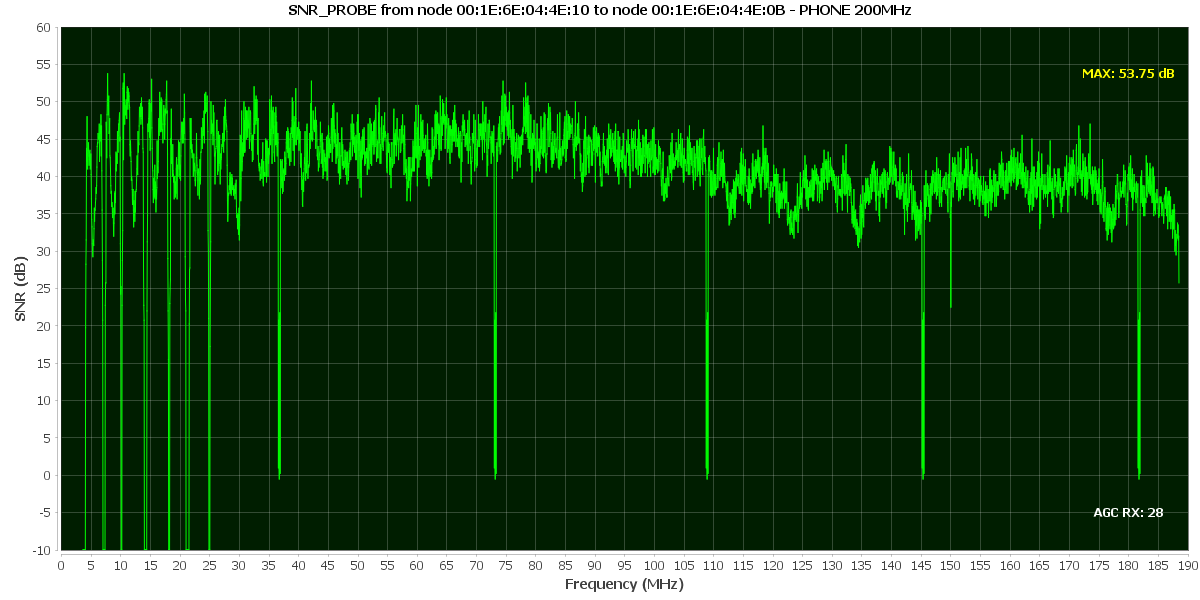
reply