I recall reading this story of some user doing a sync with Zune on their new computer. The computer had no songs on it and the Zune synced with that machine and wiped all the existing music off his Zune without warning him(or something like that its been years). I recall thinking, yep thats Microsoft. And to this day I still encounter dumb ways of thinking in many of their products. The endless negative stories I hear about Windows 11 are just the tip of the iceberg. The entire company has to be following a cohesive vision with leadership at top needing to be truly involved to make great end to end products and really Microsoft has not been that in a long time.
I was a zune user. I had my music organised meticulously and could simply drag and drop to my zune from my (parents) windows desktop. It was simple and it was fantastic.
Then I got a iPod so I needed to download iTunes. I downloaded iTunes, it told me to import my music. I imported my meticulously organised collection. It duplicated every single file into the iTunes approved format (AAC?) - my meticulous collection was now less meticulous, messy even.
It caused me to swear off Apple products for decades. Though it also led me to some very basic programming in order to delete the duplicates. I was only partially successful.
Programming led me to use Linux, before I eventually moved over to Mac. I like to think this was their plan all along.
iTunes for Mac was also awful. I don’t know where the idea comes from that iTunes on Mac was good software but I remember reading that and getting a my first (then Intel) Mac and wondering why it got so much praise on Mac. It was the same software with slightly better UI but generally the same awful UX (except for drivers and performance which was never an issue on Win for me)
As a hobbyist teen I built my own itunes clone for PC from scratch and remember getting so excited when Apple posted a job for someone to port iTunes officially.
I remember getting so excited, then depressed when I realised a hobbyist teenager could never compete with the people Apple would have applying. Later seeing how bizarrely bloated iTunes for PC turned out, guess I probably could have.
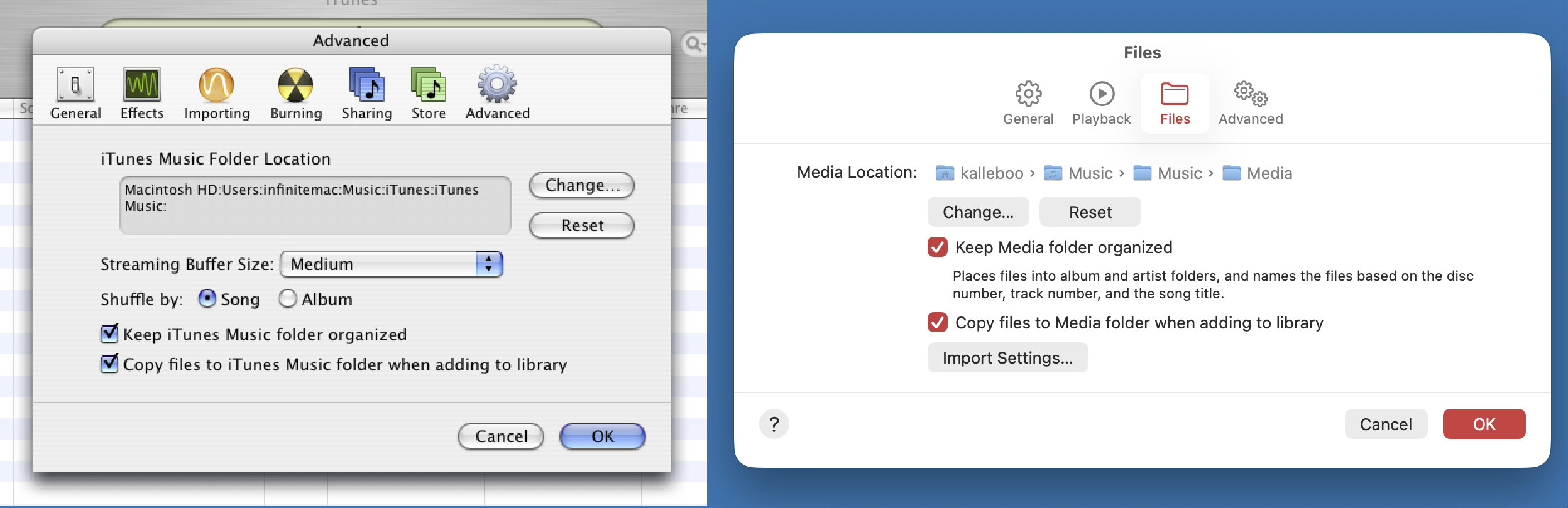
If only you had bothered to check the settings, you would have found the option to keep your music files where they are when adding to the iTunes library. It's been there all along, and it's still there in SoundJam's current reincarnation as Music.app.
I believe that, (possibly only) in the early days, it offered to add any imported music to your library, which I think it indeed did by converting to AAC and putting in a directory structure of its choosing.
It probably could convert to AAC, but the biggest issue for collector nerds with carefully curated collections of mp3's organized in folders by artist and album and with perfect metadata was that iTunes would take all your hard work, shake it around, rename all the files and dump them in a single folder and fuck up your metadata. At least that's how I remember it, but it's over 20 years ago ...
I think the core lesson of the story is knowing if your hobby is listening to music or curating a music collection. Optimize for one or the other.
I went from meticulously curated MP3 collection on Linux to letting iTunes do it for me, and I realized that the meticulous curation and hunting down album art and everything was a hobby I didn't actually love. But if you do love it, great! Different tools for different jobs.
Submitting to iTunes made syncing to the phone much easier, but I've been using claude to rebuild/repair my 20+ year old library, and have learned that iTunes has very weak if any support for "work" - a feature it has to split up classical music the way the CD does (once file per movement). Frustrating that there will likely never be a high-quality syncing player that works well with iPhones.
I remember the trick was to use a network hard disk or drive for the music. iTunes kept the organized folders and all files untouched while building its metadata-only archive in local. But in general, yes, the tendency to mess with your file was built-in.
The trick was to skip the onboarding and go into the Preferences, there was an option there to disable putting your files in the music library folder and messing with the layout
edit: I just compared iTunes 4 and Music in Tahoe and they still have the same preference! It's funny how they clearly did a s/iTunes/Music/, resulting in the "Music/Music" dir https://kalleboo.com/linked/itunes4-vs-musictahoe.png
As I recall it, the AAC option was for syncing to iPods with lower capacity (like the Shuffle) so that it would convert your 320/256kbps MP3s to 128kbps AACs to fit more music. It did this for a copy of them though, I've never heard of it actually converting your main library and checking out an old version of iTunes it has no way of converting your whole library (just individual tracks one by one).
Having iTunes organize your music into its own folder structure was an preference you could turn off, but that option was not shown in the onboarding so it ruined many a people's meticulously organized files...
I'm sure there are other examples, but you picked one here that is very unfair.
> their new computer. The computer had no songs on it and the Zune synced with that machine and wiped all the existing music
This is identical to the default way the iPod worked. If you bought a new Mac, and needed to get your music onto it, you had to use the migration assistant (connect via ethernet or firewire) or copy the music yourself. If you just plugged in your iPod to the new 'empty' mac and hit Sync, you'd lose your music too.
This was done as a show of good faith to the RIAA - their nightmare was that users would go from one dorm room to the next, dumping all their music onto all their friends' PCs. As a result, an iPod (or indeed still an iPhone today) can only sync with one music library (aka one computer) at a time. If you put it in "manually manage" mode, you can copy onto the iPod/iPhone from a 'foreign' library, but you can still never copy in the other direction. And all of this is true even when your music has no DRM encryption.
Heh, sounds like Windows Phone. Release Windows Phone 7, get early adopters and traction. Thank the early adopters by releasing Windows Phone 8, which is incompatible with existing Windows Phone 7 devices. Also make it use a new app development SDK so that Windows Phone 8 apps don't work on Windows Phone 7 (modulo some weird transition tech that almost nobody uses).
The funny thing was they could have done the adaptation--instead of doing it they just presumed devs would transition.
They were also done with the android-apps-on-windowsphone project but dumped it because PC marketplace managers got mad at it because then devs wouldn't use their sdk. Luckily we still got the first version of WSL because of that project's partnership with that linux team.
And the Zune ecosystem had it's own DRM music format that also died IIRC.
However, what the Zune ecosystem DID have that was insane for the time, was a $10 or so monthly subscription that let you listen to and download ANY song, as long as you had Wifi, with the bonus that you could download completely unprotected MP3s of ten of those songs a month. Songs at the time were still $1 each, so this was essentially free music streaming for people who bought songs regularly, with no potential for rug pulls.
Outside of this subscription, you could loan a song to your friend, who could listen to it on their Zune like three times.
They also had a nifty procedural playlist feature.
They were trying to do social media of music! Microsoft used to be freaking nuts.
One of the many reasons I moved away from ipods is because iTunes (which was awful; some of the worst software I've used) did the same thing to me just before I went on a trip.
I thought to myself: "I better add these two new albums to my ipod so that I can listen to them while away".
I plug in the ipod, itunes loads up, I walk away.
I come back 10 minutes later and it had not finished yet and I wonder what is going on.
Turns out it deleted my entire 40gb library off my ipod and started re-syncing.
I had to leave so I unplugged the ipod but it was basically useless at that point.
I do agree with Microsoft in general but Apple seems to be very much the same in my experience.
iTunes was great in the beginning. If you can, find someone with a G3/G4 and OSX 10.4/10.5 and see just how snappy that thing feels even with a 100th the RAM of today and a spinning disk. A real nice piece of software.
But then they just started dumping everything onto it and it eventually crumbled under the weight.
To be fair, I had that experience with my first iPod. As soon as I got it, I synced it with my computer and loaded up a ton of songs on it. This took a while.
Some time later, I connected it to my dad's computer to put a couple more songs on it. The first thing it did when I hit "sync" was delete everything on the iPod.
I learned that day that "sync" meant something different to Apple than it did to me.
I'm sure it gave me some kind of prompt but it was not a clear "hey this is going to delete everything" prompt.
To be fair, iTunes suffered from the same defect at one point. Microsoft is now a clinic on defective design, execution, and attitude. But back then it wasn't that bad.
The iTunes case was also a classis UI 101 blunder combined with stupidity. If there was no iPod plugged in, the "Sync on connection" toggle in iTunes simply disappeared. First of all, when something is inapplicable, you grey it out. You don't just make it disappear.
But in this case, even greying it out would have committed the same blunder, because the default state for this behavior was YES.
So if the hard drive in your computer went bad and you installed the OS fresh on a new one, thinking that all your music was backed up on your iPod, you were right... until you plugged it in.
So, so dumb.
And finally: Apple never addressed the lack of "computer overwrites mobile" and "mobile overwrites computer," which Palm OS syncing nailed in the '90s.
This weeks fun example of 'What will Windows 11 do today?' is that it suddenly wants to max out the Ethernet adapter with nothing. No packets are actually going anywhere but it just ends up hogging the entire data bus until you restart it once or twice.
This is the kind of nonsense we have been putting up with for years.
Oh, you mean like MacOS (OSX) installer deleting whole hard drives if there was a space in the volume name? It's so funny how fan boys can selectively ignore the bugs by their favorite company