We had a work requirement to start logging hours in Jira. I hated having the website open, it was slow to find the Jira I was working on, find the link for logging hours and adding a comment. I wanted a desktop app that had a list of issues assigned to me with buttons to add comments and work log hours.
I messed with Tkinter but was struggling for awhile just getting it to look…nice. I stumbled on PySimpleGUI and suddenly I was flying. Setup the hooks to the Jira api and I had what I wanted. Was a great project to learn UI development.
Logging detailed hours is now basically a requirement nationally in the US because of the messed up change to the tax code that makes companies separate out maintenence development from greenfield development.
My workplace has this as a requirement for a legal reason and we recently switched from Jira to the equivalent MS timesheet platform and it’s way worse. The other side of the grass isn’t always greener
In my industry/workplace it’s the norm but the work I do is very cool and I don’t have to work crazy hours/the pay is decent so it’s not that big of a deal
Do you have the sources for this application available somewhere? I was considering writing something similar just this week. So an already available application where I just point it to the right instance would be amazing
Before you learn React, you should learn html and JavaScript and before you learn those, you should know how to read. Every skill builds on the next. For me, having a positive experience with this led to more positive experiences with MAUI and GTK. I’m not writing out the most scaled out projects - I’m just having fun learning.
I'm really, really excited about these GUI frameworks. Native desktop experience is so much better than web-view amalgamations. And kudos to PySimpleGUI for the simplified event loop, and multi-backend approach, that is genuinely new.
I do wonder why don't we see more "automatic" GUIs: given some data structures and functions, make a passable interface to interact with them. Use heuristics to pick when a panel should be vertically or horizontally laid out, or placed in a tabbed interface, or a popup, etc. It would unlock a lot of functionality that is too nested for CLI and too "native" for web apps.
I've played with this a bit over the years, starting with my automatic form generator for the web back in 2011 based on function arguments (coupled with an automatic data to html thing to see the function output), and more recently some similar stuff for my gui toolkit too (using the D programming language).
For example, you can write:
```
import arsd.minigui;
void main() {
// need to define the data you want in a struct,
// it requires a struct even if you only want one item
struct Data {
string code;
}
// then do the dialog function with the struct and it
// auto-creates a dialog for all the parts of the struct
// and calls the function you provide when the user hits OK
dialog((Data received) {
// you got the number here
  messageBox("You gave me " ~ received.code);

 });

 // need to run the event loop explicitly so main doesn't return
        // early and end your program; this will return when all windows are closed
 EventLoop.get.run();
}
```
You can also attach some user defined attributes to tell it which widget you want to control the thing (defaults are line input for string and int, drop-down select for enum, groups for structs... that's about all i bothered to implement so far, tbh my gui toolkit is more of a side project toy than a main event so the time i put in is limited), for example using `@ControlledBy!VerticalSlider(0, 100)` on an `int` to make it a slider from 0 to 100 instead of a text box asking for a number.
My menu thing uses this too, you can attach functions to menus and it can pop up a dialog. For example you might do `@menu("Search") Find(string text) { ... }` and let it auto-generate the menu and dialog box for it. I also have a `DataControllerWidget` which does the callback on any change event, allowing for real-time manipulation. I wrote a little blog post about this a couple years ago (seriously, i move sooooo slowly on this stuff!) http://dpldocs.info/this-week-in-d/Blog.Posted_2020_11_02.ht...
I'd love to spend more time on this, I think it is really cool, but tbh I haven't gone too far beyond the basics and since day job has no use for such stuff it gotta be squeezed into when i feel like doing code on the weekend.
There was something answering that description a couple decades ago, called Naked Objects. Never tried it because I wasn't into Java, but it sounded useful.
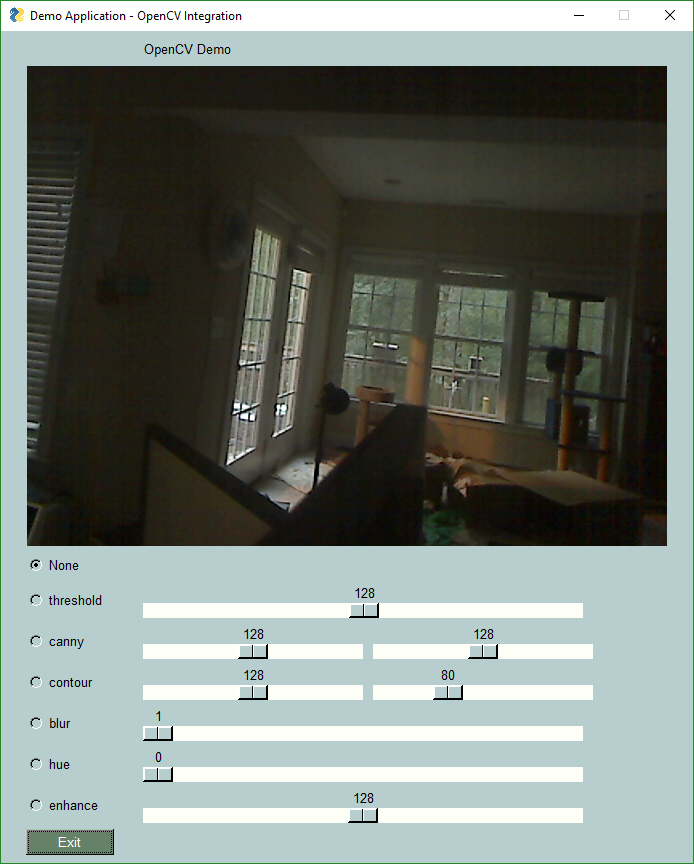
The examples look straight up taken from the 90s esthetically [0]. Don’t get me wrong, for prototyping/internal tools that need a GUI to be usable by people not tech savvy enough to use a CLI it’s perfect, but what about the cases where you want things to look good?
While native UI are always best for performance etc, I’ve always found them harder to style than a webpage.
What is the equivalent of components (listed of styled components that go together) in python GUI? Something like for Flutter or SwiftUI, that look slick without much effort.
I'm sure it's a matter of either doing it well or poorly, but in my experience, "styled" UI's are one of the reasons why software is so bad for most software and most users. At least the default UI style provided by the OS is something people can learn and transfer from one app to another. And since I'm not a gifted UI designer, it's probably better than anything I can come up with.
It also adds to the already crippling cost of software development. The words you dread to hear from marketing: "Our software looks old."
I don't mind the 90s look at all, but it doesn't even match the OS look from back in the 90s. The checkbox backgrounds are wrong, the title label at the top is misaligned, the Exit button is in the wrong place, the entire thing screams "badly designed".
There was software like this in the 90s, but it's not the 90s aesthetic people usually talk about. A lot of work went into the design of Windows 95's user interface.
I recently tried overwatch and I seriously cannot find a single damned thing in that UI.
Unlabelled buttons. Shit in completely random places. Extra buttons where not needed just to insert ridiculous white space. Components that don’t have functionality you expect, which is only granted by happening in to the similar component from a different pathway.
What an utterly idiotic UI. If you are a manager at blizzard, please fire these bone heads that did this.
If looks are a top priority, web pages seem pretty hard to beat.
They also give built in separation of frontend and backend, and the option of remote access should you later need it.
Plus, you can use them just like a native app: Just make a tiny minimal tkinter or similar kind of GUI, that just has an "Open browser UI" button.
You can even secure it against daemons running as other users on the same machine, by having the launch button put a token in the URL, but I haven't seen this done anywhere.
The problem is that Tkinter (at least for Windows) is really based on 90s widgets. You could set PySimpleGUI's theme to "SystemDefaultForReal" but it will still look out-of-place because the native Windows widgets has that modern look while Tkinter has never been updated at all.
Looks good. I have a suggestion for it, although it might be this library is too mature for such a dramatic change: use dictionaries (which, as of a recent Python, remember which order the elements were inserted) instead of lists.
I did something like that in an old job, except it was a much thinner wrapper around PyQt (and surprisingly little code). A key difference is that setting properties/signals and nesting widgets was done together. One benefit of that over setting properties in the constructor is that, if you need a name for a widget (e.g., to set the text later), you can still set the properties of it in the main bulk of the view.
The "setup_view" function was the whole API. They talked about opening sourcing it as part of something else – I hope they do because I found it really handy for quickly knocking together simple GUIs. But this library looks like a good alternative, so thanks for posting.
Looking at the latest trends of GUI frameworks, decoupling the layout from the data gives much cleaner code. Let the framework take care of all the data binding for you. Both web and desktop go more and more in this direction. Nobody does
That means, avoid mutating widgets directly. Instead bind their properties to some data store that rerenders automatically on change. The input/output example on their page demonstrates something like this.
Why do you post that quote? I think there must be some implied meaning I'm not getting. Is there a way to use dictionaries to set properties and nest widgets in a similar way to my code example?
No, it showed setting text through a different method that does not use a dictionary. (Maybe it uses one in its implementation, but we're taking about the interface here.) There is no usage of Python dictionaries anywhere on the whole page.
I have to admit, the alternative method used in the second example is interesting, it's probably just as good as my suggestion in most ways. But ape4's quote about dictionaries still doesn't make sense to me (both on its own or in context in this conversation).
Well, it's starting to get close to the ease of use of VB6 or Delphi/Lazarus. Progress is definitely being made, now they just need an interactive GUI builder, so you can just #import the forms you make, the Bob's your Uncle.
---
I lost a boatload of time on a project trying to get WxPython and WxFormBuilder to work together years back... any little change in the forms broke everything in the backend. I finally wrote a little shim that mated everything up, until I had to change a fields Type, and it broke everything. It appears that won't be the case here. (Thank goodness!)
As a developer for a Python GUI application [1], I think the biggest problem with using Python for desktop applications is the packaging. All existing tooling for creating a distributable binary either stops working or starts to require nontrivial hacks once you have more than a few dependencies. Even popular packages have issues. You get cryptic missing hidden import problems and missing data files that you didn't know were ever needed. Some dynamic module loading also stops working once they are brought outside of the normal python environment, which is the case if you use PyInstaller or cx_freeze. I'm not sure what can really be done here. Maybe Python needs to propose a standardized way to package standalone programs like Java's jars that only depends on the interpreter.
Python has zipapps (https://peps.python.org/pep-0441/),
which are standardized and similar to JARs.
You can build a zipapp that includes your application's dependencies using a tool like shiv or PEX,
only with binary extensions the artifacts are still per-platform: https://github.com/linkedin/shiv#gotchas.
I recommend users to install my Python programs with pipx (https://github.com/pypa/pipx).
I think it is the best option when the audience is at all technical.
pipx makes such a big difference for managing Python applications.
It avoids the version conflicts of `pip install --user` and the pain of manually creating per-application venvs.
In general, it provides a reasonable user experience.
Because of this user-friendliness,
I can recommend pipx as the primary installation method and expect people to succeed at installing the program with it.
(I don't see issues about pipx installation in the trackers of projects that recommend it.)
My programs have binary dependencies but no GUI.
Pipx still breaks. I tried to use something a few days ago that had been working until a month ago and it failed with some useless generic python error that I can't remember. I looked at the code in the /usr/bin/thing and it was just a wrapper. After following the rabbit around I just uninstall pipx, install it again, and then reinstall the thing that I was originally trying to use. No idea what broke it, perhaps a python update or something. The 'dead' version is probably still hanging around in my home directory taking up space somewhere.
Python absolutely sucks in this regard and I don't think there is a permanent solution. Except give python a compiler that can spit out binaries and libraries. I wish nim was 100% python code compatible.
Compiled binaries with shared libs work fine as long as they come from an OS package repository. Statically compiled binaries work almost everywhere. But a script that needs a bag of other specifically versioned scripts needs to live in it's own (sometimes impossible) world. Hell, I've even had a single pip install on a clean system fail because two dependencies of the module I was installing wanted different versions of some common dependency. Gah, burn it with fire.
I'm always amazed at the Windows ecosystem. I can download something that was built in the 90s and happily run it in wine.
Yeah, I've had pipx break once with a generic error.
It was after a Python version upgrade.
I also ended up reinstalling pipx and the applications to fix it.
I should qualify my recommendation.
With pipx, your application will very likely install and work correctly,
but it won't necessarily stay working when the Python installation changes.
A self-contained binary is better in this way.
I don't see Python packaging and dependency management as a bulldoze-everything-and-start-over disaster anymore.
Thanks to improvements like wheels, manylinux, `pyproject.toml`, https://peps.python.org/pep-0517/, and Poetry/PDM/Flit/Hatch/etc. they are increasingly adequate.
I have compiled a Python application to a native binary with https://github.com/Nuitka/Nuitka.
Once I got it to compile,
it fully worked.
The process was a little fiddly,
although I don't remember the exact problem.
In the end I set up a Docker container for the build,
and then it built.
Maybe Mojo will be what you wish Nim was.
For standalone scripts, there are options.
(My list: https://github.com/stars/dbohdan/lists/python-scripts-with-d....)
Support for scripts should be coming to pipx.
I have used the development version and liked it.
This is an area where things are actually pretty good but not common knowledge.
> I'm always amazed at the Windows ecosystem. I can download something that was built in the 90s and happily run it in wine.
Been working with it for the last year or so and the looks are alright but I just completely loathe the way tkinter is designed... it just feels so old.
I'm surprised that nothing has filled the void that VB6 left behind in the rapid application development space. The language wasn't great, but VB6's strength was the drag and drop GUI builder.
Drag and drop UI design kept me using qtcreator for way longer than I would have otherwise. Usefully, you can just plonk the layout file next to your python script to use it with pyqt, since the IDE's python support isn't great. (may just be my borked install)
VB6's strength was that Windows was a virtual monopoly at the time. Today you have more fragmentation, where the user masses are still mostly on Windows but the developers are mostly on Macs or Linux.
Developing a desktop GUI framework for a single platform is relatively easy. Developing a cross-platform GUI framework for three or more platforms is extremely hard. And a lot of people would STILL ignore it if it's not "mobile first", targeting iOS and Android too (meaning that it's probably dogshit for desktop apps).
I'm considering taking a tool I have which has a pretty nicely fleshed-out CLI interface and wrapping a GUI around it, so people who don't run desktop Linux can use it too. This seems like it might be perfect for my needs.
Mostly I'm wondering whether anyone else has ever done what I'm trying to do here. My tool has well defined CSV, TSV and JSON flags -- has anyone else ever tried to use an actual full CLI tool unchanged to build a GUI around? What challenges should I be ready to face?
Chess engines are a good reference for this. The decision-making part is a CLI that plugs into a GUI like WinBoard[0] or Arena[1]. There’s a protocol the engine and GUI follow, such as the WinBoard or UCI[2] protocols, which just exchange text commands via STDIN/STDOUT.
The main challenges are the same problems you’d run into with multithreading, like deadlock where the GUI and CLI are both waiting on the other. So both sides typically need to be running their I/O in a separate thread from the “business logic”, so both sides remain responsive.
A second common issue is idiosyncrasies around each OS’s handling of pipes, things like making sure you flush the buffer, or just the different OS-level API calls that differ between Linux, Mac, and Windows.
I use both handbrake GUI and yt-dlp GUI. Here's something they both do horribly and I would suggest for any CLI tool with a GUI wrapper: have a persistent textarea at the bottom of the GUI that shows the equivalent CLI call to the settings I select in real time. This will teach the user how your tool works and also give GUI-only users a taste of the power they could have if they used the command line.
So basically, treat the GUI as a stepping stone to helping the user build scripts/workflows around your CLI. That way you are only developing the CLI, and the GUI is just a helper app. The second you start adding features to the GUI that can't be done in the CLI, you are now maintaining two separate apps.
This is a really good idea, and I can't believe it didn't occur to me with my PowerShell tooling background, since a lot of them have been doing this for a long time.
I have one comment, and I hope it's not rude: There is too much text. Everywhere where you can put text, the author put a lot of it. Sentence after sentence, rambling on. Coherently so, most of the time, sure, but just one after the other and not a single relevant screenshot for the first thousand words.
Something is not right here. Either this is a joung enthusiastic coder, which is probably the case, or there is so much text in order to convince you to try it.
The readme even has an about me section where the author introduces himself.
For some examples, scroll to random points in the readme and read a few paragraphs, then repeat what you just read.
Each section has a clear heading. If you don't care about a section, all you have to do is scroll a little bit. No one is forcing you to read the "about me" section.
Some people actually enjoy reading about tools, rather than just looking at it from an entitled viewpoint of "what can I do to get this running as fast as humanly possible while reading as minimal words as possible". This is a tool that someone else wrote that you get to use for free, so stop whining and let them be free to express themselves as they see fit.
I just scanned it. It's not an MVP for some product they want to attract investors. It's a tool. Which has documentation written by someone who wrote it.
I hope this one is not rude too: are you sure you're just not afraid of having to read stuff rather than being spoon fed bullet points and steps?
Give me a wordcount on that readme, you'll see what I mean. If it was 1/3rd the length it'd still be one of the longest readmes ive ever read - and almsot all the ones ive read and written are by humans.
I think the problem with the README is that it sounds more like a marketing brochure than documentation. It's full of slogans and weird illustrations comparing it to "Other Python GUIs".
I would say your comment is most definitely rude, especially the part where you reduce the reason for the text to two options, neither of which are very flattering. Incidentally, it seems like neither of your given reasons are accurate either.
You could have gotten the same idea across by saying something like "This is a visual project so I feel like it should include more screenshots in the main description" and leaving the insulting assumptions out entirely.
Thats not my main point, though - my point is that this rambling text doesnt work as a readme, for me, and i feel its much too long and has little content for the amount of text
I think the problem is they named it "Simple", thus implanting in the mind of the reader a certain preconception about what to expect.
It is like if you name your project with the words Smart, Open, Trusted, Secure, etc etc, people will tend to point out that it doesn't meet it's name ideal.
Contrast with a project like C or BSD. What's the opposite of C? Nothing. Nobody can point out that "Hey, the C language doesn't live up to it's name" because it's name has no connotations or preconceptions.
I found it delightful and appreciate the lengths the author went in explaining why this exists and the goals of the project. A breath of fresh air compared to the usual sea of boilerplate and links to proprietary chat apps I don't want to use.
There is a lot of non-information, for sure. For example,
> Some programs are not well-suited for PySimpleGUI however. By definition, PySimpleGUI implements a subset of the underlying GUI frameworks' capabilities. It's difficult to define exactly which programs are well suited for PySimpleGUI and which are not. It depends on the details of your program. Duplicating Excel in every detail is an example of something not well suited for PySimpleGUI.
says absolutely nothing and gives the reader no useful leads as to the applicability of the framework to their project.
That's the key part of the entire README; I found it very well put.
tl;dr: "you will be disappointed if you want to do something fancy"
(of course, should you want all three of (a) easy, (b) fancy, and (c) someone else has already done much of it for you, I'd bet you would be bound for disappointment anyway)
It would be the key part if it had actual information. What type of programs are "some programs"? Too many controls, multi-window, drag-and-drop, too fast control updates or rendering, 2D graphics, extensible controls, etc.? GUI frameworks have pretty common components, and clearly they know something about the limitations, but those limitations aren't enumerated at all.
I urge you to scroll to any point in the readme and read, and recount what you read, because most of it is repetetive and fluff for no (obvious to me) reason
Lol. He is definitely not young as in inexperienced coder. He will definitely not going to win awards for barely sufficient documentation and docs organisation. Dude got a personality.
I've followed the project when I was in college and used it in my personal project.
I worked with a non-software team that used this to build a UI about two years ago. It’s great to spin up something quickly, and worked well for a team that didn’t have much UI experience - to a point. It becomes very hard to maintain and navigate as soon as any complexity comes in - much harder than Qt, Winforms, or Swing. The styling was lackluster. Maybe it’s improved in that time, but I think its place is quick one-off UIs and rapid prototyping.
Does anyone have experience with this? The goal to lower the entry bar for GUI development seems laudable to me, wonder where the solution stops to work, though.
It works quite well for small and medium sized programs, far better than I expected. The looping system is quite easy to use, and there is even a nice system for calling long functions without blocking the GUI.
You can even use pyinstaller to make a fake application using it.
I’d say it stops working so well if you want a ”modern” looking GUI, as the GUI looks pretty old.
Not to answer your question but it brings back some nice memories. I was in college when author started this project. He worked a lot on it. After a few years, he stopped and archived the project. Looks like it's back again. Nice!
I used it in all my college demo and small projects and I loved it. The most complex GUI that I made was a oscilloscope frontend for lab-made signal recorder. It is indeed a simplegui library.
This is an awesome library. I've used it for multiple, mostly internal tools. The more complex one were a tool for cardiac action potential analysis and another for the evaluation of multiple choice tests. Complexity exploded over time, but that hinged on my coding skills, or lack thereof... PySimpleGUI did enable me to make GUI tools without getting my hands dirty outside my Python world, so kudos for that.
Protip: the 'Reddit' theme looks way more modern compared to the other ones. Use that to get away from the 90s looks.
Yes it works, and my needs for GUI's are relatively simple so I haven't hit limits+issues. "Relatively simple"=Business app stuff like CRUD and also personal project+task mgmt tools.
Before I landed on this one I spent significant time testing/prototyping PyQt and TkInter. Those tools required more effort than I was looking for (based on expectations from past environments and tools for business app dev). PySimpleGUI is quicker and easier than the other tools and is powerful enough for my needs.
> Supported frameworks include tkinter, Qt, WxPython, or Remi. The term "wrapper" is sometimes used for these kinds of packages.
Other than the support for web UIs, this seems like Java AWT but for Python. It presumably has the 'lowest common denominator' problem of supporting only those widgets which are available in all the wrapped GUI toolkits.
For desktop UI work, why not just use Qt's official Python bindings? Qt has good cross-platform support, and its Python API seems very approachable.
Since some comments point out that the design looks old: I agree.
However, the framework’s author describes the usecase as building simple UIs for what otherwise would be used via the command line or for building UIs for cases when people can't or don’t want to learn a more complex framework (this could include HTML/CSS/JS, which is quite complex, if you do not know it yet!).
What's the solution for shipping a desktop Python app these days? I use Python a lot for small internal tools and always land up having to ship it as part of a web service and build a web UI for it so staff can use it as "set up conda, install the deps and run python ... " doesn't fly
I find Nuitka worked a lot better than the alternatives. It genuinely compiles the Python to an executable, rather the all the other alternatives (like pyinstaller) which actually have the Python files hidden inside of them. It doesn't give any particular speed advantage (despite that being the original point) but works very well for packaging.
I would suggest using the "standalone" mode of Nuitka. As the name suggests, it is self contained, but it's a lot of files per program because all the C extension modules are separate files. It's tempting to use "onefile" model instead because it really is over for so seems neater, but this is really just a self extracting program with the same files hidden inside as standalone, so has a few issues like the other packagers (e.g. can trigger virus warnings or leave files lying around in temp directory).
There's a few projects that can package a python environment into a single executable (the main tradeoff is you end up including a copy of python with every single executable if you have lots of tools) - when I wanted it to create an installer (.msi/.dmg), I've found cx_Freeze came the closest to "it just works".
It secretly extracts its internal Python files to a temp directory and runs them from there, which can look a bit virus-ish and can potentially leave them lying around forever if the application doesn't exit cleanly.
As a user, definitely not. Web apps are slow, require an internet connection, don't integrate nicely with my OS, and generally inferior to native GUIs in just about every way.
And now the user needs a server running somewhere.
We tried this approach once, for this exact reason that we didn’t want an “old thick client”. Our app interacted heavily with the user’s OS and their line of business app, and it was a nightmare dealing with the customer’s IT department, wondering why we needed to run HTTP servers everywhere, causing security alerts.
We switched it to a simple Tkinter app and everyone involved was much happier.
Let's not forget that a web app, in general terms, requires a web server to run. Most users don't have the expertise or patience to run a server (not to mention all of the risks that come with running one).
What risk? Other users on the same system accessing the web UI?
That can be mitigated with a token included in the browser launch URL, but it seems like a pretty unlikely vector anyway, someone would have to write code that specifically knows about SyncThing, and then convince you to install it, and then you'd have to not use password protection.
Opening your computer to network. Incorrectly configured folders for sharing could end up wiping out your data (no warning or chance for recovery, unless you configure file versioning- which is confusing AND off by default). WebUI not configured with a password by default, allowing multi-user systems to access your files.
All of your complaints are specific to Syncthing which, admittedly, doesn't have great defaults (but the fans will be quick to defend it).
A webui for a desktop app can be made perfectly securely, though.
For example it can bind to 127.0.0.1, not do external network requests, and require a token (generated by a systray menu utility or an app shortcut for example) that will prevent automated exploits from accessing it as well as other users on a multi-user system.
That's a very limited solution though and it's super incomplete . Last I tried, the user needed to install python first and you can't bundle it. And it's not a myth, it's something I have experienced myself. Pyinstaller falls apart the moment you try to pull packages that are what make python useful in the first place for tons of people (numpy, pytorch, etc).
PyInstaller does not require that the target machine have Python installed.
And it will produce a single-file executable that bundles the interpreter, application Python code, extensions, and any other resources (data files, images, fonts, etc).
Both numpy and pytorch are explicitly supported, although that's not guaranteed for all extension packages.
None of that is new, it's been the way PyInstaller always worked.
However on Linux things kinda suck because PyInstaller will package your current interpreter, so if it's linked against things that are different on another Linux (eg no glibc) it will often crap itself. But so is the joy of distributing compiled software to Linux users :).
This is a genuine issue, and it takes some work to avoid.
I typically use an older distribution as my build box: this means that the dependencies pulled in by the interpreter are older versions, and when it runs on a newer distribution, the backward compatibility for libraries will ensure it works ... usually.
I've messed about with using a completely independent build tree for this: something that depends on libc/libm/etc only from the OS, and all other dependencies are part of my build. That seems like it works pretty universally, but it's a lot of work.
I've been meaning to look into leveraging the Flatpak runtimes for this: they seem like they have pretty similar concerns.
When the only tool you have is a hammer, everything is a nail.
It depends on your requirements. I still produce actual native GUIs for tools I write. They're faster, require less futzing to service, generally continue working for years if not decades, have far richer control possibilities out of the box and tend not to rely on 5000 layers of excrement slapped on top of each other.
This is not “very convincing” if it doesn’t meet your requirements.
There are plenty of ways to distribute thick client apps that are usable from any client, easy to update, and which don’t have access to local resources, like Remote Desktop, VMware, Citrix, etc.
and ask your users to install those before being even able to use your app?
I haven't phrased my argument very neatly, but the point stands: anyone with an iphone/android/linux/… can easily use a web app, now, without any prerequisites.
You don't have to bundle it or distribute it differently than with a webserver and it's a single codebase.
That's not the case for any other tech that I'm aware, and it's a shame.
I agree, sure.
I was only replying to the "… but why?" comment: There are plenty convincing reasons to go the web app route, although it obviously has downsides too.
Textual[0] does this for CLI apps. That’s not for full GUI apps, but it’s very DOM-like, uses CSS selectors, etc. and a cool option when it meets your needs.
What is the recommended modern way to write GUIs in Python? Assume I'm in Python 3.12 and have a Poetry project as my management solution and that I have general software and GUI experience. What do I use? My application might have lots of streaming data to be plotted, streaming images to be displayed, lots of buttons and other elements. Is it PyQt6 with PyQtGraph? I don't want it to look like a Python app.
Tkinter is fairly basic but feels very native on every platform I’ve tried, and it’s easy to use. There are lots of extensions available too. I just wrote a comment about it:
If you’re interested in Python desktop apps, check out TKinter. I have a piece of boilerplate code I typically start with [0], and within an hour I can have a finished piece of software that runs in the native windows manager on any OS with no libraries or frameworks to manage. It’s not the prettiest code but it’s very easy to write and I love how native it is.
For the charts, they use implot[0], it's written in C++. You can interact with the demo website[1] if you want to get a feel of the real-time plotting.
I wouldn't want it to be clear it was made with Python with some vey Python-y library that makes things look a certain way. I want the app to look modern in a way that it could have been written in C# for all the user knows.
I wrote a Python app with a Tkinter GUI for a customer. You can’t tell it’s written in Python or Tkinter as long as you change the default icon.
I’ve encountered a few vendor apps over the years, like data collector apps, that I noticed were written in Python with Tkinter. The only way I knew was they hadn’t changed the default Tkinter icon.
So you’re saying Python is non-modern? Also - Python has no “native” gui toolkit so it’s impossible for things to look “a certain way” that would betray the underlying language.
I think you really have no idea what you’re talking about.
>> Want to share your PySimpleGUI program with friends and family that don't have Python installed on their computer? Try the GUI front-end for PyInstaller that you'll find in the psgcompiler project.
i haven't used this pyinstaller gui, but for my purposes (internal python 3.8) i just set up a batch script for each project to have a single command to make my executable. i've also had to do some wrestling with pyinstaller for specific features, not sure how much the pyinstaller gui helps iron those issues out.
> 2023 is going to be the "Make or Break" year. I ultimately need to determine if the project is going to continue. To date, it's nowhere near sustainable. The income doesn't cover the cost of the project, meaning that it's not only unable to allow me to pay for my cost of living, but I continue to rack up debt, borrowing money, to keep the project functional.
> This isn't new information if you've followed the over 1,200 announcements I've made since Sept 2018. The data is available should you wish to look at the GitHub Sponsorships and do the simple math required to calculate income from Udemy. It would be great for the project to keep going. I'm hopeful, but more than hope's required to keep the project going.
So if you like this project and want to see it around in the future, please support it.


I messed with Tkinter but was struggling for awhile just getting it to look…nice. I stumbled on PySimpleGUI and suddenly I was flying. Setup the hooks to the Jira api and I had what I wanted. Was a great project to learn UI development.