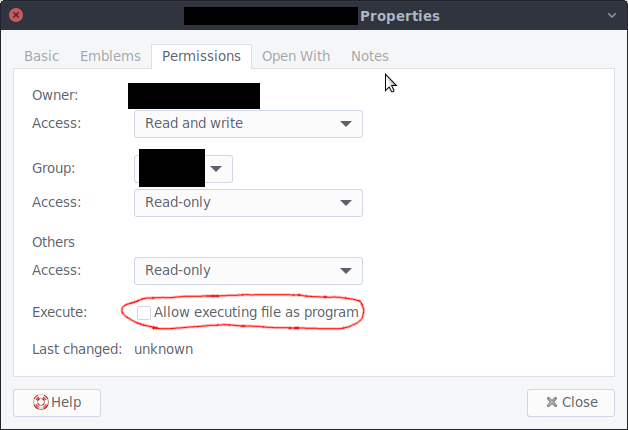
As a desktop user, it makes me physically ill everytime I have to do that. I'd honestly pay for someone to make auto-executing the default on most common Linux distros. Like, in 20+ years of using computers, I don't remember one time where I downloaded something and did not want to run it afterwards.
Fortunately for the rest of us, common Linux distro maintainers have a better understanding of security than you appear to.
If I download a pdf, I don't want it to run. I probably want to open it, but if I've gone through the trouble of downloading it onto the filesystem as opposed to just opening it in the web browser, there may be other things I want to do with it. Maybe I want to print it, or maybe I want to break it up into component parts. Or maybe I want to transfer it to a sandboxed environment before I open it because I don't trust it.
If you don't want to take an active role in maintaining security on your computer, then by all means use a commercial operating system. Pay a license and let Microsoft and Apple make those decisions for you. They have competent people who can program reasonable default settings for the average user. If you're running Linux or an open source operating system, you've already decided to take these responsibilities into your own hands.
> If you don't want to take an active role in maintaining security on your computer, then by all means use a commercial operating system. Pay a license and let Microsoft and Apple make those decisions for you. They have competent people who can program reasonable default settings for the average user. If you're running Linux or an open source operating system, you've already decided to take these responsibilities into your own hands.
That is a beyond ridiculous take. The last Windows OS that did not make me mad was Win98, and every time I have to use Mac machines I want to gouge my eyeballs out. I want an OS that lets me shoot myself in the foot as much as I want.
> If you're running Linux or an open source operating system, you've already decided to take these responsibilities into your own hands.
no, I just want to use the fastest possible OS for my use case on my hardware, which is Linux.
> Though I don't really recommend doing this since you should not be executing downloaded binaries often enough for this to be worth doing.
I literally do this multiple times per day. What in hell do you folk do with your computers?
Thanks for the script ! There's a few tens of thousands of files in my downloads folder, I hope this isn't going to pollute the inotify fds too much...
I usually install programs through the distro package manager. Out of curiosity, what are you doing that requires downloading so many executables from the web?
>requires downloading so many executables from the web?
Hopefully not leaking company information to clever attackers.
I work with a number of clients in high security environments where you have to get permissions to perform operations like execution (or even setting chmod x on a file). It really does limit people running random things and causing destruction.
When you seriously download and run multiple executables a day I wouldn't call that a common use-case. At least 99.9% of my downloaded files are not executables. Those are usually pulled via the package manager or git, so basically I only download an AppImage if both the repos and flatpak can't install it.
I have no idea in what situation I'd need to load so many executables via the browser.
when I do my OS has no trouble opening them in my image or text viewer. The issue is when I download something that should be executable, and I have to paintaskingly open a terminal, and
cd ~/Téléchargements; chmod +x <try to remember the first letter><hit tab 15 times><miss it><go check inside the firefox download manager><restart><end up typing the whole name>
This seems like more of a UI issue than anything. Could be fixed by simply presenting the user with a prompt asking whether they want to allow this file to execute as a program if it's missing the permissions.
Consider writing a bash script that makes a subdirectory with current date if it doesn't exist, downloads url from the command line argument into that directory, changes the permissions and runs it.
Then your workflow could be:
- keep terminal open
- Alt+tab to firefox, browse, copy link to executable file
- Alt+tab to terminal, ./handle.sh <paste the link> ENTER
- Alt+tab to firefox again
- rinse and repeat
There's many benefits - you don't get thousands of files in one directory (which can lead to performance degradation and even random errors), there's little risk that you run the wrong file, you don't waste as much time.
the idea of having to go in those damned menus one more time just to launch an app sends shivers down my spine. I already barely tolerate windows and macOS's prompts when downloading executables.