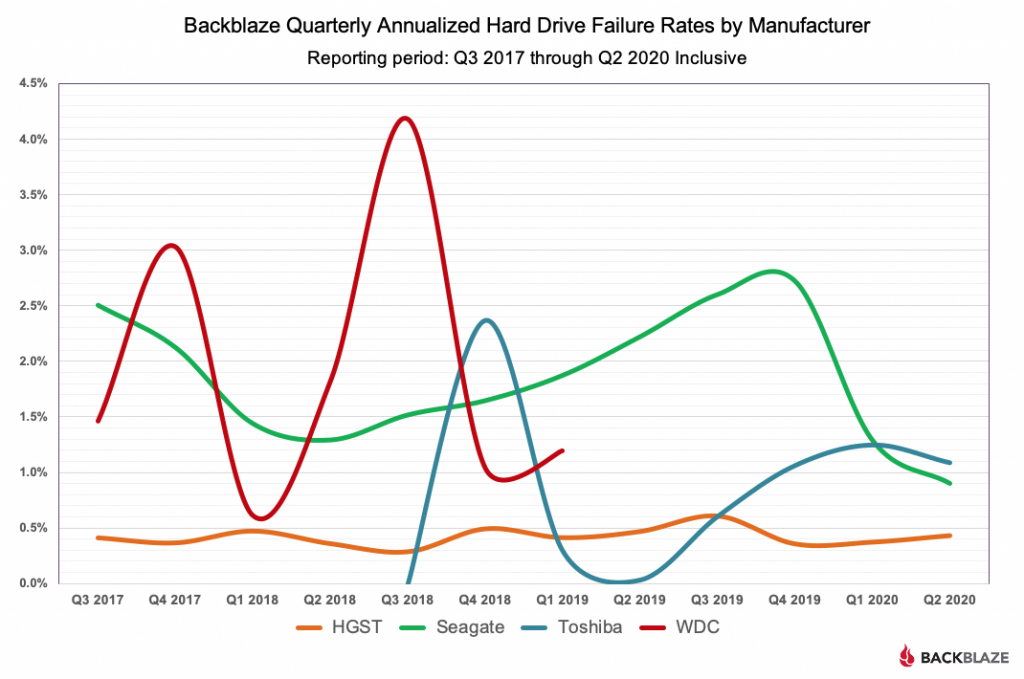
Andy at Backblaze here. To put a pin in it, the three main factors for which drives we use are cost, availability and reliability. We have control over reliability as our systems are designed to deal with drive failure. That leaves the market to decide on cost and availability. Assuming a competitive market we can buy the drives that optimize those factors.
Hey Andy, I've got a question: I went to analyze your raw data dumps and saw a couple of things that I wanted to understand:
* A hard drive may go missing in the data from one day to the next without appearing as "failed" -- does this mean you've taken these hard drives offline for some reason?
* A hard drive may appear as failed one day, and then appear the next day with a failed=0 flag. Does this mean that these drives have been serviced and returned to the front lines?
Hey Andy, many thanks to Backblaze for putting this together. Your stats are the first thing I looked at when looking for new NAS drives.
Since you mentioned cost, do you have data on average price per GB, both acquisition and electricity cost / year? With how many drives you guys bought there should be enough datapoints for a pretty neat graph.
The average cost per GB is about $0.02/GB or $20/TB for the drive. Electricity varies based on the data center and the negotiated or local rates, so harder to calc. I like the idea of the chart, but may be tough to get the right data.
My main concern with third party backups is the privacy aspect. I never want to worry that some silent TOS change means that ad companies are scanning all my documents. Does backboaze have any options for e2e encryption or some sort of iron clad privacy policy without a “we can change it at any time” clause?
If your 3rd party storage provider plays any role in your encryption strategy then I would suggest that you’re probably doing it wrong. Data should be encrypted before it leaves your world and not decrypted until it comes home. That way, I don’t care a whit what they do to my data so long as it’s there when I ask for it back.
Several backup tools have encryption in place so that your data can be encrypted before it leaves your device. Rclone for example has encryption and Backblaze B2 capability.
To the non-rclone users, this refers to one of the targets of rclone; the crypt backend wraps the real backend by chaining them together, e.g. localdata <=> crypt <=> providerstorage (basically like a bi-directional filter). https://rclone.org/crypt/
Edit: I use rclone as the backend for duplicity, so you can also chain it through another tool with different encryption and use rclone as just the transfer engine, getting all the benefits of rclone's providers with the benefits of duplicity's backup strategies.
I use HashBackup[0] (I think the author is on HN) and it has a B2 option. It encrypts your data by default, and you can set up an intermediate backup (like an external HDD) to sit between your live system and B2 so you have multiple layers of backups.
If you're comfortable setting up a cron job, it's a great fit. I use it to back up a 1.5TB Samba directory and wind up paying about $5/m for B2.
They have an option in software to enable encryption. You provide a key and supposedly the encryption happens at the client in your end. Obviously you have to trust their software and terms like you mentioned. Though backblaze has a great track record and is very open. If you don't want to trust them there are other softwares you could use to encrypt your data before giving it to backblaze.
But one of the benefits of backblaze is the simplicity. Simplicity of setup, backups, and restores. If you muddle with that by encrypting before giving to backblaze you lose out on part of the value.
It also usually seems when people roll their own it opens up risk of forgetting something. BB is easy, set up their encryption and you should be fine.
> They have an option in software to enable encryption. You provide a key and supposedly the encryption happens at the client in your end.
For restore, though, decryption happens at the server end. You have to supply your key to their server, which decrypts the data at their end, then sends you the subset you are interested in restoring.
I've been using Backblaze B2 + restic for automated backups of my working documents and photos. restic backups are encrypted by default and Backblaze B2 is one of the supported backends.
> We have control over reliability as our systems are designed to deal with drive failure.
That surely assumes an upper limit of the likelihood of a drive failure. There was a perception that the quality of 3.5" floppy disks declined drastically in the early 21st century. Must we not fear something similar for spinning-rust hard drives once most everyone uses SSDs?
Briefly, any drive (floppy disk or tape drive) has some likelihood of failure. You can minimize loss of data (the reliability being discussed) by replicating data in more than one storage item. It just becomes a matter of how many you buy (and how good you are at keeping them all properly organized).
Today reliability is sufficient that one can meet a given data availability goal by replicating the data 2, 3, 4, 5, <whatever> times as there is only once in a blue moon a bad batch of drives when they tried out a new bearing lubricant or so. But what if the economic incentives decline, the marked breaks apart (as it arguably does), much like it happened for floppy disks once they were (perceived as) obsolete and used only in fringe application (HP logic analyzers come to mind, but also Boing airplanes). Is there not the danger that the quality drops drastically to the point that one would need an unreasonable number of copies?
> Today reliability is sufficient that one can meet a given data availability goal by replicating the data 2, 3, 4, 5, <whatever> times as there is only once in a blue moon a bad batch of drives when they tried out a new bearing lubricant or so.
Unless you have an uptime bug in the firmware where all your drives die at once:
It's a factor of how quickly they can replace drives and how well redundant data is spread between disparate systems. IIRC, they make sure data is dispersed not only at the chunk and drive level, but the system and rack level (and maybe datacenter level? not sure).
At that point, if there's not contingency redundancy built in (See below), it's really a matter of how long it takes to replace a drive (in both identifying the problem, physically replacing the hardware, and replicating data to it). There's a lot of (fairly simple) math involved in running down those numbers, but based on the percentage of drives that fail in a quarter, I think it would take both a spectacular run of bad luck combined with negligence on their part in making sure redundancy levels are kept over a longer period to actually have problems.
> Is there not the danger that the quality drops drastically to the point that one would need an unreasonable number of copies?
I think the very simple way to look at this is that space capacity and automatic redundancy checking can account for a lot of bad drives. E.g. if a drive has 100 chunks of data all copied to 100-200 other drives and systems (such that there are three copies of any chunk), that the data exists three places, and if that drive dies and the system detects those 100 chunks are now only exist in two places, it can immediately locate 100 locations that have capacity to receive a chunk and start replicating data to keep the level of redundancy they need. Even if there was a very large set of bad drives, they would have to all go bad in a very short time frame, short enough that the couldn't be physically swapped out and data couldn't be copied across the network, for it to cause a problem.
At least that's how a system like this could be developed, and my understanding is that Backblaze's system works like this to some degree.
I win. The 8TB drives I used to populate my NAS scored 0.10% better than the 0.81% average. That means my NAS is better than everyone else's.
This big takeaway from these numbers is how dramatically low they are in comparison to drives 5/10/25 years ago. If you treat them reasonably, modern drives are rock stable.
You’d still need the slots and some raid modes are limited by the size of the smallest disk. Drives being as cheap as they are, it’s often not economically viable to retain the old drives.
Basically, divide up each disk into 1TB partitions, then RAID the 1TB partitions together. Synology uses this for their Hybrid RAID. Obviously care needs to be taken to not confuse partitions but this lets you use disks of differing sizes.
Unraid also offers RAID with differing sizes for disks, it has quite different failure modes though but it's been fairly reliable for me.
Affordable disk shelves - something like the Netapp DS4243 - on the other hand tend to be reliable and give plenty of space for SAS and SATA drives. I bought a fully populated shelf (4 x powersupply (of which I'm only using 2, the rest are disconnected and meant as spares), 2 controllers and 24 15K SAS drives (mostly HGST, a few Seagate drives) for around €400. I'm currently running it with a number of those 15K drives but will eventually replace some of them with slower but bigger SAS or SATA drives, not so much to get more space but to save power. For now the thing runs fine, the error logs on the drives are mostly clean (2 drives with a few errors, mostly likely due to power glitches as they occurred a long time ago and have not recurred). If you want lots of space for drives with redundant power and cooling these shelves are a good value since there are plenty of them on the market which keeps prices down.
I'm using a combination of striping, RAID and mirroring depending on the content, using lvm and mdadm instead of ZFS for the increased flexibility. The server itself contains a HP R410i RAID card which drives 8 internal 2.5" SAS drives, the thing could be expanded for not that much money to a 16 x 2.5" array but I see no reason to do so given the higher prices for 2.5" drives and the abundance of capacity offered by the DS4243.
Ports and physical space for drives aren't free. (Though there's some trade-off available between time/money if you want to DIY.)
For my own use, I've found it isn't worthwhile expanding beyond eight drives rather than getting rid of smaller ones - adding additional ports costs money and it takes more power and space.
Tangential question: What NAS device and set up do you use? I'm thinking of buying one and would like to learn from a fellow (technically better acquainted) HN user. Thanks in advance!
It might not be the cheapest, but 4+1 drives is more efficient than 3+1. Currently I have three 8TB drives: 1xWD Red and 2xIronwolfs (wolves?) with one running as parity (SHR). No complaints. It does everything I need it to do. The interface is simple and everything "just works" as anticipated. If/when I run out of space I plan on adding another 2x8TB drives, probably more ironwolves.
I wouldn't go bigger than 8TB as they already take DAYS to add to the array.
Migrated from a 1512. It took probably about 3-4 days to migrate everything. The new box handled it easily. The old one was struggling a bit with rsync. As the default is ssh with it. Once I had to downgraded the encryption then it went a lot faster (from 30MB to 90MB which was close enough to the limit of the cable to not worry).
918+ here.
The last two drives I put in were 16TBs, and as you say it takes time. It wasn’t helped by me messing the process first round (you need to add the smallest drives first with SHR), so it took over a week.
I've tried virtually everything over the years - unRAID, SansDigital boxes, Linux RAID, WIndows RAID, Hardware PCI card RAID...
This year I broke down and bought a Synology (918+). It's not perfect but I'm still a HAPPY happy camper --> I'm at a point in my life where RAID is a means/tool, not a goal / fun project to pour lifetime of hours upon ¯\_(ツ)_/¯
First thing you need to decide is buy off the shelf NAS or make your own based on some hardware you may have lying around.
I have an old TS140 with an i3 that can take 4 HD, has ECC RAM with 4 slots. I'm currently exploring setting it up with Freenas (or Truenas after the merge) based on ZFS. So far it looks pretty good and performant.
For off the shelf NAS, Synology options look good..
Not the OP, but I'll answer. I have the Synology DS-918 for the past 2 years, and it's been great. They have fairly decent included management software + an application library. I have it setup to automatically backup to Backblaze every night, which makes me fairly confident anything I store on it will be recoverable.
I'd recommended building a custom one, if you're technically inclined. But off the shelf ones are fine, just not as cost-effective, but they are smaller though!
I previously had a HP N54L with FreeNAS, modded with extra two extra drives to get 6x4TB and that setup was very simple to do.
Now I moved over to a custom one which is a Fractal Node 804 case, i3 8100T, C246M-WU4 mobo and 32GB ECC DDR4 RAM. It has a SF450W Platinum PSU, and it pulls less than 40W in use - could get it lower with some underclocking. This runs Debian Buster with ZFS on Linux, and it's been rock stable for over half a year now - moving the drives over from my N54L was surprisingly simple. Plex transcoding works fine as well. Definitely recommend it.
I shopped around and waited for sales/price drops and got it all for under £500 (not including drives). I don't the pricing if your're not in the UK, so it may be cheaper elsewhere to do another combination.
As for drives wait for good deals on WD Elements/My Book Desktop External Hard Drive and shuck them. Note, only do this for +8TB drives (these are CMR drives atm) as under that size the drives are SMR which you should avoid like the plague for RAID/ZFS as they have been reported to fail if you ever need to rebuild. So then you're looking at 4x£120 which is another ~£500ish investment.
If you want to save money get a preowned box like the N54L off eBay at ~£100, and spend the money on drives, then stick FreeNas on it and if you're only file-serving the box is good enough.
I think the custom box is a bit overkill but it's got so much room for upgrades, I plan on getting 8x10TB drives in there one day, plus you can run VMs on it as the i3 processor isn't too bad.
FWIW I out together a ragtag NAS (recycling CPU and PSU from elsewhere) for around $400. Even if you start from scratch, the main cost is storage. If you're not afraid to void some warranties, you can get 8TB drives for around 30% less by shuccing WD external drives
Synology DS1815+ with 16 GB RAM, and a DX513 extension cabinet. While early versions were marred by the Intel Atom bug (I had mine replaced under warranty), it has been a solid performer. I backup to an DS1511+ (also with an extension cabinet) hosted at a friend, and host his extra box in return. The management software is very nice, and as it can run Docker, it is straightforward to augment with additional functionality.
Thank you very much. The tip about Btrfs is very helpful. Despite having experienced some silent file corruption before, I'd not have thought about it if I had not seen your comment. :)
I'm really happy with the synology DS418 I have. I recently attached a UPS as well, which I wish I would have done before (had a scare with losing my disk array). The system is incredibly easy to setup (once you decide on your volume strategy) and administer, and the one time I needed support it was extremely well handled.
I really enjoy reading the Backblaze analysis on this every year, it's such a valuable and interesting data set. I do have one suggestion: it would be great to go one step further and add confidence intervals for the AFR estimates. E.g. if you see 0 drive failures, you don't really expect an AFR of 0 (that is not the maximum likelihood estimate), and the range of AFR's you expect for each drive decreases as a function of the number of drive days (e.g. if one drive has 1 day of use, we know basically nothing about AFR so confidence interval would be ~0-100% (not really, but still quite large), or it would be smaller if you wanted to add a prior on AFR).
It would also be interesting to see the time-dependence (i.e. does AFR really look U-shaped over the lifetime of a drive?). That would require a dataset with every drive used, along with (1) number of active drive days, and (2) a flag to indicate if the drive has failed and of course (3) which kind of drive it is. Does Backblaze offer this level of granularity?
I've recently joined the WD shucking crowd so, unfortunately, there are no stats for the drives I'm running. The cost/GB has just gotten too ridiculously low on shucked drives and my array large enough that a failure or two isn't the end of the world, oh and 3-2-1 backup rule.
I've always really enjoyed reading Backblaze's reports though and have made past buying decisions based on their information.
I wonder if it might be possible for a community sourced version of these reports? A small app that checks SMART data and sends it to a central repository for displaying stats? Many from the self-hosted/homelab crowd are running these shucked drives so there has to be a large pool of stats out there if it can be gathered?
Andy at Backblaze here. We've looked at this and the one "issue" is the consistency of the environments from the community data. In our DCs, the drives are kept a decent temperature, hardly ever moved, and our DC tech sing to them every night (OK, just kidding about that last one). Community drives will comes from all types of environments, from pristine to dust bunny hell. Still, it might be interesting to compare the two data sets if a community cohort could be collected.
Incidentally I've tracked down a HDD (spinning rust) performance (and later breakage) problem to a very loud (and I mean awfully painful, intense vibration on your eardrums) alarm test every wednesday...
Do you monitor the noise in your DCs? Maybe for high peaks?
FWIW I wonder if they're still run as something of a separate group, but given that the article says the HGST brand was removed in 2018, who knows what speed the long term merge might occur upon.
Explains why HGST brand drives are harder to come by I think.
Yeah, this wouldn’t surprise me, and it’s not super uncommon. Similar things happened with Cisco and Meraki, though I’ve heard over time that’s started to erode.
The problem is, as far as I can tell you can't really buy them anymore. At least from consumer sites, maybe they still sell large orders to enterprise customers. But it seems like WD is finally discontinuing the HGST name.
One of my main questions is how different these stats are for hard drives that are not running all the time. Personal experience over a decade in an underfunded lab was that if you took a drive offline and left it for couple years, you had 10-40% chance of it failing.
I had a couple drives that no longer worked after leaving the computer dormant for a few months. most of my drive failures have occurred immediately after hardware upgrades though. seems like I lose at least one drive every time I replace a mobo. I'm always surprised that breaks them, but they always survived trips to/from college in the trunk of my car.
I'd give those drives a reformat... Some motherboards have firmware that does odd things to drives, like hiding the first or last sectors to store its own data or for various OEM recovery techniques.
That can make your data look corrupt. Yet reformatting (or just putting the drive in with the old motherboard) will magically fix them.
Interesting how HGST has consistently low failure rates [0]. What makes these drives so reliable? Japanese fixation on quality? Specifics of Hitachi design?
Interesting to note that this wasn't always the case - The Hitachi Deskstar line used to have the nickname "Deathstar" due to their low reliability (this was maybe 15-20 years ago)
It's also worth noting that the "Deathstar" fiasco was such a disaster because previously people who cared about reliability had been selecting the IBM drives due to their excellent track record. It took only one generation (or two) of defective drives to completely ruin IBMs reputation.
Years later people noticed that the drives were highly reliable again and the Deathstar problem was a fluke. But now it's too late. All of the HDD manufacturers have been gobbled up by just two companies and all of the interesting competition is on the SSD side.
Only if Western Digital was dumb enough to kill the golden egg laying goose. If I were they I would try to keep the Hitachi manufacturing just as it was when they bought it. They do seem to still brand them differently than their own drives and charge a hefty premium and market them to data centers rather than individuals. For me they are way too expensive now. So for me the only Japanese option is Toshiba. I have had much better luck with Toshiba than with Seagate and would easily pay 25% or more of a premium to avoid Seagate. It is so sad because I remember when Seagate was a great and very reliable brand so many years ago.
Why wouldn't backblaze use only HGST then? What's the purpose of buying seagates which was the most unreliable hard drives from 15-20 years ago and their stats show higher failure rates. (Still I don't buy them because of the bad taste left.)
Yev from Backblaze here -> Some of the responses down below are correct - it really does come down to price. We run a fairly lean ship and so the price per gigabyte is weighed pretty heavily when we make our purchasing decisions. We have a post where we go into the cost of hard drives over time, it's about 3 years old now, but still a good read -> https://www.backblaze.com/blog/hard-drive-cost-per-gigabyte/.
I would think you'd also want to be hedging your bets a bit against some kind of catastrophic bug. Flexibility in your supply lines has also got to be a big plus (and help smooth sailing with various disasters)
Do you have an algorithm of sorts that takes into account price and historical failure rate by drive model and gives you an easy "yea or nay" for purchase decisions? Seems like you might be able to automate drive purchases with such a system (similar to limit orders on financial securities).
Yev here -> It's less of an algorithm and more of a purchasing department with lots of spreadsheets that tie into the AFR data as a data point - but yes, it's possible we could automate it, but there's some factors that our supply-chain team would need to be involved in anyway (like vendor diversity, no large batches of single drives etc...) that make outputting that algorithm a bit harder.
I was wondering this as well, it seems pretty easy to write.
Also, if you don't use one, please elaborate if you can why the obvious MTBF delta projection idea is bunk. I'm sure your talented team has thoroughly thought through all of this
I think this comes down to price. They are constantly buying drives and to avoid supply issues, it is acceptable to have a hard drive that fails to a certain degree, if the price is balanced.
It would be interesting if these reports included prices, but that might be a problem for Backblaze to reveal so much about their business operational costs.
Cost and availability, especially at the higher capacities. Note that HGST was bought out by WD in 2012, and WD started sunsetting the HGST brand in 2018.
That was during the flooding in Thailand that took out a huge chunk of hard drive manufacturing capacity. Electronics stores started putting quotas on purchases, so BB offered a bounty to friends and family who would bring in hard drives.
They had a disassembly line gutting external hard drive enclosures for the hard drives, too. One of the drives in my array was acquired via a similar process.
You should read the whole story. I should probably read it again myself.
If you have a system that can efficiently deal with a drive dying without losing data then it makes sense to weight availability and cost higher over reliability.
For home users a dead or dying drive is such a headache that it's usually worth spending the extra bucks on something that is less likely to fail on you.
It's interesting that, despite Seagate being relatively bad compared to HGST, Backblaze keeps installing more and more Seagate drives and not that many HGST drives. I guess the analysis that's missing here is the cost per drive hour?
As I recall, Backblaze does what some other companies have also figured out: amortized maintenance costs across racks.
Long ago we hit a point where power and cooling, not floor space, were the biggest bottlenecks for many data centers. Those numbers shift around, but during that era a bunch of people noticed that it's less labor intensive to fill an entire rack at a time. Put a few extra racks in as spares, and as hardware fails you power them off and power up new machines in the spare rack. When X servers in a rack are dead, you migrate everything else out of the rack, then strip it to the rails and put brand new hardware in it. You increase your server density twice in that case.
Event-driven maintenance is disruptive to other work. It tends to have a ticking clock involved, so you likely assign it to more experienced people, which is 2 opportunity costs in one. Rack-at-a-time is batch processing. You can schedule it, you can assign multiple people to it, and speed is less of an issue. I might have the new guys stripping a decommed rack, use building a new one as training for four people and one teacher. You put a third of it together, I'll come tell you why the wiring is wrong, lather, rinse, repeat.
Yev from Backblaze here -> Yes, we tend to weigh heavily in favor of price and Seagate thus far as been affordable with performance that meets our requirements, so that's why you'll see those drives in higher numbers. We're also trying to diversify our fleet a bit, so it's not purely one vendor, but we do try to keep an eye on cost since we run a pretty lean ship!
I have seen homogeneity 'kill' twice in my career. The first time was unprovisioned hardware, then second time we lost half of the hard drives assigned for dev machines in the space of about 9 weeks. I had so many processes in place by that point that it was a huge inconvenience (mostly due to whole disk encryption) but zero data loss.
The worst thing you can do is to put all of your eggs into one basket. And bulk ordering might get you a set of drives all from the same batch. Bad batches will tend to all fail for a similar reason. Drives fail on a bell curve, right? So the first drive may fail way before any others, but in a RAID array, rebuilds are stressful. Eventually you will hit a statistical cluster. Multiple drives failing close together. If that happens during a rebuild, you will lose a RAID 5 array. If you are very lucky, your RAID 10 array loses two drives in the same mirror. If you have two failures during a long rebuild, even RAID 6 won't save you.
I just bought a Synology box for home. This is my third and probably final RAID enclosure for personal use. I was having trouble finding Backblaze-tested drive models to populate it, so I filled it with drives from a Drobo and kept looking. Initially I had populated the Drobo with 4 drives I bought at once. When one failed, I bought 2 HGST drives and replaced a pair. When the new drives arrived, I started trying to cycle them through, and one of the drobo drives failed. I'll give you two guesses which one.
There is, as far as I can tell, no prosumer multi-disk filesystem that uses consistent hashing to stripe+mirror files across an arbitrary number of disks, instead of the heavy linear algebra RAID5 relies on. It requires touching the whole disk on every rebuild, and I believe that's why Object Storage is slowly taking over from the top end. It's a simpler form of redundancy.
I hope that it's worked its way down to my price range by the time the motherboard on the Synology burns out.
Andy from Backblaze here. Nice thinking about the bulk ordering and considerations for RAID. All things we have considered. We use our own Reed-Solomon encoding with a 17/3 set-up across 20 drives across 20 different systems, we call that a Tome. Then we have a specific protocol we follow as drives fail in a Tome to protect the data at all costs. We have the luxury for example to stop writing to a given Tome as we have plenty of others available. This takes a lot of the stress off of the system.
Your thoughts on bulk buys and bad drive batches/models is solid. We test drives in small batches first, and we follow drive failures so we don't get to the point of hitting the wall. It would be great to mix and match drives, but you end up with a system that maxes out at the least performant drive. So not optimal.
Do you power cycle the disks during regular operations?
There is a failure mode in disks which can be modelled as something fails on the drive, but it continues to work fine for maybe months or years until the next power cycle, upon which it then won't work.
Obviously that's a problem for redundancy schemes because you think you have plenty of redundancy till there is a power outage and suddenly loads of drives fail at once.
I have never seen any of your reports measuring or reporting on these 'fail after power cycle' events, which is surprising.
I recall reading about your triple redundancy with R-S codes, but it's good to restate it for each audience.
From the behavior of my RAID (which also uses Reed Solomon, doesn't it?) it feels like repairing an array takes time proportional to the size of the drive, not the size of the contents, and it feels like a waste. But it's possible that my comfort levels for available disk space are a lot more conservative than other people's, and so the difference is less pronounced in a 'normal' storage situation.
For instance, an array that's at 80% capacity takes 25% longer to rebuild than I wish it would, whereas an array that's at 66% capacity takes 50% longer.
> it feels like repairing an array takes time proportional to the size of the drive, not the size of the contents
This is only true for drive-level raid rather than filesystem level raid, or a non-raid solution like ceph's replication.
ZFS's filesystem raid can repair a raid in time proportional to the amount of data stored in it.
mdadm and raid controllers aren't aware of which parts of the block device are in use or not, and thus have to repair the whole drive.
It's exceedingly likely that backblaze's solution does not require repairing entire block devices, but rather is likely to be closer to ceph, where only the in-use portion of a failed drive must be considered / must find a new home.
I think raid and distributed storage systems (like backblaze or ceph) are more different than they are alike.
> From the behavior of my RAID (which also uses Reed Solomon, doesn't it?)
Maybe. mdadm raid5 doesn't, nor does mdadm raid1 or raid10. I think mdadm's raid6 does.
You could then for example have 18/2, and then group together 400 drives in a 2nd layer of 19/1. Hey, I reckon you could do 19/1,39/1, reducing your storage costs 7.5%...
Sure, the worst case rebuild cost is much worse, but overall data loss probability is far lower, and a 2nd layer rebuild is a very rare event, and in that case, your customers totally prefer a few extra seconds latency over an email reporting their data is lost...
I assume you mostly do streaming rather than random writes, so the overhead is evenly spread amongst the disks, and is the same 15% as your current scheme.
Yeah, pretty much the same reason people keep buying Seagate drives generally: They cost less and they aren't so much worse that it is worth paying a higher price for a drive that's less likely to fail.
Are there trends for AFR by drive age? ie. for a specific drive or manufacturer, what is the failure rate for drives that have been in use n years? It'd be interesting to see how the failure rate go up/down as they get older.
Electronics typically follow a "bathtub" reliability curve. You'll have a large number of early failures (unflatteringly called "infant mortality") then the curve levels off for a long period of time, and then starts rising again as the items start wearing out.
Just a heads up: there's no such thing as a refurbished hard drive. It's not economical. Instead, those drives are actually just used drives with the SMART counters cleared.
Yes and no. It's more like they're "recertified". It's pretty easy and non-invasive to replace the logic board, which can fix many problems that might warrant an RMA. I've also gotten refurbs back from Seagate and WDC RMA's that have new top covers on the drive (evidenced by a new, non-retail sticker, no old sticker underneath it). Presumably they're doing some inspection of the platters and heads before sending them out. These drives came with a 30day warranty and cleared SMART data. But I would argue that its fair to reset the SMART data after this kind of refurbishment/re-certification.
That being said, there are definitely some sketchy drive resellers on marketplaces like Amazon who just clear the smart data on old drives and sell them as refurbished, or even new.
Because they're discontinued, Western Digital rolled them into their server line, and people like me are snapping the remaining stock incase drives in our RAID die.
The volumes of units are high enough I think this is north of 'too small sample size for statistical validity' So the question in my mind is, how significant is the variance in the failure rates?
Is this underlying manufacturing error tolerances, or is this shipping/deployment effects, or is this .. Aliens?